








 Contact Platform Support
 Help Center
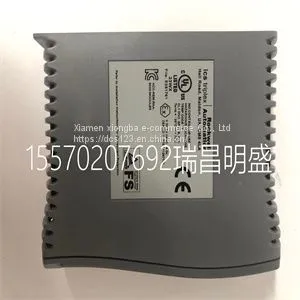
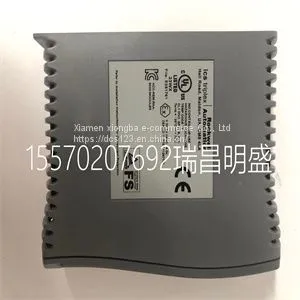
Module Spare Parts T9432



Related Products
-
 Module Spare Parts T9451US$ 1 - 100000MOQ: 1 Piece
 -
Module Spare Parts T9481US$ 1 - 100000MOQ: 1 Piece
-
Module Spare Parts 1336F-BRF50-AA-EN-HASUS$ 1 - 100000MOQ: 1 Piece
-
Module Spare Parts 1336F-BRF50-AA-EN-HAS2US$ 1 - 100000MOQ: 1 Piece
-
Module Spare Parts 1407-CGCMCUS$ 1 - 100000MOQ: 1 Piece
Focus on DCS, PLC, robot control system and large servo system.
Main products: various modules / cards, controllers, touch screens, servo drivers.
Advantages: supply of imported original products, professional production parts,
Fast delivery, accurate delivery time,
The main brands include ABB Bailey, Ge / fuanc, Foxboro, Invensys Triconex, Bently, A-B Rockwell, Emerson, ovation, Motorola, xyvom, Honeywell, Rexroth, KUKA, Ni, Deif, Yokogawa, Woodward, Ryan, Schneider, Yaskawa, Moog, prosoft and other brands
| T9432 |
Setting the Auto-zero mode to Once improves the accuracy of the measurement. With auto-zero enabled, the inputs of the SCXI-1141/1142/1143 are internally grounded. The driver makes a measurement when the task begins and then subtracts the measured offset from all future measurements. Although the DAQ driver does wait a certain amount of time for the signal to settle, it may not be long enough if the filter is set to very low cutoff frequency. This is especially true if the voltage ever goes out of range and the amplifier becomes saturated. You can manually zero out the offset by comparing the ground coupled value of a channel to its DC coupled value, then subtracting that offset from future measurements. This allows you to control the time allowed for the signals to settle. Configurable Settings in MAX Note If you are not using an NI ADE, using an NI ADE prior to version 8.3, or are using an unlicensed copy of an NI ADE, additional dialog boxes from the NI License Manager appear allowing you to create a task or global channel in unlicensed mode. These messages continue to appear until you install version 8.3 or later of an NI ADE. This section describes where you can access each software-configurable setting in MAX. The location of the settings varies depending on the version of NI-DAQmx you use. Refer to the DAQ Getting Started Guide and the SCXI Quick Start Guide for more information on installing and configuring the hardware. You can use DAQ Assistant to graphically configure common measurement tasks, channels, or scales.Configurable Settings This section describes how to set the gain/input signal range and how to configure your software for compatible sensor types. It also describes how to perform configuration of these settings for the SCXI-1141/1142/1143 in NI-DAQmx. For more information on the relationship between the settings and the measurements and how to configure settings in your application, refer to Chapter 4, Theory of Operation. Common Software-Configurable Settings This section describes the most frequently used software-configurable settings for the SCXI-1141/1142/1143. Refer to Chapter 4, Theory of Operation, for a complete list of software-configurable settings. Gain/Input Range Gain/input range is a software-configurable setting that allows you to choose the appropriate amplification to fully utilize the range of the E/M Series DAQ device. In most applications NI-DAQ chooses and sets the gain for you determined by the input range. This feature is described in Chapter 4, Theory of Operation. Otherwise, you should determine the appropriate gain using the input signal voltage range and the full-scale limits of the SCXI-1141/1142/1143 output. You can select a gain of 1, 2, 5, 10, 20, 50, or 100 on a per channel basis. Chapter 3 Configuring and Testing SCXI-1141/1142/1143 User Manual 3-2 Input Selection The front end of the SCXI-1141/1142/1143 includes a software configurable switch that allows you to programmatically connect the input channels of the SCXI-1141/1142/1143 to either the front connector or internal ground. Refer to Table 5-1, NI-DAQmx Voltage Measurement Properties, for details about the available input coupling modes supported by the SCXI-1141/1142/1143.

Send Inquiry to This Supplier


You May Also Like
-
Module Spare Parts 1715-OB8DEUS$ 1 - 100000MOQ: 1 Piece
-
Module Spare Parts 1746SC-IN04IUS$ 1 - 100000MOQ: 1 Piece
-
Module Spare Parts 1747-ASBUS$ 1 - 100000MOQ: 1 Piece
-
Module Spare Parts 1747-L552US$ 1 - 100000MOQ: 1 Piece
-
Module Spare Parts 1747-L553US$ 1 - 100000MOQ: 1 Piece
-
Module Spare Parts 1756-CNBUS$ 1 - 100000MOQ: 1 Piece
-
Module Spare Parts 1756-EN2TXTUS$ 1 - 100000MOQ: 1 Piece
-
Module Spare Parts 1756-EWEBUS$ 1 - 100000MOQ: 1 Piece
-
Module Spare Parts 1756-IF16US$ 1 - 100000MOQ: 1 Piece
-
Module Spare Parts 1756-RM AUS$ 1 - 100000MOQ: 1 Piece


