








 Contact Platform Support
 Help Center
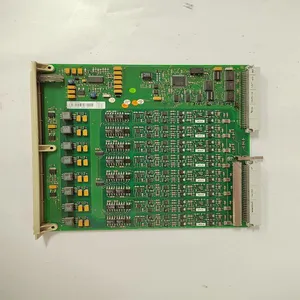
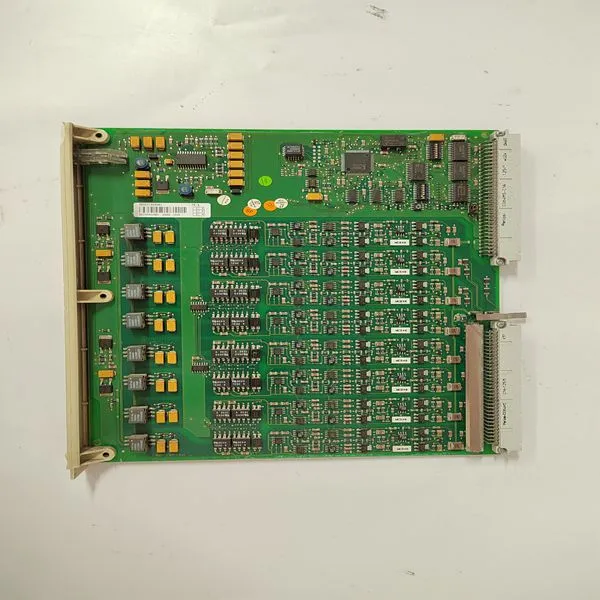
DSAO120A 3BSE018293R1

Related Products
Brand: ABB
Type: DSAO120A 3BSE018293R1
Origin: the Swiss
Warranty: 365 days
Colour: new/used
Shipping method: Courier delivery
Module of PLC, DCS, ESD system card, the card is a vibration monitoring system, steam turbine control system module, the advantages of the gas generator spare parts brand: Allen Bradley, BentlyNevada, ABB, Emerson Ovation, Honeywell DCS, Rockwell ICS Triplex, FOXBORO, Schneider PLC, GE Fanuc, Motorola, HIMA, TRICONEX, Prosoft etc. Various kinds of imported industrial parts of our products are widely used in metallurgy, petroleum, glass, aluminum manufacturing, petrochemical industry, coal mine, papermaking, printing, textile printing and dyeing, mechanical, electronic manufacturing, automobile manufacturing, plastic machinery, electric power, water conservancy, water treatment/environmental protection, boiler heating, energy, power transmission and distribution and so on.
Dynamics (DYN) Key Screens Figure 5-10 shows the possible screens that may appear if the DYN key is pressed. This mode is used to adjust controller dynamics. When the DYN key is pressed, the dynamics for the parameter that is in control, at that time will be displayed. To tune the dynamic settings of the other controllers, the key for the specific controller must be pressed and the STEP DOWN selected until the dynamics parameters appear. For information on tuning PIDs, refer to Chapter 3 of this manual. To adjust the gain settings, the @ symbol must be on the respective display line of the value to be adjusted. The @ symbol is moved by pressing the SELECT key. The controller dynamics are adjustable from the 505E’s Service panel only, they cannot be adjusted remotely.
Figure 5-11 shows the possible screens that may appear if the STOP key is pressed. The STOP key is used to perform a controlled/manual turbine shutdown or stop. To perform a Manual Shutdown, select YES from the Status screen or close the Controlled Shutdown contact input (if programmed) or select Controlled Shutdown from a Modbus communications link. This function can be stopped or aborted by pressing the front panel NO key from the Manual Shutdown Status screen, opening the contact, or selecting Abort Controlled Shutdown from a Modbus communications link. The Controlled Shutdown sequence can be restarted again by pressing the front panel YES key from the Manual Shutdown Status screen, re-closing the contact, or re-selecting Controlled Shutdown from a Modbus communications link. The link will display the Controlled Stop In Progress and Controlled Shutdown Trip Completed status indications.
 For this key to be active, the Auxiliary function must be programmed. Figure 5-12 shows the possible screens that may appear if the AUX key is pressed. Only the screens related to the Auxiliary control’s programmed functionality will be displayed. If Remote Aux Setpoint is programmed, screen 3 will appear. The Auxiliary PID dynamics and droop level (if required) can be adjusted from these screens.

Send Inquiry to This Supplier


You May Also Like
-
DSRF197 3BSE019297R1US$ 1066 - 2057MOQ: 1 Piece
-
PM904F 3BDH001002R0001US$ 1066 - 2057MOQ: 1 Piece
-
PPD113B01-10-150000US$ 1066 - 2057MOQ: 1 Piece
-
RF522 3BSE000743R1US$ 1067 - 2058MOQ: 1 Piece
-
TC512V1 3BSE018059R1US$ 1067 - 2058MOQ: 1 Piece
-
TK803V018US$ 1067 - 2058MOQ: 1 Piece
-
5SHX2645L0004 3BHL000389P0104US$ 1067 - 2058MOQ: 1 Piece
-
UNITROL 1020 UNS0119A-Z,V1 3BHE030579R0003US$ 1067 - 2058MOQ: 1 Piece
-
TP830 3BSE018114R1US$ 1070 - 2061MOQ: 1 Piece
-
5SHX1445H0001 3BHL000391P0101US$ 1070 - 2061MOQ: 1 Piece


