Home > Electrical & Electronics > Electrical Control System > Allen-Bradley 1756-IB32 Digital Dc Input Module

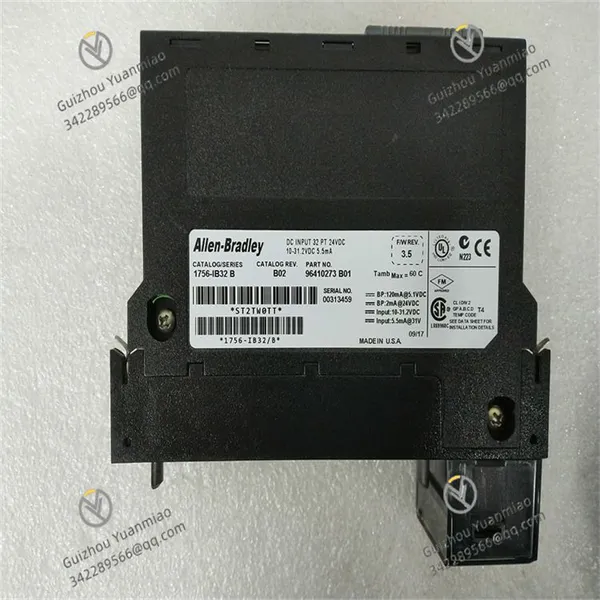
Allen-Bradley 1756-IB32 Digital Dc Input Module
Allen-Bradley 1756-IB32 Digital Dc Input Module photo-1
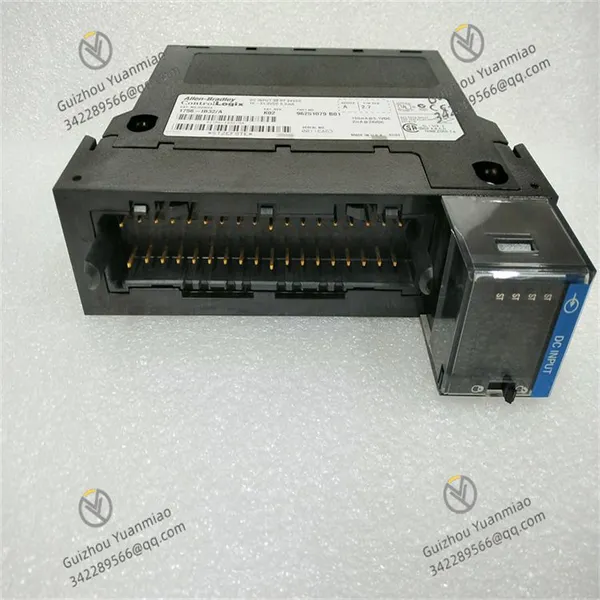
Allen-Bradley 1756-IB32 Digital Dc Input Module photo-2
Negotiable MOQ: 1 Unit (Price negotiable depending on order volume and customization)
Key Specifications
Get Latest Price
Material:
Other, Global universal model
Condition:
Other, Global universal model
Task:
Other, Global universal model

Payment & Shipping
Payment Methods:
Port of Shipment:
China
Delivery Detail:
Delivery time depends on order quantity.
Material Other, Global universal model
Condition Other, Global universal model
Task Other, Global universal model
Mathematical Model Other, Global universal model
Signal Other, Global universal model
Customized Non-Customized
Structure Other, Global universal model
Operating temperature -0°C to 60°C
Humidity 5% - 95% (non - condensing)
Power Input 24V DC

I. Overview


1756-IB32 is a digital input module in Rockwell Automation's ControlLogix series, which is responsible for collecting on-site digital signals in industrial automation systems. It can accurately and real-time transmit discrete signals (such as switch status, presence or absence of materials, etc.) from various sensors, buttons, limit switches and other devices to the ControlLogix processor, providing raw data support for the system's control decisions.


This module is widely used in manufacturing production lines, mechanical processing equipment, logistics conveying systems and other scenarios. In automobile production lines, it can be used to collect the clamping status of welding fixtures, part in-place signals, etc.; in logistics and warehousing, it can collect the operation status of conveyors, cargo detection signals, etc. As an important part of the ControlLogix system, 1756-IB32 works together with processor modules, output modules and other modules in the same series to help build a complete and efficient automatic control system, ensuring the accurate and stable operation of industrial production processes.


1756-IB32 (1)


II. Technical Parameters


Number of Input Channels: It has 32 independent digital input channels, which can collect 32 discrete signals at the same time, meeting the demand for multi-channel signal collection of small and medium-sized industrial equipment or production lines, reducing the number of modules used and optimizing the system layout.


Input Signal Type: Supports DC input signals, usually compatible with common industrial DC voltage levels such as 12V DC and 24V DC (specific parameters are subject to the product data sheet), and is compatible with output signals of most industrial digital sensors and switch devices.


Input Current: The typical input current of each channel has clear specifications under a specific voltage. For example, it is about 7mA at 24V DC (specific values refer to the product manual), ensuring matching with the electrical characteristics of external devices and avoiding abnormal signal collection.


Response Time: The response time of the input signal is short, generally in the range of 1ms to 10ms (adjustable according to configuration), which can quickly capture changes in on-site signals and ensure real-time monitoring of high-speed changing industrial scenarios.


Isolation Method: Adopts inter-channel isolation or group isolation design, with an isolation voltage usually reaching 250V AC, which effectively prevents electrical interference between different channels, and improves the anti-interference ability and working stability of the module in complex industrial environments.


Power Requirements: It needs to obtain power from the ControlLogix rack backplane, with low typical power consumption. For example, the current consumption is about 400mA at 5V DC (specific parameters are subject to the product data sheet), which has little impact on the system power load.


Environmental Adaptability Range:


  • Operating Temperature: It can work normally in the temperature range of 0°C to 60°C, adapting to temperature fluctuations in industrial production sites, and can run stably whether in high-temperature processing workshops or normal-temperature control rooms.

  • Relative Humidity: It can withstand 5% to 95% non-condensing relative humidity, and can still maintain reliable signal collection performance in humid environments such as food processing workshops and around cleaning equipment.


Dimension Specifications: It adopts the standard module size of the ControlLogix series, perfectly matching the 1756 series rack, with convenient installation, no extra space occupation, and easy system integration and later maintenance.


III. Functional Features


Multi-channel Signal Collection: 32 input channels can collect multiple digital signals at the same time, which can centrally process switch status information from different devices, reduce the number of modules used in the system, lower system costs, simplify on-site wiring, and improve system integration.


Fast Response Performance: The short response time ensures that the module can timely capture changes in input signals. For high-speed running production equipment, such as material detection of high-speed conveyors and travel switch signals of stamping equipment, it can accurately reflect the signal status, provide timely feedback for the control system, and ensure the synchronization and accuracy of the production process.


Reliable Isolation Protection: The isolation design between channels effectively blocks electrical interference between different channels, prevents electrical faults of one channel from affecting the normal operation of other channels, and also protects core equipment such as the ControlLogix processor from interference and damage from external signals, improving the reliability of the entire automation system.


Diagnosis and Status Indication: The module is equipped with LED status indicators, with one indicator corresponding to each channel, which can intuitively display the signal status of the channel (for example, on indicates signal input, off indicates no signal input). At the same time, the module can communicate with the processor through the backplane to report its own operating status and fault information (such as power failure, channel short circuit, etc.), facilitating engineers to quickly troubleshoot problems.


Easy Integration and Configuration: As a standard module of the ControlLogix series, 1756-IB32 has excellent compatibility with other modules in the series and can be seamlessly integrated into the ControlLogix system. Through Rockwell Automation's programming software (such as Studio 5000), engineers can easily complete module parameter configuration (such as input signal filtering time), channel mapping and other operations without complex programming, reducing the technical threshold of system integration.


Industrial-grade Durability: Adopting industrial-grade components and design, it has good anti-vibration and anti-impact performance, can withstand mechanical stress and electromagnetic interference in industrial sites, ensures long-term stable work in harsh industrial environments, and reduces production downtime caused by module failures.


1756-IB32 (2)


IV. Operation Guide


Installation Steps:


  • Preparation: Confirm that the installation environment meets the module's environmental adaptation requirements, and the rack power supply is turned off. Prepare necessary tools such as screwdrivers, and check whether the module's appearance is intact and the connectors are damaged.

  • Rack Installation: Align the 1756-IB32 module with the idle slot of the ControlLogix 1756 series rack, push it in smoothly along the guide rail until the module is in close contact with the rack backplane, then fix both sides of the module with screws to prevent the module from loosening.

  • Wiring Connection: According to the module's wiring diagram, use appropriate wires to connect the output signals of external devices (such as sensors, switches) to the input terminals of the module. Pay attention to distinguishing the positive and negative polarities (for DC input), ensure the wiring is firm, and avoid virtual connection or short circuit. After wiring, carefully check whether the wiring is correct.

  • Power On: After confirming that all connections are correct, turn on the rack power supply, the module will start working, and at this time, the initial status of each channel can be observed through the LED indicators.


Configuration Process:


  • Software Preparation: Install Studio 5000 software on the programming computer and ensure that the software version is compatible with the module. Connect the computer to the ControlLogix processor through a programming cable to establish communication.

  • Module Addition: Open the corresponding project in Studio 5000 software, enter the I/O configuration interface, add the 1756-IB32 module according to the actual installation position of the module in the rack, and the software will automatically identify the module model.

  • Parameter Setting: Configure the module parameters according to actual application needs, such as the filtering time of input signals (which can reduce signal misjudgment caused by high-frequency interference). Some parameters can remain default, and if adjustment is needed, set them according to software prompts.

  • Channel Mapping: Associate the 32 input channels of the module with the internal tags of the processor so that the processor can read the signal status of each channel. After creating and mapping the tags in the software, download the configuration to the processor.


Troubleshooting:


  • Abnormal Signal Collection: If a certain channel has no signal input or the signal is unstable, first check whether the external device is working normally (such as whether the sensor is damaged, whether the switch is closed), and whether the wiring is firm and correct. A multimeter can be used to measure whether the voltage of the input signal is within the rated range of the module to eliminate problems with external devices and wiring.

  • Indicator Fault: If the LED indicator is not on or displays abnormally, check whether the module is installed correctly and whether the power supply is normal. If the power supply is normal, there may be an internal fault in the module, and you can try to replace the module for testing.

  • Communication Fault: If the processor cannot read the module's status or data, check whether the connection between the module and the rack backplane is tight, and whether the module configuration in Studio 5000 software is consistent with the actual installation. You can re-download the configuration to the processor, or check whether the communication link between the processor and the module is normal.

  • Overall Module Fault: If the module cannot work, and after eliminating problems such as power supply, wiring, and configuration, it may be that the module hardware is damaged, and professional maintenance personnel should be contacted for repair or replacement.

Product Tags: Allen-Bradley , 1756-IB32 , 1756-IB16

Send Inquiry to This Supplier

Message
0/5000

Want the best price? Post an RFQ now!
Gold Verified Supplier
1Yr
Verified Business License
Business Type
Trading Company
Year Established
2014
Factory Size
1,000-3,000 square meters
Product Certifications
SA8000