








 Contact Platform Support
 Help Center
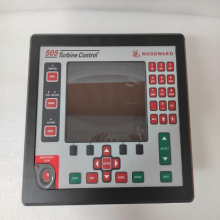
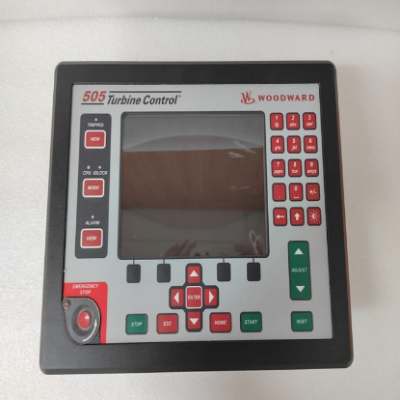
WOODWARD 8269-1073 17" OCP Touchpanel


Related Products
-
 WOODWARD 8928-5311 RemoteViewNegotiableMOQ: 1 Piece
 -
WOODWARD 8200-1500 ControllerNegotiableMOQ: 1 Piece
-
WOODWARD 8200-1502 Original Instructions ManualNegotiableMOQ: 1 Piece
-
WOODWARD 8200-1505 Manuals and User GuidesNegotiableMOQ: 1 Piece
-
WOODWARD 8200-1310 Logic Controller ModuleNegotiableMOQ: 1 Piece
I. Overview
WOODWARD 8269-1073 is a 5009XT touch screen workstation integrated with RemoteView functionality, and its core positioning is a visual operation and monitoring terminal for industrial power equipment control systems. Designed specifically for the control scenarios of power equipment such as turbines and generators, this product enables visualized operation of core functions including equipment load control/limitation and isochronous load sharing between units. Meanwhile, it features comprehensive functions like data acquisition, status monitoring, parameter configuration and fault alarm, providing intuitive and reliable human-machine interaction support for the stable operation and efficient operation and maintenance of power equipment.
The 8269-1073 touch screen workstation boasts excellent industrial environment adaptability and system compatibility, allowing seamless connection with Woodward series power control units. It is widely used in high-end fields such as navy, aerospace, industrial manufacturing, wind power generation, automated production lines, safety systems and unattended equipment. It is particularly suitable for complex industrial scenarios that require high control precision of power equipment and real-time visual monitoring. Adopting an industrial-grade ruggedized design, the product can operate stably in harsh industrial environments, effectively ensuring the continuity and reliability of power equipment control systems.
II. Product Features
Integrated Visual Operation Function: Equipped with RemoteView remote visualization technology and a high-definition touch screen, it provides an intuitive graphical operation interface. It supports visualized operation of core functions such as load control/limitation of turbines and generators, and isochronous load sharing between units, simplifying the execution process of complex control logic and reducing the difficulty for operators to get started.
Comprehensive Equipment Monitoring Capability: It can real-timely collect and display the operating parameters of power equipment (such as rotational speed, load, temperature, pressure, etc.), system working status and fault information. Through dual graphical and digital display methods, operators can quickly grasp the equipment operation situation and provide accurate data support for decision-making.
High-compatibility System Connection Design: Tailor-made for Woodward series power control units, it has good protocol compatibility and hardware adaptability. It can be seamlessly connected to turbine and generator control systems to achieve high-speed data interaction with control units, and also supports linkage connection with industrial automation systems.
Industrial-grade High-reliability Architecture: Adopting an industrial-grade ruggedized hardware design, it uses high-quality components resistant to high and low temperatures and vibration, and has passed strict environmental reliability tests. It can adapt to long-term stable operation in complex industrial environments and ensure the uninterrupted operation of human-machine interaction links.
Remote Monitoring and Operation & Maintenance Support: With the help of the RemoteView function, it supports remote access and operation. Operation and maintenance personnel can complete parameter configuration, status checking, fault troubleshooting and other work away from the equipment site, greatly reducing on-site operation and maintenance costs and improving operation and maintenance efficiency.
Improved Fault Alarm Mechanism: It real-timely monitors the system operating status. When equipment faults or parameter abnormalities are detected, it immediately reminds operators through touch screen pop-ups, sound and light alarms (optional) and other ways, and records detailed information such as fault type and occurrence time, providing a basis for fault traceability and quick disposal.
Flexible Parameter Configuration Function: It supports flexible configuration of key parameters such as load control threshold, load sharing ratio and alarm threshold. According to different application scenarios and equipment operation requirements, the control strategy can be accurately adjusted to adapt to the diversified control needs of power equipment.
III. Technical Parameters
1. Core Basic Parameters
Product Model: WOODWARD 8269-1073
Product Type: 5009XT touch screen workstation integrated with RemoteView functionality
Manufacturer: Woodward
Core Functions: Visual operation of power equipment, load control/limitation, isochronous load sharing, operation status monitoring, parameter configuration, fault alarm, remote monitoring
Applicable Equipment: Turbines, generators and other power equipment
Application Fields: Navy, aerospace, industrial manufacturing, wind power generation, automation systems, safety systems, unattended equipment, communication base station power systems, etc.
2. Electrical Performance Parameters
Supply Voltage: 24V DC (typical value, voltage fluctuation range shall refer to the official manual)
Operating Current: ≤5A (normal operating condition)
Communication Interfaces: Support industrial communication interfaces such as Ethernet and RS485 (subject to official configuration)
Communication Protocols: Compatible with Woodward proprietary communication protocols and standard industrial communication protocols
Signal Acquisition Accuracy: ±0.5% (typical value, for standard analog signals)
Response Time: ≤100ms (operation command response)
3. Environmental and Physical Parameters
Operating Temperature: -20℃~+60℃ (industrial-grade wide temperature operating range)
Storage Temperature: -40℃~+85℃
Relative Humidity: 5%~95% RH (no condensation)
Vibration Resistance: 2g, 10Hz~150Hz (sine wave, compliant with industrial equipment vibration standards)
Protection Grade: IP54 (typical value, subject to the official manual)
Touch Screen Size: ≥7 inches (high-definition color touch screen, specific size subject to official configuration)
Installation Method: Rack-mounted/wall-mounted (adapted to industrial standard installation dimensions)
IV. Working Principle
The core working principle of the WOODWARD 8269-1073 touch screen workstation is to achieve precise control and real-time monitoring of power equipment through a closed-loop process of signal interaction - data processing - visual display - command execution. The specific working process can be divided into four core stages:
Stage 1: System Initialization and Link Establishment StageAfter the device is powered on, the workstation automatically completes system initialization and performs hardware self-test and software loading. It establishes a stable data link with the Woodward power control unit through the preset communication interface, completes protocol handshake and parameter synchronization, and ensures precise adaptation with the control unit.
Stage 2: Data Acquisition and Status Monitoring StageThe workstation real-timely collects the operating parameters of power equipment (rotational speed, load, temperature, etc.), control unit working status and external sensor signals through the communication link. It performs preprocessing such as filtering and verification on the collected data to eliminate invalid data and ensure data accuracy.
Stage 3: Visual Display and Interactive Operation StageThe preprocessed valid data is real-timely displayed on the touch screen through the graphical interface, and operators can view the equipment operation status through the touch screen. When it is necessary to adjust control parameters or execute control commands (such as load limit adjustment, load sharing start), the operation commands are input through the touch screen, and the workstation converts the commands into standard control signals and transmits them to the control unit.
Stage 4: Command Execution and Fault Feedback StageAfter receiving the commands, the control unit drives the actuator to complete the corresponding operations, and feeds back the command execution results to the workstation at the same time. If the collected parameters exceed the preset threshold or equipment faults are detected, the workstation immediately triggers the alarm mechanism, displays and records fault information on the touch screen, and can upload the fault information to the remote operation and maintenance platform through the RemoteView function to remind relevant personnel to handle it in a timely manner.
V. Common Fault Troubleshooting
1. No Display on Touch Screen / Failure to Start
Phenomenon: After the device is powered on, the touch screen has no display at all and the indicator light is off; or it restarts repeatedly and fails to enter the operation interface normally.
Causes: Abnormal supply voltage or poor contact of the power supply line; power module failure; touch screen hardware damage; abnormal system firmware.
Solutions: 1. Use a multimeter to detect the supply voltage to ensure it meets the rated power supply requirements of the product, check whether the power supply line connectors are tight, and repair loose or damaged lines. 2. Replace with a spare power module for testing to rule out power module failure. 3. If the power supply is normal but there is still no display, try to restart the device. 4. If the restart is ineffective, the touch screen hardware may be damaged or the firmware is abnormal, and you need to contact Woodward official after-sales service for maintenance or firmware upgrade.
2. Failure to Establish Communication with the Control Unit
Phenomenon: The workstation cannot collect the operating parameters of the control unit and equipment; operation commands cannot be sent to the control unit; the interface prompts a "communication interruption" fault.
Causes: Loose, damaged or incorrectly wired communication lines; incorrect communication parameter configuration (such as mismatched address and baud rate); control unit communication interface failure; workstation communication module failure.
Solutions: 1. Cut off the power supply, check the connection status of the communication lines, verify that the wiring method complies with the official specifications, and repair or replace damaged lines. 2. Enter the workstation communication parameter configuration interface, check parameters such as address and baud rate to ensure they are consistent with the control unit, and restart the communication link after reconfiguration. 3. Connect the workstation communication interface with a spare control unit for testing to troubleshoot control unit interface faults. 4. If the above operations are ineffective, the workstation communication module may be faulty, and you need to contact the official after-sales service for maintenance.
3. Abnormal Collected Parameters / Excessive Fluctuation
Phenomenon: The equipment operating parameters displayed on the touch screen are inconsistent with the actual situation; the parameter values fluctuate frequently and cannot be stabilized; some parameters are displayed as "invalid values".
Causes: External sensor failure or signal line interference; expired parameter acquisition accuracy calibration; abnormal workstation data processing module; abnormal data transmission of the control unit.
Solutions: 1. Check the working status of external sensors, use professional tools to detect sensor output signals, and troubleshoot sensor faults. 2. Check whether the signal lines are close to high-power interference sources, preferentially use shielded cables and reliably ground them to reduce electromagnetic interference. 3. Re-calibrate the parameter acquisition accuracy in accordance with the official manual procedures. 4. Restart the workstation and the control unit to reset the data transmission link. 5. If the problem persists, contact the official after-sales service to test the workstation data processing module.
4. Failure to Execute Operation Commands / Abnormal Execution
Phenomenon: Commands such as load control and parameter adjustment issued through the touch screen have no response; the command execution results are inconsistent with expectations, resulting in abnormal equipment operation.
Causes: Command permission not enabled; parameter settings exceeding the allowable range of the equipment; control unit failure; abnormal data synchronization between the workstation and the control unit.
Solutions: 1. Check the current operating account permissions to confirm that the command issuing permission is enabled. 2. Check the command parameters to ensure that the set values are within the rated allowable range of the equipment. 3. Check the working status of the control unit to rule out control unit faults. 4. Restart the workstation and the control unit to re-establish the data synchronization link. 5. If the commands still cannot be executed normally, contact the official after-sales service to troubleshoot system compatibility or hardware faults.

Send Inquiry to This Supplier



You May Also Like
-
WOODWARD 8200-1312 Digital Governor Turbine ControlNegotiableMOQ: 1 Piece
-
WOODWARD 8200-1330 Digital ControllerNegotiableMOQ: 1 Piece
-
WOODWARD 5541-705 Discrete Input 20 Through Relay 8 InterlockNegotiableMOQ: 1 Piece
-
WOODWARD 8200-1203 LinkNet-HT Analog 4-20 mA ModuleNegotiableMOQ: 1 Piece
-
WOODWARD 8200-1200 LinkNet-HT RTD ModuleNegotiableMOQ: 1 Piece
-
WOODWARD 8262-1142 5009XT With 2 220 VAC PSNegotiableMOQ: 1 Piece
-
WOODWARD 8262-1141 5009XT With 2 120 V AC/DC PSNegotiableMOQ: 1 Piece
-
WOODWARD 8262-1143 5009XT With 2 24 VDC PSNegotiableMOQ: 1 Piece
-
WOODWARD 8928-7574 Actuator Module Kit (2 2-Chan Act Modules, 2 Cables, 1 FTM)NegotiableMOQ: 1 Piece
-
WOODWARD 8928-7575 5009XT Optional Analog/IO/FTM/CableNegotiableMOQ: 1 Piece


