








 Contact Platform Support
 Help Center
Home > Electrical & Electronics > Telecommunication & Broadcasting > WiFi Products > Huawei AC6605 Access Controller New and Oringinal Product
Huawei AC6605 Access Controller New and Oringinal Product
Negotiable
MOQ: 1 Piece (Price negotiable depending on order volume and customization)
Key Specifications
Get Latest Price
Place of Origin:
China
Brand Name:
Huawei
Model Number:
UC6605
Payment & Shipping
Payment Methods:


Port of Shipment:
SHANGHAI
Delivery Detail:
Delivery time depends on order quantity.
Related Products
-
 AC6005 Access ControllerNegotiableMOQ: 1 Set
 -
Huawei AC6005 Wireless Access ControllerNegotiableMOQ: 1 Piece
-
Huawei AC6605 Wireless Access ControllerNegotiableMOQ: 1 Piece
-
Huawei AC6605 Wireless Access ControllerNegotiableMOQ: 1 Piece
-
Huawei AC6605 Wireless Access Controller Huawei Wireless Access ControllerNegotiableMOQ: 1 Piece
Place of Origin
China
Brand Name
Huawei
Model Number
UC6605
Huawei AC6605 Access Controller New and Oringinal product
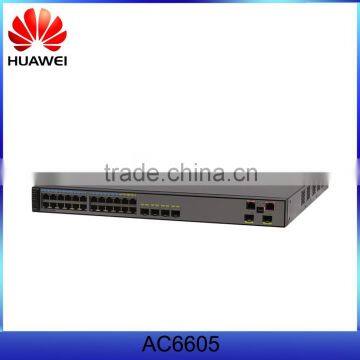
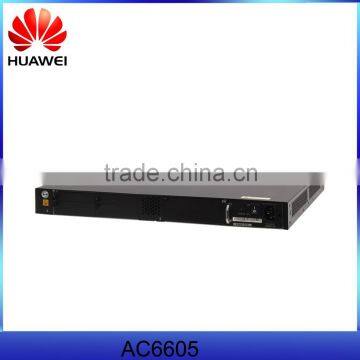
Huawei AC6605 is a box wireless access controller that provides wired and wireless access services. It delivers flexible campus and office networking solutions for medium-to large-sized enterprises and branches.
Appearance
Ports
1. MODE button, switches working mode of indicators.
2. 20 10/100/1000BASE-T Ethernet electrical ports
Support 10M/100M/1000M auto-sensing.
Support PoE power supply on 20 ports.
3. Four combo ports
4. One ETH management port
5. One Mini USB port
6. One Console port
7. Two 10GE SFP+ uplink optical ports
Indicator Description
| Number | Indicator | Silkscreen | Description |
|---|---|---|---|
| 1 | On the rear panel: power supply indicator on the right | PWR1 | Steady green: The power supply is running properly. |
| Steady orange: When the device has two power supplies installed, the power supply in this slot is switched off, is not connected to a power source, or is faulty. | |||
| Off: This slot has no power supply installed or the power supply in the slot is not working properly when only one power supply is installed. | |||
| 2 | On the rear panel: power supply indicator on the left | PWR2 | Steady green: The power supply is running properly. |
| Steady orange: When the device has two power supplies installed, the power supply in this slot is switched off, is not connected to a power source, or is faulty. | |||
| Off: This slot has no power supply installed or the power supply in the slot is not working properly when only one power supply is installed. | |||
| 3 | System status indicator | SYS | Slow blinking: The system is running properly. |
| Fast blinking: The system is being started. | |||
| Steady orange: The temperature or functions of the device become abnormal. | |||
| Slow blinking: The device has entered the dormancy mode. | |||
| Steady red: After the device is registered, the system does not operate properly, or a power alarm, fan alarm, or temperature alarm is generated. | |||
| Off: The system is not working. | |||
| 4 | State status indicator | STAT | Steady green: The service interface indicator is in the default mode. In this mode, the indicator indicates the state of each interface. |
| Off: The indicator is not in the State mode. | |||
| 5 | Speed status indicator | SPED | Steady green: The service interface indicator indicates the speed of each interface. After 45 seconds, the service interface indicator automatically restores to the default mode (STAT). |
| Off: The indicator is not in the Speed mode. | |||
| 6 | PoE status indicator | PoE | Steady green: The service interface indicator indicates the PoE status of each interface. After 45 seconds, the service interface indicator automatically restores to the default mode (STAT). |
| Steady orange: At least one interface does not support PoE power or has a PoE error when mode switching is not performed. | |||
| Off: The indicator is not in the PoE mode. | |||
| 7 | Mode switch button | MODE | When you press the button once, the SPED indicator turns green and the service interface indicators show the speed of the interfaces. When you press the button for a second time, the PoE indicator turns green and the service interface indicators show the PoE status of the interfaces. When you press the button for a third time, the STAT indicator turns green. If you do not press the button within 45 seconds, the indicators restore to the default status. That is, the STAT indicator turns green, and the SPED and PoE indicators are off. |
| 8 | Service interface indicator | 24 GE electrical interfaces: numbered in the up-bottom and left-right orders and begins with 1. GE optical interfaces: Each optical interface has a corresponding indicator above it. |
Meanings of service interface indicators vary according to the indicator status. For details, see the following table. |
| 9 | ETH interface indicator | The ETH interface has an arrow above it | Steady green: A link has been established to the interface. Blinks green: The interface is sending or receiving data. Off: No link has been established to the interface. |
| 10 | Mini USB interface indicator | Steady green: The Mini USB interface is in use. Off: The Mini USB interface is not in use. |
|
| 11 | Console interface indicator | Steady green: The Mini USB interface is not in use. Off: The Mini USB interface is in use. |
| Mode | Description |
|---|---|
| STAT mode | Steady green: A link has been established to the interface. |
| Blinks green: The interface is sending or receiving data. | |
| Off: No link has been established to the interface or the interface has been shut down. | |
| SPED mode | Steady green: 10M/100M/1000M interface: The interface is operating at 10/100 Mbit/s. 1000M/10G interface: The interface is operating at 1000 Mbit/s. |
| Blinks green: 10M/100M/1000M interface: The interface is operating at 1000 Mbit/s. 1000M/10G interface: The interface is operating at 10 Gbit/s. | |
| Off: No link has been established to the interface or the interface has been shut down. | |
| PoE mode | Steady green: The interface is providing PoE power. |
| The interface cannot provide PoE power due to any of the following reasons: The power of the PD exceeds the power supply capability of the interface or exceeds the threshold. The overall output power has reached the maximum output capability of the device. The PoE power function is not enabled on the interface in manual power-management mode. | |
| Blinks orange: The interface stops providing PoE power to a PD because a fault occurs (for example, an incompatible PD is connected to the interface). | |
| Steady orange: The PoE function is disabled on the interface. | |
| Off: The interface is not providing PoE power to any PD. |
Characteristics
Abundant Port Types
- Uplink port :Two 10GE optical ports.
- Service port: 24 GE ports, the last four are used with four optical ports as combo interfaces.
- Maintenance port:One RJ45 maintenance serial port; One RJ45 maintenance Ethernet port ; One mini USB maintenance serial port.
Large Capacity, High Performance, Integrated Design
- Integrated design: An AC can function as an access or aggregation device to provide wired access services and function as a management device to control STA access.
- Large switching capacity: An AC device has twenty-four GE interfaces and two 10GE interfaces. It provides 128 Gbit/s switching capacity and 10 Gbit/s forwarding capacity.
- PoE: The AC supports the PoE function and can provide the maximum power on 24 ports. This PoE capability can provide power to APs and other powered devices (PDs) connected to the AC unit.
Carrier-Class Reliability
- The AC supports port backup based on the Link Aggregation Control Protocol (LACP) or Multiple Spanning Tree Protocol (MSTP).
- The AC supports redundant AC/DC power supplies.
- The AC supports hot swappable power supplies.
- The AC supports 1+1 hot backup.
Easy-to-Install and Easy-to-Maintain
- The AC6605 dimensions (width x depth x height) are 442 mm × 420 mm × 44.4 mm and the AC6605 can be installed in a standard IEC cabinet (19 inch).
- Power supplies of AC are hot swappable, facilitating maintenance.
- The built-in web system of AC allows local GUI-based management.
- The AC can be managed by the eSight that provides various northbound interfaces.
- The AC support the intra-board temperature probe, which monitors the operating environment of the AC in real time.
Energy Conservation
- Low noise fans that can adjust the speed automatically are used, thus reducing noises in the system and power consumption of fans.
- The chip switches to the power saving mode when no connected device is detected on a service interface, that is, the interface is idle.
- It uses highly-integrated and energy-saving chips produced through advanced processing techniques. With the help of the intelligent device management system, the chips not only improve system performance but also greatly reduce power consumption of the entire system.

Send Inquiry to This Supplier

* Email
Want the best price?
Post an RFQ now!
Business Type
Trading Company
Year Established
2004
Factory Size
Below 1,000 square meters
Total Employees
51 - 100 People
You May Also Like
-
TYT Smarthome Gateway / Home Applainces Remote Comtroller in Zigbee Coordinator SystemUS$ 59 - 139MOQ: 1 Square Inch
-
Serial Wifi Module Wire Ethernet PCB Antenna Transparent Transmission WF-01US$ 1 - 10MOQ: 10 Pieces
-
External 3G Gsm Modem Pool 8 Port Speaker/call Sending Bulk SMS MMSUS$ 345 - 500MOQ: 1 Piece
-
RF DIN 7/16 Attenuator 50W 3dB/6dB/10dB/20dB/30dB/40dB/50dBNegotiableMOQ: 1 Piece
-
2015 New Stylish Optical Bluetooth Transmitter for Smartphone ,laptopUS$ 11 - 13MOQ: 1000 Pieces
-
UM220-III NUS$ 0.1 - 1MOQ: 1 Piece
-
2.4G WIFI/Bluetooth Internal FPC Antenna FR4 Antenna PCB Wifi Patch Antenna With IPEX UFL ConnectorUS$ 0.48 - 0.7MOQ: 100 Pieces
-
Bluetooth Audio Module RS232 Serial Bluetooth Module HC-06 Adapter Communication Master-Slave 2 Modes MINI USBUS$ 1 - 100MOQ: 100 Units
-
RIGHT ANGLE f QUICK MALE RF CONNECTORUS$ 0.01 - 0.99MOQ: 1000 Pieces
-
High Strength FRP RadomeNegotiableMOQ: 100 Pieces


