Home > Electrical & Electronics > Electrical Control System > TURCK BL20-16DI-24VDC-P Economy Module
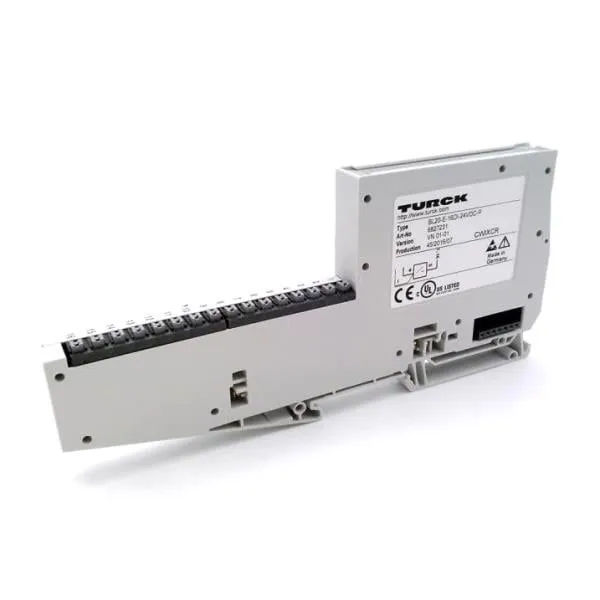
TURCK BL20-16DI-24VDC-P Economy Module

TURCK BL20-16DI-24VDC-P Economy Module photo-1
Negotiable MOQ: 1 Piece (Price negotiable depending on order volume and customization)
Key Specifications
Get Latest Price
Material:
Other, Global universal model
Condition:
Other, Global universal model
Task:
Other, Global universal model
Payment & Shipping
Payment Methods:
Port of Shipment:
guizhou
Delivery Detail:
Delivery time depends on order quantity.
Material Other, Global universal model
Condition Other, Global universal model
Task Other, Global universal model
Mathematical Model Other, Global universal model
Signal Other, Global universal model
Customized Non-Customized
Structure Other, Global universal model
Operating Temperature 0~+55℃
Relative Humidity 5%-95% (non-condensing)
Dimensions 120mm×100mm×22.5mm

I. Overview


TURCK BL20-16DI-24VDC-P is a distributed digital input module of the BL20 series, specifically designed for signal acquisition in industrial automation control systems. Its core function is to convert 24VDC digital signals output by field sensors (such as proximity switches, photoelectric switches, and limit switches) into bus-transmittable data, which is then uploaded to PLCs or controllers to realize equipment status monitoring and logic control. Adopting a modular design, this module is compatible with various industrial buses including Profinet, EtherNet/IP, and Modbus (when used with BL20 series gateways), supports hot-swap and expansion configurations, and has an IP20 protection rating. It is widely used in production line monitoring and equipment interlock control scenarios in industries such as automotive manufacturing, logistics and warehousing, mechanical processing, and energy and chemical engineering.


II. Key Features


Multi-Channel Signal Acquisition

  • Equipped with 16 independent digital input channels, each supporting 24VDC standard signal input. Compatible with NPN/PNP type sensors (switchable via bus configuration) without the need for hardware jumpers, adapting to diverse field devices.

  • Supports dry contact/wet contact signal access. Each channel has an input response time ≤1ms, enabling accurate capture of fast-changing equipment status signals (e.g., workpiece detection on high-speed conveyors).


High Reliability & Anti-Interference Design

  • Electrical isolation between channels effectively prevents signal crosstalk. Built-in surge protection (±2kV) and short-circuit protection circuits automatically cut off the faulty channel to protect the module when the input signal is abnormal or short-circuited, without affecting the operation of other channels.

  • Electromagnetic interference (EMI) resistance complies with EN 55011/EN 55022 industrial standards, adapting to high-interference environments such as frequency converters and motors. Wide operating temperature range (0~+55℃) meets stability requirements in harsh industrial scenarios.


Comprehensive Diagnosis & Status Feedback

  • Supports triple diagnostic functions: channel-level diagnosis, module-level diagnosis, and bus-level diagnosis. Real-time detection of faults such as channel short circuits, signal loss, and abnormal module power supply.

  • Diagnostic information is uploaded to the controller via the bus. Combined with LED indicators on the module panel (power light, run light, channel status lights), fast fault location is achieved. Supports extended diagnostic data storage, recording fault occurrence time and type to facilitate preventive maintenance.


Flexible Expansion & Compatibility

  • As a component of the BL20 distributed I/O system, it can form a network with up to 47 modules of the same series (digital, analog, communication modules) and access bus systems such as Profinet IRT, EtherCat, and Modbus TCP through gateways.

  • Compatible with Turck IP-Address Tool configuration software and mainstream PLC programming platforms (e.g., Siemens TIA Portal, Rockwell Studio 5000). Supports acyclic data transmission and parameterized configuration, simplifying system integration.


Easy Installation & Maintenance

  • Adopts standard 35mm DIN rail mounting, weighing only 83g with a compact size, saving control cabinet space. Plug-in terminal design supports quick wiring and replacement, improving installation efficiency.

  • Supports hot-swap operation, allowing module replacement without shutting down the system, reducing system maintenance downtime. Module parameters are automatically backed up via the bus, eliminating the need for reconfiguration after replacement.


III. Technical Specifications


CategoryDetailed Specifications
Channel Configuration16 digital inputs, single-ended input mode
Input SpecificationsPower Supply Voltage: 24VDC (Allowable Range: 18-30VDC); Input Signal Type: 24VDC Switch Signal
Input CharacteristicsResponse Time: ≤1ms; Input Current: Typical 4mA (at 24VDC); Supports NPN/PNP Polarity Switching
Protection FunctionsShort-Circuit Protection, Surge Protection (±2kV), Reverse Polarity Protection
Diagnostic FunctionsChannel Short-Circuit Diagnosis, Module Power Supply Diagnosis, Bus Communication Diagnosis, Extended Diagnostic Data Storage
Environmental AdaptabilityOperating Temperature: 0~+55℃; Storage Temperature: -20~+70℃; Humidity: 5%-95% (non-condensing); Protection Rating: IP20
Physical SpecificationsDimensions: Approx. 120mm×100mm×22.5mm; Weight: 83g; Mounting Method: 35mm DIN Rail Mounting
Bus CompatibilityRequires BL20 series gateway (e.g., BL20-E-GW-EN); Supports Profinet, EtherNet/IP, Modbus TCP, etc.
Power ConsumptionTypical Power Consumption: ≤2W (when powered by 24VDC)

BL20-16DI-24VDC-P


IV. Working Principle


The core working logic of the BL20-16DI-24VDC-P is "Field Signal Acquisition → Signal Conditioning → Digital Conversion → Bus Transmission + Diagnostic Monitoring," with the specific process as follows:

Signal Acquisition

24VDC digital signals (high level/low level) output by field sensors (e.g., proximity switches) are connected to the corresponding input channels of the module via terminals. The built-in power management unit of the module provides a stable operating voltage (18-30VDC wide-voltage adaptation) for the channels.


Signal Conditioning

The input signal first passes through surge protection circuits and filter circuits to suppress external electromagnetic interference and voltage spikes. It then undergoes electrical isolation between the channel and the module's core circuit via an optoelectronic isolation unit to avoid crosstalk.


Digitalization & Logic Processing

The conditioned analog signal is converted into a digital logic signal (0/1) by a high-speed comparator. The module's microcontroller real-time reads the signal status of 16 channels and performs logical judgment (e.g., signal validity verification).


Bus Transmission

Communicates with the BL20 series gateway through the backplane interface, packages the digital status data of 16 channels into bus protocol frames (e.g., Profinet frames), and the gateway uploads the data to the PLC or controller to realize data interaction. It also supports acyclic communication to receive parameter configuration commands issued by the controller (e.g., channel polarity switching).


Diagnosis & Protection

The module's built-in diagnostic circuit real-time monitors channel current, power supply voltage, and bus communication status:
  • If a channel short circuit (current exceeding the threshold) or power supply undervoltage/overvoltage is detected, the protection mechanism is immediately triggered to cut off the power supply of the faulty channel and record fault information.

  • Diagnostic data is uploaded synchronously with channel status data, providing feedback through LED indicators and upper computer software to realize visual fault monitoring.


V. Operation Guide


  1. Installation Steps


Installation Environment

  • Select a dry, well-ventilated area inside the control cabinet, away from high-temperature heat sources (e.g., frequency converters) and strong electromagnetic interference sources.

  • The module must be fixed on a metal DIN rail to ensure good grounding and enhance anti-interference capabilities.


Physical Installation

  • Snap the module onto a 35mm standard DIN rail and tighten the fixing screws. Maintain a minimum distance of ≥5mm between adjacent modules to ensure unobstructed heat dissipation. The module is lightweight (83g) and can be densely installed, but space for wiring operations must be reserved.


Wiring Specifications

  • Power Wiring: Connect the 24VDC power supply to the "L+" and "M" terminals of the module. Ensure correct polarity (avoid reverse connection). Use AWG 18-22 gauge wires for wiring and tighten terminal screws to avoid poor contact.

  • Signal Wiring: Connect sensor signal wires to the "DIx+" and "DIx-" terminals of the channel (x=1-16). For NPN sensors, connect the signal output terminal to "DIx+"; for PNP sensors, switch the wiring method according to the configuration.

  • Shielding Wiring: Ground one end of the sensor shielded wire and connect the other end to the module's shielding terminal to reduce electromagnetic interference.


2. Software Configuration (Based on Turck IP-Address Tool + PLC Programming Software)

Gateway Configuration

  • After networking the BL20 gateway (e.g., BL20-E-GW-EN) with the module, configure the gateway IP address via the Turck IP-Address Tool to ensure consistency with the PLC network segment.


Module Recognition & Parameter Configuration

  • Open the PLC programming software (e.g., Siemens TIA Portal), add the BL20 series GSD file, and the system will automatically recognize the BL20-16DI-24VDC-P module.

  • Configure channel parameters: Set input polarity (NPN/PNP), diagnostic enable, and signal filtering time (default 1ms, adjustable as needed).

  • Configure bus communication parameters: Select data transmission method (cyclic/acyclic) and diagnostic data upload cycle.


Download & Activation

  • Download the configuration project to the PLC and gateway. The module automatically loads parameters and starts working. The input status and diagnostic information of each channel can be monitored through the software.


3. Operation & Maintenance

Status Monitoring

  • Judge the working status through the LED indicators on the module panel:

    • Power Light (Power) Steady On: Module power supply is normal.

    • Run Light (Run) Steady On: Module communication is normal and operation is stable.

    • Channel Status Light (DIx) Steady On: Corresponding channel input is high level; Off: Input is low level.

    • Fault Light (Fault) Flashing: Module or channel fault; check diagnostic details via the upper computer.


Hot-Swap Operation

  • When replacing the module, there is no need to shut down the system. Simply pull out the faulty module and insert a new one. The system will automatically recognize it and restore communication, with channel parameters synchronized automatically.

Regular Maintenance

  • Inspect wiring terminals for looseness and shielded wire grounding every 3 months; clean dust on the module surface.

  • Check diagnostic logs via the upper computer software every 6 months to identify potential faults (e.g., frequent channel short circuits may indicate sensor faults).

  • Prevent the module from contacting corrosive gases or liquids, and ensure the operating environment temperature is within the range of 0~+55℃.


4. Common Troubleshooting


Fault PhenomenonPossible CausesTroubleshooting Methods
No Signal on All ChannelsModule power not connected / Wiring errorCheck if the 24VDC power supply is normal and the wiring of L+ and M terminals is secure
No Signal on a Single ChannelSensor fault / Channel wiring error / Channel short circuitTest with a replacement sensor; check if the channel wiring is correct; confirm if the channel is short-circuited via the diagnostic function
Fault Light FlashingAbnormal bus communication / Module faultCheck if the connection between the gateway and the module is normal; re-download the configuration; test with a replacement module
False Signal TriggeringElectromagnetic interference / Insufficient filtering timeCheck the grounding of the sensor shielded wire; increase the signal filtering time in the software (maximum 10ms)
Module UnrecognizableIncorrect gateway configuration / GSD file not addedConfirm the gateway IP address is correctly configured; add the BL20 series GSD file in the PLC software
Product Tags: BL20-16DI-24VDC-P

Send Inquiry to This Supplier

Message
0/5000

Want the best price? Post an RFQ now!
Gold Verified Supplier
1Yr
Verified Business License
Business Type
Trading Company
Year Established
2014
Factory Size
1,000-3,000 square meters
Product Certifications
SA8000