Home > Electrical & Electronics > Electrical Control System > PROSOFT MVI56E-SIE Ethernet Communication Module
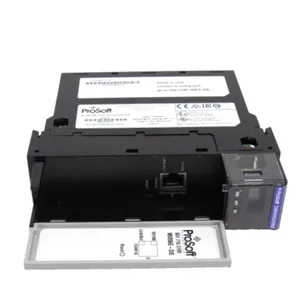
PROSOFT MVI56E-SIE Ethernet Communication Module
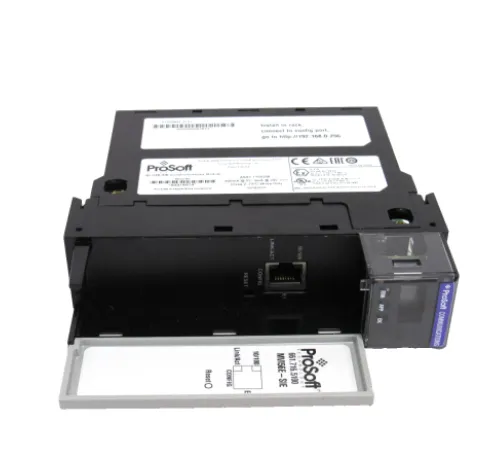
PROSOFT MVI56E-SIE Ethernet Communication Module photo-1

Negotiable MOQ: 1 Piece (Price negotiable depending on order volume and customization)
Key Specifications
Get Latest Price
Material:
Other, Global universal model
Condition:
Other, Global universal model
Task:
Other, Global universal model
Payment & Shipping
Payment Methods:
Port of Shipment:
guizhou
Delivery Detail:
Delivery time depends on order quantity.
Material Other, Global universal model
Condition Other, Global universal model
Task Other, Global universal model
Mathematical Model Other, Global universal model
Signal Other, Global universal model
Customized Non-Customized
Structure Other, Global universal model
Operating Temperature 0℃~60℃
Relative Humidity 5%-95% (non-condensing)
Dimensions 210mm × 80mm × 80mm

The PROSOFT MVI56E-SIE is an Ethernet communication module. With its dual-protocol conversion capability for CIP and S7comm, 1500V DC electrical isolation design, and multi-node concurrent communication capability, it is widely used in industrial fields such as metallurgy, petrochemicals, electric power, and intelligent manufacturing. It undertakes the data interaction task between ControlLogix PAC and Siemens S7 series PLCs, solving the communication barriers between control systems of different brands. Its core technical advantages include supporting simultaneous access of up to 20 Siemens PLCs, 5000-word register data caching, and quick CF card configuration replacement. Combined with the ProSoft Configuration Builder (PCB) graphical configuration tool, it achieves seamless integration and efficient operation and maintenance of cross-brand systems, making it a key communication component in hybrid automation systems.


I. Technical Parameters


  1. Core Communication and Interaction ParametersEquipped with 1×10/100 Mbps auto-sensing RJ45 Ethernet port, supporting auto crossover cable detection and compatible with CAT5 or higher specification cables. Adopting a client/server communication architecture, the ControlLogix PAC can connect to up to 20 Siemens S7 series PLC (S7-200/300/400/1200/1500) server nodes simultaneously as a client. Supporting read/write operations of multiple data types including DB registers, I/O points, tags, counters, and timers, the user-defined data storage area reaches 5000×16-bit word registers. The data refresh cycle can be optimized through software programming, with a typical interaction delay ≤10ms to meet real-time control requirements.

  2. Safety and Isolation ParametersThe Ethernet port and ControlLogix backplane feature 1500V DC electrical isolation, which effectively blocks potential difference interference between different systems and ensures the safety of the module and main controller. Compliant with RoHS environmental protection specifications and CE certification requirements, some versions have obtained IECEx explosion-proof certification for application in hazardous industrial environments. It has a comprehensive communication fault detection mechanism, supporting real-time feedback of abnormal states such as link interruption and data verification errors.

  3. Compatibility and Hardware ParametersFully compatible with the 1756 ControlLogix series backplane, occupying only a single slot (installable in both master and slave racks) and powered via the backplane bus. The power consumption is 2.5W@5V DC, with a backplane current load of 800mA@5V DC and 3mA@24V DC. Equipped with a 4-character scrolling alphanumeric LED display, it real-timely shows module status, IP address, and diagnostic codes, supplemented by link and activity LED indicators to achieve visual status monitoring. Supporting non-volatile industrial-grade CF card for configuration file storage, it facilitates quick replacement of on-site spare parts.

  4. Environmental and Reliability ParametersOperating temperature range: 0℃~60℃; storage temperature range: -40℃~85℃, suitable for most industrial workshop environments. Relative humidity: 5%~95% (non-condensing). Vibration resistance complies with IEC standards (5g, 10Hz~150Hz); shock resistance reaches 30g operational level. Mean Time Between Failures (MTBF) ≥300,000 hours, supporting 24/7 continuous operation.

  5. Software and Protocol ParametersSupporting CIP-CONNECT function, it can configure and diagnose modules on remote racks through ControlLogix 1756-ENxT/CNB modules. Adopting the ProSoft Configuration Builder (PCB) graphical configuration tool, it supports communication node parameter setting, data mapping rule definition, and diagnostic information viewing. Providing standard Add-On Instruction (AOI) programs, it simplifies the development of data transmission logic between the module and ControlLogix processor.


II. Functional Features


  1. Seamless Dual-Protocol Conversion, No Barriers to Cross-Brand CommunicationBuilt-in dual-protocol parsing engines for CIP and S7comm, it automatically realizes bidirectional conversion between the CIP protocol of the ControlLogix system and the S7comm protocol of Siemens S7 series PLCs, eliminating the need for users to manually write protocol parsing codes. In the Meishan Iron & Steel coke oven control system, this module successfully achieved real-time data interaction between ControlLogix and Siemens S7 series PLCs. Compared with traditional Woodhead gateways, it improved integration by 40% and configuration efficiency by 50%. Supporting unified interaction of multiple data types, it can simultaneously read/write DB block data, I/O point status, and timer/counter values of Siemens PLCs, meeting the data requirements of complex control scenarios.

  2. Multi-Node Concurrent Communication, Strong Adaptability to Large-Scale SystemsA single module supports simultaneous access of 20 Siemens PLCs, realizing parallel transmission of data from each node through time-division multiplexing technology to avoid communication bottlenecks. In the distributed control system of large petrochemical parks, a single module can connect Siemens S7-1200/1500 PLCs in different production units, centrally uploading scattered production data to the ControlLogix main system. Compared with the multi-gateway deployment scheme, it reduces system complexity by 60% and maintenance costs by 35%. The local cache design with 5000-word registers can alleviate data loss caused by network fluctuations, and the cached data adopts a cyclic overwrite mechanism to ensure priority transmission of key data.

  3. Graphical Configuration + Quick Replacement, Doubling Operation and Maintenance EfficiencyAdopting the PCB graphical configuration tool, users can complete communication node addition and data mapping relationship configuration through drag-and-drop operations. The configuration process is visual, and no professional communication knowledge is required. The CF card design for configuration file storage enables module parameter restoration by simply inserting a pre-configured CF card during on-site spare part replacement, reducing the replacement time from the traditional 2 hours to within 10 minutes. Supporting ProSoft Discovery Service (PDS) software, it can quickly scan modules in the network and assign temporary IP addresses, simplifying the initial deployment process.

  4. Remote Diagnosis + Enhanced Isolation, Ensuring Safe OperationThrough the CIP-CONNECT function, operation and maintenance personnel can remotely access the module's diagnostic interface, real-timely view the connection status, data transmission rate, and error count of each communication node, realizing remote fault location. The 1500V DC electrical isolation design effectively resists electromagnetic noise generated by strong interference sources such as frequency converters and motors in industrial sites, controlling the communication bit error rate below 10⁻⁹ in the high-interference environment of metallurgical workshops. The 4-character LED display can directly show fault codes (e.g., "ERR1" indicates a communication port fault). Combined with the diagnostic logs of the PCB software, it shortens fault troubleshooting time by 70%.


MVI56E-SIE.png


III. Working Principle and Applications


3.1 Working Principle


The PROSOFT MVI56E-SIE realizes cross-brand communication based on the core logic of "Protocol Conversion - Data Caching - Bidirectional Interaction". The specific process is as follows:

① Configuration Loading Phase: After power-on, the module loads configuration files from the CF card or via the backplane bus to obtain communication parameters (IP address, port number, data mapping rules) between ControlLogix and Siemens PLCs.

② Data Receiving Phase: Acting as a client, it actively establishes connections with 20 Siemens S7 servers, reads specified data (e.g., DB1.DBD0) from each PLC according to the preset cycle, parses it via the S7comm protocol, and stores it in the local 5000-word registers.


③ Protocol Conversion Phase: Convert the Siemens data in the registers into CIP protocol data recognizable by ControlLogix according to the mapping rules defined by the AOI program, and transmit it to the main controller via the backplane bus.

④ Command Issuing Phase: Receive control commands from the ControlLogix main controller, convert them via the CIP-S7comm protocol, and issue them to the designated Siemens PLCs to achieve cross-brand control.

⑤ Status Monitoring Phase: Real-timely monitor the status of each communication link. When an interruption or error occurs, it feeds back through LED indicators and diagnostic logs, and starts a reconnection mechanism to ensure communication recovery.


3.2 Application Scenarios


  • Metallurgical Coke Oven Control System: In the ground and vehicle communication control system of the coke oven at Meishan Iron & Steel in Shanghai, the module is deployed in the ControlLogix rack as a core gateway to connect multiple Siemens S7 series PLCs. It realizes centralized collection of production data such as coke oven heating temperature and gas flow, as well as the issuance of coordinated control commands for coke pushing locomotives and coke blocking locomotives. Compared with traditional gateways, it is deeply integrated with the ControlLogix platform, reducing configuration time by 50% and improving communication stability by 40%, ensuring precise control of the coke oven production process.


  • Petrochemical Hybrid Control System: In petrochemical refining and chemical units, the existing ControlLogix main system needs to access 15 Siemens S7-300/400 PLCs distributed in different tank areas. The module connects all Siemens PLCs simultaneously via Ethernet, collects liquid level and pressure data from each tank area and uploads it to the main system. The valve opening/closing commands issued by the main system are transmitted to the Siemens PLCs for execution after conversion by the module. The 1500V isolation design resists strong electromagnetic interference in the tank areas, and the 20-node concurrent capability meets the centralized management and control requirements of multiple tank areas.


  • Intelligent Manufacturing Production Line Integration: In an auto parts production line, the front section of the line uses a ControlLogix system to control stamping equipment, while the rear section uses a Siemens S7-1500 PLC to control assembly equipment. The module realizes real-time interaction of production capacity data and equipment status between the two sections of the production line. When a fault occurs in the stamping equipment, it timely issues a pause command to the assembly equipment via the module to avoid material accumulation, improving production efficiency by 15%.


  • Power Auxiliary Control System Renovation: In the renovation project of the auxiliary control system of a thermal power plant, 8 original Siemens S7-200 PLCs (controlling coal conveying and ash removal equipment) need to be connected to the newly built ControlLogix main control system. The module realizes data collection of all Siemens PLCs via 100 Mbps Ethernet, completing system upgrade without replacing the original equipment, reducing renovation costs by 60%, and controlling communication delay within 10ms to meet the real-time monitoring requirements of the power system.


IV. Common Faults and Troubleshooting Methods


  1. Fault 1: Failure to Establish Connection with Siemens PLC, LED Displays "CONN" FaultPossible Causes: Incorrect IP address or port configuration of the Siemens PLC; mismatched subnet mask/gateway between both parties; S7comm protocol not enabled on the Siemens PLC; communication blocked by firewall; physical link fault.

  2. Troubleshooting Methods:① Verify via PCB software that the IP address and port number (default 102) of the Siemens PLC configured in the module are consistent with the actual ones.② Check the subnet mask and gateway parameters of the module and Siemens PLC to ensure they are in the same network segment, and test network connectivity using the Ping command.③ Log in to the Siemens PLC programming software (e.g., Step7) to confirm that the S7comm protocol is enabled and the communication node is not locked.④ Open firewall port 102 and the module communication port, or temporarily disable the firewall for testing.⑤ Replace the Ethernet cable, test link connectivity with a network cable tester, and reinsert the RJ45 connector to ensure good contact.

  3. Fault 2: Data Transmission Error, Large Deviation Between Collected Value and Actual ValuePossible Causes: Incorrect data mapping rule configuration (e.g., mismatched register address or data type); inconsistent data format between Siemens PLC and module; excessive electromagnetic interference in the industrial site; module cache overflow.

  4. Troubleshooting Methods:① Open the "Data Mapping" interface of the PCB software, verify that the register address (e.g., DB1.DBW0) and data type (16-bit/32-bit) of the Siemens PLC are consistent with the module configuration, reconfigure and download.② Confirm that the data byte order (big-endian/little-endian) of the Siemens PLC matches the module settings; enable the byte order conversion function in the PCB software if necessary.③ Replace with a double-shielded Ethernet cable, ground the shield layer at one end (ground resistance ≤4Ω), and keep the module at a distance of ≥1.5m from strong interference sources such as frequency converters.④ Optimize the data refresh cycle to avoid cache overflow caused by large amounts of data transmission in a short time; extend the refresh cycle of non-critical data.

  5. Fault 3: Module Cannot Be Recognized by ControlLogix Main ControllerPossible Causes: Module not properly inserted into the ControlLogix backplane slot; backplane bus fault; incompatible firmware version between the module and controller; AOI program not correctly imported.
  6. Troubleshooting Methods:① Turn off the system power, reinsert the module into the backplane slot and ensure it is tightly fastened, and check that the golden fingers at the bottom of the module are free of oxidation or dust.② Insert the module into a spare slot for testing; if it is still not recognized, the backplane bus may be faulty and the rack needs to be repaired.③ Log in to the ProSoft official website to download the module firmware compatible with the controller version, and perform online upgrade via the PCB software.④ Re-import the standard AOI program into the ControlLogix controller to ensure no compilation errors in the program.

  7. Fault 4: CF Card Configuration Cannot Be Loaded, LED Displays "CFG ERR"Possible Causes: CF card damaged or not formatted; configuration file damaged or version incompatible; poor contact of the module's CF card slot.

  8. Troubleshooting Methods:① Replace with a spare CF card, format it into FAT32 format according to the module requirements, and re-import the backed-up configuration file.② Check that the configuration file version matches the module firmware version; regenerate the configuration file corresponding to the version if they are incompatible.③ Turn off the power, remove the CF card, clean the dust in the slot, reinsert it for testing, and replace the CF card slot if necessary.
Product Tags: MVI56E-SIE

Send Inquiry to This Supplier

* Message
0/5000

Want the best price? Post an RFQ now!
Verified Business License
Business Type
Trading Company
Year Established
2014
Factory Size
1,000-3,000 square meters
Product Certifications
SA8000