








 Contact Platform Support
 Help Center
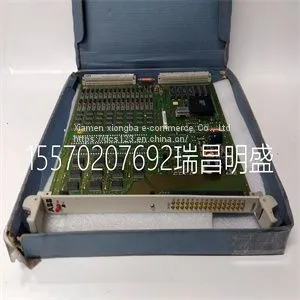
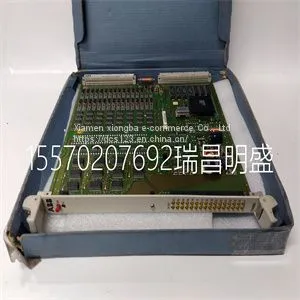
Module Spare Parts 216AB61 HESG324013R0100 HESG435572P1



Related Products
-
 Module Spare Parts 216DB61 HESG324063R0100 HESG216882AUS$ 1 - 100000MOQ: 1 Piece
 -
Module Spare Parts 216EA61b HESG324015R1 KHESG324258R3I HESG448230R1US$ 1 - 100000MOQ: 1 Piece
-
Module Spare Parts 8115-DO-DCUS$ 1 - 100000MOQ: 1 Piece
-
Module Spare Parts 8121-DI-DCUS$ 1 - 100000MOQ: 1 Piece
-
Module Spare Parts 8502-BI-DPUS$ 1 - 100000MOQ: 1 Piece
Focus on DCS, PLC, robot control system and large servo system.
Main products: various modules / cards, controllers, touch screens, servo drivers.
Advantages: supply of imported original products, professional production parts,
Fast delivery, accurate delivery time,
The main brands include ABB Bailey, Ge / fuanc, Foxboro, Invensys Triconex, Bently, A-B Rockwell, Emerson, ovation, Motorola, xyvom, Honeywell, Rexroth, KUKA, Ni, Deif, Yokogawa, Woodward, Ryan, Schneider, Yaskawa, Moog, prosoft and other brands
| 216AB61 HESG324013R0100 HESG435572P1 |
Spirometry Data Definition Unit Leak The percentage of volume leaked from the patient circuit. % . Timing Data Definition Unit I:E The ratio of inspiratory time to expiratory time. N/A Tinsp The duration of the inspiratory phase of the breath cycle. s Texp The duration of the expiratory phase of the breath cycle. s RR The number of breath cycles a patient completes per minute. /min Cycle Time The sum of the duration of inspiratory and expiratory phases. s Waveform settings Access waveform settings All waveforms and spirometry loops are configured by selecting the Settings icon located in the right-hand corner of the waveform. 1. Select the waveform or spirometry loop. The settings menu displays with the Settings icon in the upper right-hand corner. 2. Select the Settings icon. 3. Configure or adjust the desired settings. Waveform Settings Style Solid or Outline Speed Fast or Slow Color White, Green, Red, Yellow, or Blue Scaling Auto or Manual Spirometry Loop Settings Scaling Auto or Manual 9 Patient monitoring 2065490-001 9-5 AB.100.195 Figure 9-1 • Select the Settings icon to access waveform settings Waveform configuration On the Waveform Settings menu, Basic Waveforms, Advanced Waveforms, and Splitscreen views can be customized to show up to four waveforms with measured data specified in the following table. Wave Field Options Fields 1 and 2 Paw Volume Flow Paux Fields 3 and 4 Off Paw Volume Flow Paux CO2 O2 An airway module must be installed and set as the data source to monitor CO2 or O2 in Wave Field 3 or 4. Waveform style On the Waveform Settings menu, waveforms can be set as one of the following styles: • Solid: the waveform curve or loop is filled with the set color. • Outline: the waveform curve or loop is shown as a line in the set color. Note CARESCAPE™ R860 9-6 2065490-001 Waveform speed

Send Inquiry to This Supplier


You May Also Like
-
Module Spare Parts 8521-TC-SAUS$ 1 - 100000MOQ: 1 Piece
-
Module Spare Parts 8937-HNUS$ 1 - 100000MOQ: 1 Piece
-
Module Spare Parts 97590-8 BD-PCI4PORTUS$ 1 - 100000MOQ: 1 Piece
-
Module Spare Parts 9907-018US$ 1 - 100000MOQ: 1 Piece
-
Module Spare Parts 9907-1200US$ 1 - 100000MOQ: 1 Piece
-
Module Spare Parts DS200TCEBG1ACEUS$ 1 - 100000MOQ: 1 Piece
-
Module Spare Parts DS200TCQCG1BGFUS$ 1 - 100000MOQ: 1 Piece
-
Module Spare Parts DS200TCTGG1AFFUS$ 1 - 100000MOQ: 1 Piece
-
Module Spare Parts DS215KLDBG1AZZ03A DS200KLDBG1ABCUS$ 1 - 100000MOQ: 1 Piece
-
Module Spare Parts DSAI130 57120001-P5US$ 1 - 100000MOQ: 1 Piece


