








 Contact Platform Support
 Help Center
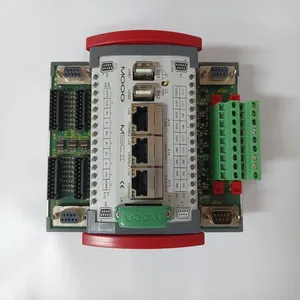
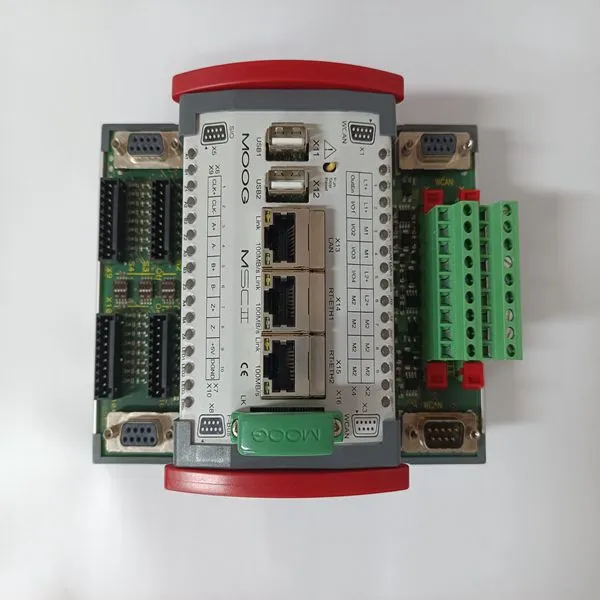
D136-002-005 D138-002-002

Related Products
Brand: MOOG
Type:D136-002-005 D138-002-002
Origin: the United States
Warranty: 365 days
Colour: new/used
Shipping method: Courier delivery
Module of PLC, DCS, ESD system card, the card is a vibration monitoring system, steam turbine control system module, the advantages of the gas generator spare parts brand: Allen Bradley, BentlyNevada, ABB, Emerson Ovation, Honeywell DCS, Rockwell ICS Triplex, FOXBORO, Schneider PLC, GE Fanuc, Motorola, HIMA, TRICONEX, Prosoft etc. Various kinds of imported industrial parts of our products are widely used in metallurgy, petroleum, glass, aluminum manufacturing, petrochemical industry, coal mine, papermaking, printing, textile printing and dyeing, mechanical, electronic manufacturing, automobile manufacturing, plastic machinery, electric power, water conservancy, water treatment/environmental protection, boiler heating, energy, power transmission and distribution and so on.
MOTOR SETUP If you are using an S200 Base Unit drive, use the J3 connector for motor feedback. Only SFD motor feedback is supported on Base Unit drives. If you want to use SinCos or ComCoder as motor feedback, you must use the AUX FB (J14) connector, which is not available on Base Unit drives. See Drive Model Numbers and Descriptions for a complete list of S200 drives. 4.1.3 S200 Tools Communications Wizard 4.1.3.1. LAUNCH S200 TOOLS Launch the S200 Tools program by clicking the desktop icon or from the Windows Start button (Programs > Danaher Motion > S200Tools). The default location for S200Tools.exe, is (C:Program FilesDanaher MotionS200Tools).
When the S200 Tools program is launched for the first time, no drives should be listed under the Online or Offline Communications Mode. 4.1.3.2. START COMMUNICATION WIZARD Open the Communication Wizard by selecting it from the toolbar (Utilities > Communication Wizard) or clicking the shortcut icon.
If you do not know which type of drive is connected, click the Test button. The returned message will either say that there is no connection, confirm that you have an S200 connected, or tell you that the connected node is NOT an S200 drive. Troubleshooting If you receive the "No Connection" message, check the hardware connections. After you have confirmed your setup, click the OK button.
 Motor Feedback Configuration The S200 Base Unit drives only support SFD motor feedback. If you are using SFD motor feedback, no further configuration is needed. If you want to use SinCos or ComCoder as motor feedback, you must use the AUX FB (J14) connector, which is not available on Base Unit drives. 4.1.5 Save Options There are three types of Save options. It is important to know how to use each type to ensure that configurations are not lost. • Download NV – This button will save the parameter settings displayed in S200 Tools to the selected drive. These parameters are saved to the drive's permanent memory and are recalled during a power-up cycle. • Download Drive – This button will save the parameter settings displayed in S200 Tools to the selected drive/node. However, unlike Download NV, these parameters are only saved to the drive's temporary RAM and will not be recalled at a power-up cycle. It is recommended that you use the Download Drive button when testing settings. Once you are satisfied with the settings, click the Download NV button to permanently save the settings to the drive. • Save/Save As – You can also save the settings of a drive as a configuration file (*.S2C). Remember, saving a configuration file does NOT save the settings to the drive. Configuration files can be helpful for saving multiple drive setups. You can easily download a setting to a drive by opening the configuration file in the Offline mode and clicking the Download NV/Drive buttons once the proper drive is selected in the Online mode. It is recommended that you save a configuration file for each setup.

Send Inquiry to This Supplier


You May Also Like
-
BENTLY 3500/92 136180-01US$ 1072 - 2063MOQ: 1 Piece
-
A6140/9199-00058US$ 1072 - 2063MOQ: 1 Piece
-
F650-G-N-A-B-F-2-G-1-HI-C-EUS$ 1072 - 2063MOQ: 1 Piece
-
IS200AEPCH1BAAUS$ 1073 - 2064MOQ: 1 Piece
-
IS210AEBIH3BECUS$ 1073 - 2064MOQ: 1 Piece
-
IS210BPPBH2BMDUS$ 1073 - 2064MOQ: 1 Piece
-
IS200WETBH1ABAUS$ 1073 - 2064MOQ: 1 Piece
-
HONEYWELL SPS5785 51198651-100US$ 1073 - 2064MOQ: 1 Piece
-
MVME147S-1US$ 1074 - 2065MOQ: 1 Piece
-
VIBRO 200-560-000-113 VM600US$ 1074 - 2065MOQ: 1 Piece


