



Home > Electrical & Electronics > Power Supply & Distribution > Power Distribution Cabinet & Box > KPC 3F Intelligent Reactive Power Compensation Controller
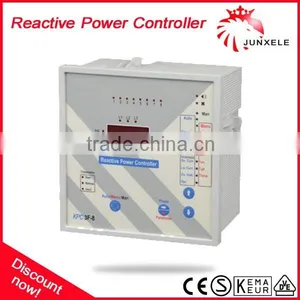
KPC 3F Intelligent Reactive Power Compensation Controller
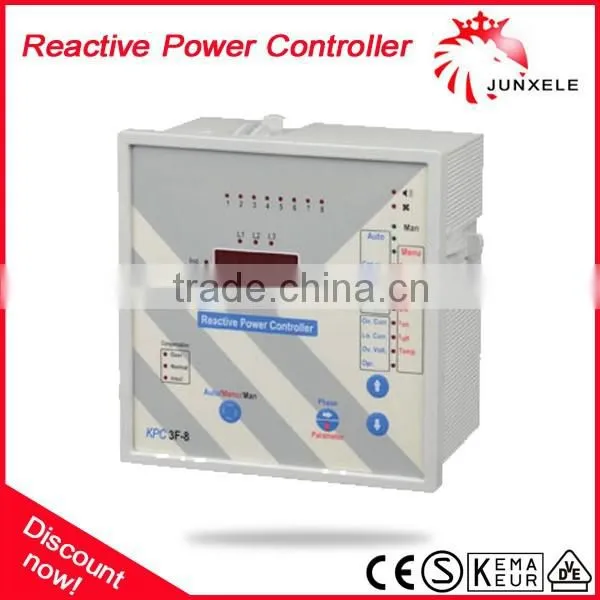
KPC 3F Intelligent Reactive Power Compensation Controller photo-1
US$ 1 - 100 MOQ: 100 Pieces
Key Specifications
Get Latest Price
Place of Origin:
Zhejiang, China
Brand Name:
JUNXELE
Model Number:
KPC 3F
Payment & Shipping
Payment Methods:
Port of Shipment:
ningbo / shanghai
Delivery Detail:
Delivery time depends on order quantity.
Place of Origin Zhejiang, China
Brand Name JUNXELE
Model Number KPC 3F

Intelligent Reactive power compensation controller


KPC 3F Intelligent Reactive power compensation controller

Product Description


General Specifications

  KPC 3F, compensates the system according to three phases' reactive power by measuring voltage and current from three
     phases.
  It compensates according to three system’scosφ value. It is recommended that it is used for electromechanical energy
     meters. It must be used with threephase capacitors.
 Measures three phases' cosφ, current and voltage values.
  Computes system's cosφ value.
  Operates according to first in first out (FIFO) principle.
  Target Cosφ value can be adjusted to be inductive or capacitive.
  Capacitor switch-on time and switch-off time can be adjusted individually.
  C/k value can be adjusted.
  It indicates Over Current and Over Voltage Alarms. Alarm outputs can be activated by user in Menu mode.
  It indicates Under Current Alarm.
  It indicates Over and Under Compensation Alarms.
  It has a fan output to cool the panel and temperature value can be adjusted. Fan can be made passive by user in Menu 
     mode.
  Automatic set and easy installation.


Buttons and Lights

1 - 1,2,3.....12: Shows the steps which capacitor is switched on.
2 - L1, L2, L3: Shows the selected line. If all light, it shows system's cosφ value.
3 - Ind.: It shows that Cosφ value displayed is inductive.
4 - Cap.: It shows that Cosφ value displayed is capacitve.
5 - Compensation:
  Over: Shows Over Compensation Alarm.
  Normal: Shows that compensation is realized.
  Insufficient: Shows Under Compensation Alarm.
6 - Auto/Menu/Man.: By this button, one of the Automatic, Menu and Manuel modes can be selected.
7 - Phase: In Automatic mode, it is used for selecting one of L1, L2 and L3 phases. Selected phase's value is displayed.
   Parameter: In Menu mode, it is used for selecting a parameter that is wanted to be adjusted.
8 - : In Automatic mode, this button is used for selecting cosφ, voltage, current and temperature values. In Manuel mode, it
           is used for switch off the step. In Menu mode, it is used for decreasing the value displayed.
9 - : In Automatic mode, this button is used for selecting cosφ, voltage, current and temperature values. In Manuel mode is
        used for switch on the step. In Menu mode, it used for increasing the value displayed.
10 - Opr.: It shows that the controller is in operation to compensate.
11 - Over Vol.: In Automatic mode, shows Over Voltage Alarm.
    Temp.: In Menu mode, shows that temperature parameter that is needed to cool the panel is selected to adjust.
12 - Low Cur.: In Automatic mode, shows Under Current Alarm.
     toff: In Menu mode, shows that switch-on time is selected to adjust.
13 - Over Cur.: In Automatic mode, shows Over Current Alarm.
     ton: In Menu mode, shows that switch-off time is selected to adjust.
14 - Temp.: In Automatic mode, temperature value inside the panel is displayed.
     C/k: In Menu mode, shows that C/k value is selected to adjust.
15 - Current: In Automatic mode, the value displayed is Current value.
    In Menu mode, it shows that Over Current parameter is selected toadjust.
16 - Voltage: In Automatic mode, the value displayed is Voltage value. In Menu mode, it shows that Over Voltage parameter is
       selected to adjust.
17 - CosΦ: In Automatic mode, the value displayed is cosφ value. In Menu mode, it shows that T arget Cosφ parameter is
       selected to adjust.
18 - Menu: Shows that the controller is in Menu mode.
19 - Auto: Shows that the controller is in Automatic mode.
20 - Man.: Shows that the controller is in Manuel mode.
21 - : Shows that fan is started to cool the panel.
22 - : Shows that the Alarm output is turned on.


Using The Controller

1 - Selecting operation mode: "Auto/Menu/Man" button is used for selecting mode. If "Auto" lights, the controller is in
     automatic mode. If "Menu" lights, the controller is in menu mode; if "Man" lights, the controller is in manuel mode. In
     Automatic mode, the controller work to reach adjusted target Cosφ value. In Manuel mode, user can switch
  the steps on/off manually. In Menu mode, user can make adjustments of the controller.
2 - Switching on/off the steps: When " " button is pressed, after 1 second, one step is switched on. In this time "Opr" lights.
      When" " button is pressed, after 1 second, one step is switched off. In this time "Opr" lights.
3 - Target CosΦ adjustment: Menu mode is selected by "Auto/Menu/Man" button. Target Cosφ adjustment is selected by
     Parameter button. Using " " and " " buttons, target Cosφ can be adjusted. In 10 seconds if any button isn't pressed,
     adjusted value is written to the memory.
4 - Over voltage adjustment: Menu mode is selected by "Auto/Menu/Man" button. Voltage adjustment is selected by
     Parameter button. Using " " and " " buttons,over voltage can be adjusted in 231-286V range. In 10 seconds, if any
     button is not pressed,adjusted value is written to the memory.
5 - Over current adjustment: Menu mode is selected by "Auto/Menu/Man." button. Current adjustment is selected by
     Parameter button. Using " " and " " buttons, over current can be adjusted in 4-6A range. In 10 seconds, if any button
     is not pressed,adjusted value is written to the memory.
6 - C/k adjustment: Menu mode is selected by "Auto/Menu/Man" button. C/k adjustment is selected by Parameter button.
     Using " "and " " buttons C/k can be adjusted in 0,01-1,00 range. In 10 seconds,if any button is not pressed, adjusted
     value is written to the memory.
7 - Switch-on time(ton) adjustment: Menu mode is selected by "Auto/Menu/Man" button, "ton" adjustment is selected by
     Parameter button. Using " " and " " buttons,switch-on time can be adjusted in 2-60 seconds range. In 10 seconds, if
     any button is not pressed,adjusted value is written to the memory.
8 - Switch-off time(toff) adjustment: Menu mode isselected by "Auto/Menu/Man." lDutton. "toff" adjustment is selected by
     Parameter button. Using " " and " " buttons, switch-off time can be adjusted in 2-60 seconds range. In 10 seconds, if
     any button is not pressed,adjusted value is written to the memory.
9 - Temperature adjustment: Menu mode is selected by "Auto/Menu/Man." button. Temperature adjustment is selected by
     Parameter button. Using " " and " " buttons, temperature can be adjusted in 30-65 C range. In 10 seconds, if any
     button is not pressed, adjusted valueis written to the memory.
11 - Displaying Cosφ value: In Automatic mode, using " " and " " buttons, Cosφparameter is selected. By Phase button,
       adjusted phase's Cosφ value or system, scostp value is displayed.
12 - Displaying Voltage value: In Automatic mode, using " " and " " buttons, Voltage parameter is selected. By Phase
       button,adjusted phase's voltage value is displayed.
13 - Displaying Current value: In Automatic mode, using " " and " " buttons, Current parameter is selected. By Phase 
       button,adjusted phase's current value is displayed.
14 - Displaying Temperature: In Automatic mode, using " " and " " buttons, Temperature parameter is selected.
       Temperature inside the panel is displayed.


Warnings and Explanations

1 - Over Current Alarm: If measured seconder current value of current transformer is bigger than adjusted over current value, "Over Cur." lights. If over current alarm is active and this continues 60sec.,the alarm is turned on.
2 - Low Current Alarm: If measured seconder current value is lower than 50mA, "Low Cur ." lights.
3 - Over Voltage Alarm: If measured voltage value is bigger than adjusted over voltage value, "Over Vol." lights. If over voltage alarm is active and this continues 60sec., the alarm is turned on.
4 - Insufficient Compensation Alarm: If the controller switches on all steps and it does not reach to system's target cosφ value, it lights insufficient compensation alarm. If this continues 60sec., " " lights and the alarm is turned on.
5 - Over Compensation Alarm: If the controller switches off all steps and its cosφ value is bigger than system's target cosφ value, it lights over compensation alarm. If this continues 60sec., " " lights and the alarm is turned on.


General Rules for Compensation

1 - Current transformer that is connected reactive power controller must have .../5A ratio.
2 - After current and voltage connections of the controller is madecarefully according to connection scheme, Cosφ and C/k
     values must be adjusted according to system's need.
3- Capacitor steps must be connected low to high order.
4- When system is energized firstly , manuel mode is selected for determining true direction of current inputs. Normally
     phases' reactive loads are inductive. If the controller shows capacitive reactive, current transformer output pins must be
     changed.
  Warning: When loads is changed rapidly in a system, to shorten switch on time causes shorter life for contactors and
      condansators.So this is not recommended. In these systems, the best solution is local or individual compensation.
  Warning: No responsibility is assured by the manufacturer for consequences resulting from wrong installation of this device
      which is not consulted by the user guide.


General Rules for Compensation

C/k adjustment, determines least power that is wanted to control. It equals first step’s capacitor power, divide by current
      transformer ratio.
Example: There is a system which first step's capacitor power is 1 kV Ar. If current transformer ratio is 100/5, what is C/k
                value that is needed to adjust.
Solution:
      C/k = First step's capacitor power / Current transformer ratio
      C/k= 1kVAr / (100/5) =0,05 is found.

KPC 3F Intelligent Reactive power compensation controller


Technical Specifications

 KPC 3F Intelligent Reactive power compensation controller


Connection Scheme


 KPC 3F Intelligent Reactive power compensation controller


Dimensions

KPC 3F Intelligent Reactive power compensation controller


Installation of A Compensation System

Example: There is a system that has Cosφ=0,80 and 50kVA total pwer. What are the total capacitor power that is needed and
           C/k value.
Solution:
          If total power S=50kVA,
          P=SxCosφ=50x0,80=40kW
Cosφ=0,80 value is reached to target Cosφ=1,00 value by using a multiplier that is taken from "Target Cosφ Table".
         Multiplier that is taken from table is 0,75. Reactive power;
Q=PxMultiplier=40x0,75=30kVAr is found. System's reactive power before compensation, equals reactive power that is
     reached with target cosφ=1,00 value. Like in this example, system's reactive power is 30kV Ar.
Current transformer ratio:
  50kVA / (220x3) =75A it is selected as a near value to the upper standart 100/5.
  For 12 steps, if we think this way 1 2 2 2 2 2 2 2 2 2 2 2; in total 23 electrical steps are obtained.
  First step's capacitor power 30kV Ar / 23 = 1,3kVAr is found.
  Nearest value 1,5kVAr or 1kVAr is selected. If we also think %20 tolerance, we choose 1kV Ar.
  1 2,5 2,5 2,5 2,5 2,5 2,5 2,5 2,5 5 5 5 = 36kVAr is found.
  C/k= 1kVAr / (100/5) =0,05 is found. C/k value is selected 0,05 to adjust.


Other products

KPC 3F Intelligent Reactive power compensation controllerKPC 3F Intelligent Reactive power compensation controller

Packaging & Shipping


Shipping
1. FedEx/DHL/UPS/TNT for samples, Door-to-Door; relay
2. By Air or by Sea for batch goods, for FCL; Airport/ Port receiving;
3. Customers specifying freight forwarders or negotiable shipping methods!
4. Delivery Time: 3-7 days for samples; 5-25 days for batch goods. relay
 
Payment Terms
1. Payment: T/T, Western Union, B/L ; 30% deposits; 70% balance before delivery.
2.MOQ: 1pcs. relay
 
Our Services


1.We are Alibaba Assessed Gold Supplier. relay

2.We are a factory manufacturing circuit breaker,contactor,transformer,best production capability ,best quality control, Best Service .

3.100% QC inspection Before Shippment. relay

4. CE/SAA/SEMKO/KEMA/VDE listed,competitve price.


How to contact us?


Please send your Inquiry Details in the Below , Click "Send" Now! relay 

Send Inquiry to This Supplier

Message
0/5000
Want the best price? Post an RFQ now!
Business Type
Manufacturer, Trading Company
Year Established
2012
Factory Size
5,000-10,000 square meters
Total Employees
101 - 200 People
