








 Contact Platform Support
 Help Center
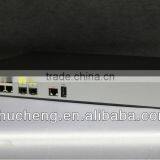
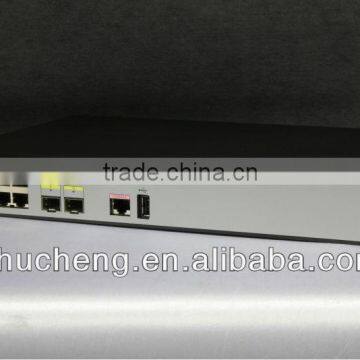
Huawei AC6005 Wireless Access Point Controller Huawei Wireless Access Controller


Related Products
-
 Huawei AC6005 Wireless Access Point ControllerNegotiableMOQ: 1 Piece
 -
Huawei AP6310SN-GN Outdoor Wireless Access Point Access Point Wifi UsbNegotiableMOQ: 1 Piece
-
Huawei AP6310SN-GN Outdoor Wireless Access Point Outdoor Access Point 5ghzNegotiableMOQ: 1 Piece
-
Huawei AP6310SN-GN Outdoor Wireless Access Point Access Point OutdoorNegotiableMOQ: 1 Piece
-
Huawei AP6310SN-GN Outdoor Wireless Access Point Huawei Access PointNegotiableMOQ: 1 Piece
Huawei AC6005 Wireless Access Controller
| wireless access point wlan controller |
The Huawei AC6005 access controller (AC) provides small- to medium-size enterprise networks. This large-capacity AC integrates 1,000 M Ethernet switch functionality for both wired and wireless access control.The AC6005 delivers a flexible networking solution that is easy to install and maintain for campus, industrial, and mid-size enterprise networks.
Abundant Port Types
- 8 GE Service ports
- One RJ45 maintenance serial port
- One USB Maintenance port.
Large Capacity, High Performance, Integrated Design
- Large forwarding capacity: the AC has 8 GE ports, and provides 4 Gbit/s forwarding capacity.
- PoE: The AC supports the PoE function and can provide the maximum power on 8 ports. This PoE capability can provide power to APs and other powered devices (PDs) connected to the AC unit.
Carrier-Class Reliability
- Port backup based on the Link Aggregation Control Protocol (LACP) or Multiple Spanning Tree Protocol (MSTP).
- The AC supports 1+1 hot backup.
Easy-to-Install and Easy-to-Maintain
- The AC6005 dimensions (width x depth x height) are 320 mm × 233.6 mm × 43.6 mm and the AC6005 can be installed on a desk or in a standard IEC cabinet(19 inch).
- The built-in web system of AC allows local GUI-based management.
- The AC can be managed by the eSight that provides various northbound interfaces.
- The AC supports the intra-board temperature probe, which monitors the operating environment of the AC in real time.
Energy Conservation
- Low noise fans that can adjust the speed automatically are used, thus reducing noises in the system and power consumption of fans.
- The chip switches to the power saving mode when no connected device is detected on a service interface, that is, the interface is idle.
- It uses highly-integrated and energy-saving chips produced through advanced processing techniques. With the help of the intelligent device management system, the chips not only improve system performance but also greatly reduce power consumption of the entire system.
Physical Specifications
| Item | Description | |
|---|---|---|
| Dimensions (width x depth x height) | 320 mm×233.6 mm×43.6 mm | |
| Maximum power consumption | AC6005-8-PWR: 163.6 W (device power consumption: 39.6 W, PoE: 124 W) AC6005-8: 25.6 W | |
| Weight | AC6005-8-PWR: 2.30 kg AC6005-8: 2.05 kg | |
| Operating temperature | -5ºC to +50ºC | |
| Relative humidity | 5% RH to 95% RH, non-condensing | |
| Operating altitude | -60 m to 5000 m | |
| AC input voltage | Rated voltage | 100 V AC to 240 V AC, 50/60 Hz |
| Voltage range | 90 V AC to 264 V AC, 47 Hz to 63 Hz | |
Protocol and Management Capabilities
| Parameter | Specifications |
|---|---|
| Number of managed APs | 128 |
| Number of access users | Entire device: 2K Single AP: a maximum of 256 (depending on the AP model) |
| Number of MAC address entries | 4K |
| Number of VLANs | 4K |
| Number of routing entries | 4K |
| Number of multicast forwarding entries | 4K |
| Number of DHCP IP address pools | 4K |
| Number of local users | 128 IP address pools, each of which contains a maximum of 16K IP addresses |
| Number of ACLs | 1000 |
| Number of ESSIDs | 4K |
| User group management | 1K |
Wireless Networking Capabilities
| Feature | Specifications |
|---|---|
| Networking between APs and ACs | APs and ACs can be connected through a Layer 2 or Layer 3 network. APs can be directly connected to an AC. APs are deployed on a private network, while ACs are deployed on the public network to implement NAT traversal. ACs can be used for Layer 2 bridge forwarding or Layer 3 routing. |
| Forwarding mode | Direct forwarding (distributed forwarding or local forwarding) Tunnel forwarding (centralized forwarding) Centralized authentication and distributed forwarding Before users are authenticated, tunnel forwarding is used. After users are authenticated, local forwarding is used. |
| Wireless networking mode | WDS bridging: Point-to-point (P2P) wireless bridging Point-to-multipoint (P2MP) wireless bridging Automatic topology detection and loop prevention (STP) Wireless mesh network: Access authentication for mesh devices Mesh routing algorithm Go-online without configuration |
| AC discovery | An AP can obtain the AC6005's IP address in any of the following ways: Static configuration DHCP Option 43 DNS The AC6005 uses DHCP to allocate IP addresses to APs. Huawei APs are identified by the Option 60 field. DHCP relay is supported. On a Layer 2 network, APs can discover the AC6005 by sending broadcast or multicast CAPWAP packets. |
| CAPWAP tunnel | Centralized CAPWAP CAPWAP control tunnel and data tunnel (optional). CAPWAP tunnel forwarding and direct forwarding in an extended service set (ESS). Datagram Transport Layer Security (DTLS) encryption, which is enabled by default for the CAPWAP control tunnel Heartbeat detection and tunnel reconnection. |
| Active and standby ACs | Enables and disables the switchback function. Supports load balancing. Supports 1+1 hot backup. |
System Configuration
| Item | Specifications |
|---|---|
| Processor | Dominant frequency: 1 GHz |
| Switching capacity | 20 Gbit/s |
| Packet forwarding capacity | 4 Gbit/s |
| DDR memory | 2 GB |
| Flash memory | 2 GB (SD card) |
Application Scenarios
The AC is connected to an aggregation switch in chain or branched mode.
The AC processes both control flows and data flows. Management flows must be transmitted over Control And Provisioning of Wireless Access Points (CAPWAP) tunnels. Data flows can be transmitted over CAPWAP tunnels or not, as required.
The CAPWAP protocol defines how APs communicate with ACs and provides a general encapsulation and transmission mechanism for communication between APs and ACs. CAPWAP defines data tunnels and control tunnels.
Data tunnels encapsulate 802.3 data packets to be sent to the AC.
Control tunnels transmit control flows for remote AP configuration and WLAN management.
Two forwarding modes are available according to whether data flows are transmitted on CAPWAP tunnels:
Direct forwarding: is also called local or distributed forwarding.
Tunnel forwarding: is also called centralized forwarding. It is usually used to control wireless user traffic in a centralized manner.
You can select the chain or branched mode according to networking requirements. On the AC, you can configure direct forwarding for some APs and tunnel forwarding for other APs. In tunnel forwarding mode, all wireless user traffic is aggregated to an AC, which may create a switching bottleneck. Therefore, tunnel forwarding is seldom used on enterprise networks.
In bypass networking mode, the AC is connected to a network device (usually an aggregation switch) to manage APs.
The AC manages APs. Management flows are transmitted in CAPWAP tunnels, and data flows are forwarded to the upper layer network by the aggregation switch and do not pass through the AC.
AP Management Specifications
| Feature | Specifications |
|---|---|
| AP access control | Displays MAC addresses or SNs of APs in the whitelist. Adds a single AP or multiple APs (by specifying a range of MAC addresses or SNs) to the whitelist. Automatically discovering and manually confirming APs. Automatically discovering APs without manually confirming them. |
| AP region management | Supports three AP region deployment modes: Distributed deployment: APs are deployed independently. An AP is equivalent to a region and does not interfere with other APs. APs work at the maximum power and do not perform radio calibration. Common deployment: APs are loosely deployed. The transmit power of each radio is less than 50% of the maximum transmit power. Centralized deployment: APs are densely deployed. The transmit power of each radio is less than 25% of the maximum transmit power. Specifies the default region to which automatically discovered APs are added. |
| AP profile management | Specifies the default AP profile that is applied to automatically discovered APs. |
| AP type management | Manages AP attributes including the number of interfaces, AP types, number of radios, radio types, maximum number of virtual access points (VAPs), maximum number of associated users, and radio gain (for APs deployed indoors). Provides default AP types. Supports user-defined AP types. |
| Network topology management | Supports LLDP topology detection. |
Switching and forwarding features
| Feature | Description | |
|---|---|---|
| Ethernet features | Ethernet | Operating modes of full duplex, half duplex, and auto-negotiation Rates of an Ethernet interface: 10 Mbit/s, 100 Mbit/s, 1000 Mbit/s, and auto-negotiation Jumbo frames Link aggregation Load balancing among links of a trunk Interface isolation and forwarding restriction Broadcast storm suppression |
| VLAN | Access modes of access, trunk, and hybrid Default VLAN | |
| MAC | Automatic learning and aging of MAC addresses Static, dynamic, and blackhole MAC address entries Packet filtering based on source MAC addresses Interface-based MAC learning limiting | |
| ARP | Static and dynamic ARP entries ARP in a VLAN Aging of ARP entries | |
| LLDP | LLDP | |
| Ethernet loop protection | MSTP | STP RSTP MSTP BPDU protection, root protection, and loop protection Partitioned STP |
| IPv4/IPv6 forwarding | IPv4 features | ARP and RARP ARP proxy Auto-detection |
| Unicast routing features | Static route RIP-1 and RIP-2 OSPF BGP IS-IS Routing policies and policy-based routing URPF check DHCP client, server and relay DHCP snooping | |
| Multicast routing features | IGMPv1, IGMPv2, and IGMPv3 PIM-SM Multicast routing policies RPF | |
| Device reliability | BFD | BFD |
| Layer 2 multicast features | Layer 2 multicast | IGMP snooping Prompt leave Multicast traffic control Inter-VLAN multicast replication |
| Ethernet OAM | EFM OAM | Neighbor discovery Link monitoring Fault notification Remote loopback |
| QoS features | Traffic classification | Traffic classification based on the combination of the L2 protocol header, IP 5-tuple, outbound interface, and 802.1p priority |
| Action | Access control after traffic classification Traffic policing based on traffic classification Re-marking packets based on traffic classifiers Class-based packet queuing Associating traffic classifiers with traffic behaviors | |
| Queue scheduling | PQ scheduling DRR scheduling PQ+DRR scheduling WRR scheduling PQ+WRR scheduling | |
| Congestion avoidance | SRED WRED | |
| Configuration and maintenance | Terminal service | Configurations using command lines Error message and help information in English and Chinese Login through console and Telnet terminals Send function and data communications between terminal users |
| File system | File systems Directory and file management File uploading and downloading using FTP and TFTP | |
| Debugging and maintenance | Unified management over logs, alarms, and debugging information Electronic labels User operation logs Detailed debugging information for network fault diagnosis Network test tools such as traceroute and ping commands Interface mirroring and flow mirroring | |
| Version upgrade | Device software loading and online software loading BootROM online upgrade In-service patching | |
| Security and management | System security | Different user levels for commands, preventing unauthorized users from accessing AC6005 SSHv2.0 RADIUS and HWTACACS authentication for login users ACL filtering DHCP packet filtering (with the Option 82 field) Defense against control packet attacks Defenses against attacks such as source address spoofing, Land, SYN flood (TCP SYN), Smurf ping flood (ICMP echo), Teardrop, and Ping of Death attacks |
| Network management | ICMP-based ping and traceroute SNMPv1, SNMPv2c, and SNMPv3 Standard MIB RMON | |

Send Inquiry to This Supplier

You May Also Like
-
TYT Smarthome Gateway / Home Applainces Remote Comtroller in Zigbee Coordinator SystemUS$ 59 - 139MOQ: 1 Square Inch
-
Serial Wifi Module Wire Ethernet PCB Antenna Transparent Transmission WF-01US$ 1 - 10MOQ: 10 Pieces
-
External 3G Gsm Modem Pool 8 Port Speaker/call Sending Bulk SMS MMSUS$ 345 - 500MOQ: 1 Piece
-
RF DIN 7/16 Attenuator 50W 3dB/6dB/10dB/20dB/30dB/40dB/50dBNegotiableMOQ: 1 Piece
-
2015 New Stylish Optical Bluetooth Transmitter for Smartphone ,laptopUS$ 11 - 13MOQ: 1000 Pieces
-
UM220-III NUS$ 0.1 - 1MOQ: 1 Piece
-
2.4G WIFI/Bluetooth Internal FPC Antenna FR4 Antenna PCB Wifi Patch Antenna With IPEX UFL ConnectorUS$ 0.48 - 0.7MOQ: 100 Pieces
-
Bluetooth Audio Module RS232 Serial Bluetooth Module HC-06 Adapter Communication Master-Slave 2 Modes MINI USBUS$ 1 - 100MOQ: 100 Units
-
RIGHT ANGLE f QUICK MALE RF CONNECTORUS$ 0.01 - 0.99MOQ: 1000 Pieces
-
High Strength FRP RadomeNegotiableMOQ: 100 Pieces


