








 Contact Platform Support
 Help Center
SIM Rotation and IMEI Change Anti-SIM Block 8 Ports 32 Sims Gsm Modem Pool


Related Products
-
 8 Ports 32Sims GSM SMS Modem With SIM Card RotationUS$ 10 - 450MOQ: 1 Unit
 -
New Arrival! 8 Ports 32Sims GSM SMS Modem With SIM Card RotationUS$ 10 - 400MOQ: 1 Unit
-
32 SIMs USB/RS232 GSM Modem Pool Automatically SIM Rotation Latest DesignNegotiableMOQ: 1 Piece
-
Automatically SIM Rotation GSM SMS MODEM POOL ETS-8132 32SIMs Quad-bandNegotiableMOQ: 1 Piece
-
Quad-band 32 SIMs GSM Modem Pool 8 Ports ETS-8132 Automatically SIM RotationNegotiableMOQ: 1 Piece
Description:
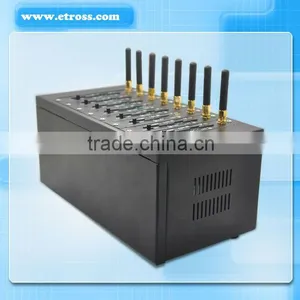
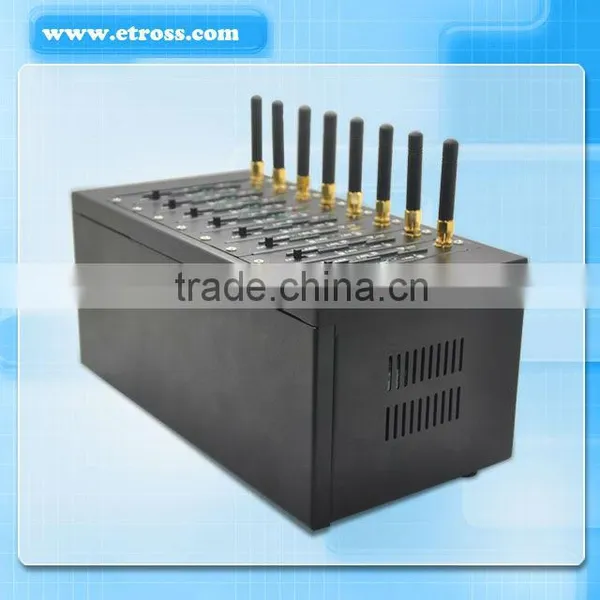
GSM Modem Pool 8 Ports 32Sims , Model no.: ETS-8132 (it has 8 ports, each ports has 4 SIM card slot, totally 8 ports 32SIMs, RS232 / USB type optional)
is a newly developed GSM/GPRS Modem pool solution which can automatically realize SIM rotation when do
SMS sending, it can effectively lower the SIM block by carriers. And improve the SMS sending efficiency.
Can preset the SIM rotation rule through hyper terminal of PC by AT command, then the device will automatically
do SIM rotation according to the rule.
Specifications:
1, GSM Modem Pool 8 ports 32 SIMs slot;
2, GSM 900/1800/850/1900Mhz Quad band (Quectel M35 module employed);
3,Automatically SIM rotation;
4,IMEI Changeable through Hyper terminal of PC;
5,RS232 / USB optional
6,AT Command
Main Features:
1,Can Support 8 channels simultaneously;
2,Can insert 32 SIM cards(each port 4 SIM cards)
3,Connect with the Computer through RS232 Data cable and PCI card pre-Installed in PCI slot in PC (For RS232 Type) / USB line for USB type.
4,Each channel with separate power switch,
5,Each channel can be demolished separately.
6,Comply with GSM Phase 2 standard.
7,RS232/USB Interface (Optional)
8,Can send and receive SMS in bulk
9, Industrial Chassis, Elegant Appearance design.
10, support Windows XP, Windows7, Linux, Unix OS etc.
Basic Features:
1,Asynchronous, transmission rate a maximum 14400 bits/s,
2,Buadrate: 115200 bits/s
3,Automatic baud rate: from 2400 to 19200 bits/s
4,GPRS compatible
5,SMA antenna interface
6,SIM card Outlet
7,built-in Adapter: 12V 3A
8, RS-232 PCI card supported / USB ports support
9, AT command control ( GSM 07.07 and 07.05)
Hardware Features:
Meet the ETSI GSM 2 + standards
Class 4 ( 2W @ 900 MHz) Class 5 ( 1W@1800 MHz)
Operating Temperature: -20 ° C - + 55 ° C
Storage temperature: -25 ° C - + 70 ° C
Device Size: standard GSM Modem Pool chassis
Weight: 3Kg per unit
Application:
Large shopping malls, supermarkets
Professional market, large wholesalers
Large hotels, large-scale entertainment
Large agencies
Transport, logistics industry
Large enterprises, and institutions
Large hospitals, large bookstore
Newspaper, television and radio stations
Oil Company ( other chain business company)
Government agencies or large township
Function setting:
Set mode:
Input “setup:” enter into setup mode
Modem pool help list:
So if you want to set the port to rotate after sending 100 SMS successfully, then you can input the following:
rotate: 11,100
Then you will see as below:
and you input “save:” to save the setting. And also you can input “display:” to view your setting.
When Setting finishes, you can input “goto normal:” to enter normal mode
Normal Mode
1, In normal mode, you can use AT Command to communicate with GSM module directly. For example to view the module IMEI no.
AT+CGSN
It will show IMEI no. as 863070013010763. For example to change IMEI :
AT+EGMR=1,7,”863070013010786” to change IMEI no. to 863070013010786
You can input AT+CGSN again to view IMEI no. which you have changed. See as below:
2, After setting,return to normal mode, you can open the SMS caster or other SMS software to do
SMS sending and receiving.
(Notice: In normal mode, must insert valid SIM card)
Update Mode:
In Update mode, you can upgrade the firmware.
1, enter into update mode
Switch on the device, it will display “modem pool 8x4 cards V1.0 2013-04-02” on the screen of hyper terminal, press “ENTER” key 3 times immediately to enter into Updata Mode.
2, upgrade firmware
Open the menu/transfer/to send a file, choose the firmware file to finish the upgrade. As below:
Send/ receive SMS:
After setting, users can do SMS sending through SMS software.
PCI card:
Device, cable, adapter, PCI card:
Face:
Front: device wtih 8 antennas
Side:

Send Inquiry to This Supplier

You May Also Like
-
Communication ModuleNegotiableMOQ: 2300 Pieces
-
Pressure Sensor Water for Mobile Phone Gate Opener,remote ab SwitchUS$ 70 - 100MOQ: 1 Piece
-
GSM ModemUS$ 10 - 20MOQ: 1 Piece
-
Temperature Sensor Label Used for Electric Substation Monitoring/Waterproof, Outdoor Use OKUS$ 90 - 180MOQ: 40 Cases
-
M2M ModemNegotiableMOQ: 1 Unit
-
Multi-interface Easy to Operate Led Screen TS852 External Sending Box With CardUS$ 1 - 400MOQ: 1 Set
-
Jinwen RF Power Amplifier 1000-1200MHz, 200 Watts, Used for Unmanned Aerial Vehicle Jamming, Electronic Countermeasures, Etc Jammer AmplifierUS$ 950 - 1190MOQ: 1 Unit
-
QUECTEL SC20ESC-8GB-UGND SC20AUSC-8GB-UGND SC20AUSA-8GB-STD SC20JSA-8GB-STD Cat4 4G Smart ModuleUS$ 70 - 90MOQ: 1 Unit
-
MR100A IoT Industrial 4G Router Module, Global VersionNegotiableMOQ: 1 Piece
-
Nokia AirScale System Module ASIA 473095A for 4G/5G Base StationNegotiableMOQ: 1 Unit


