








 Contact Platform Support
 Help Center
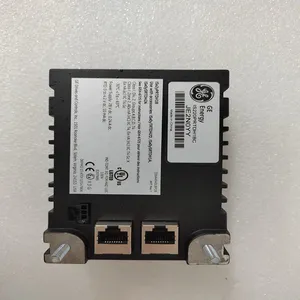
IS220PRTDH1BC 336A5026ADP13


Related Products
Brand: GE
Type: IS220PRTDH1BC 336A5026ADP13
Origin: the United States
Warranty: 365 days
Colour: new/used
Shipping method: Courier delivery
Module of PLC, DCS, ESD system card, the card is a vibration monitoring system, steam turbine control system module, the advantages of the gas generator spare parts brand: Allen Bradley, BentlyNevada, ABB, Emerson Ovation, Honeywell DCS, Rockwell ICS Triplex, FOXBORO, Schneider PLC, GE Fanuc, Motorola, HIMA, TRICONEX, Prosoft etc. Various kinds of imported industrial parts of our products are widely used in metallurgy, petroleum, glass, aluminum manufacturing, petrochemical industry, coal mine, papermaking, printing, textile printing and dyeing, mechanical, electronic manufacturing, automobile manufacturing, plastic machinery, electric power, water conservancy, water treatment/environmental protection, boiler heating, energy, power transmission and distribution and so on.
After the selected start-up mode has been performed, the turbine will operate at the minimum or idle speed setting. The 505E’s speed setpoint will move to minimum governor speed unless an idle speed is programmed. The Idle/Rated or Auto Start Sequence functions must be programmed for the turbine to control at idle speed. When using the Auto Start Sequence, the 505E will begin stepping through its sequence once at low idle. This sequence may be stopped, rated speed may be selected (if using idle/rated) or the operator may vary turbine speed with raise/lower or ‘enter’ commands through the 505E’s keypad, external switches, or communication links. The ‘Run’ and ‘Reset’ commands can be selected from the 505E’s service panel, contact input closures (if programmed), or from a Modbus communications link. In addition, the following indications are available through the Modbus links: Speed Setpt Moving to Min, Start Permissive Closed, and Start Permissive Not Closed Alarm indication. Speed Key Screens Figure 5-4 shows the possible screens that may appear if the SPEED key is pressed. Only the screens related to the Speed control’s programmed functionality will be displayed. In addition, the order of the screens may change depending on the status of the control. Screens 4, 5 and 6 will always appear. If idle/rated is programmed, screen 1 will appear. If the auto start sequence if programmed, screens 2 and 3 will appear. Once the auto start sequence is complete, these screens no longer appear.
 Idle/rated Start For details on the idle/rated startup, refer to chapter 3. When a RUN command is issued, the 505E automatically displays the SPEED screen and shows the Idle/Rated status. The speed setpoint is instantly set to the actual turbine’s speed. To increase the speed to the programmed ‘Rated Setpt’ setting, select the Rated command. A Rated command can be issued by pressing the front panel YES key from the Idle/Rtd screen (screen 1), closing the Idle/Rated contact (if programmed) or selecting a Go To Rated command from a Modbus communications link. When the speed setpoint is moving to the Rated Setpoint setting it can be stopped at any point that is not within a critical speed avoidance band by issuing a Speed Setpt Raise or Lower command. This can be done by pressing the ADJUST UP or DOWN from the front panel SPEED screen (screens 1, 2, 3, or 4), closing a Speed Raise/Lower contact input or selecting Speed Raise or Lower from a Modbus communications link.

Send Inquiry to This Supplier


You May Also Like
-
IS210AEBIH3BECUS$ 1073 - 2064MOQ: 1 Piece
-
IS210BPPBH2BMDUS$ 1073 - 2064MOQ: 1 Piece
-
IS200WETBH1ABAUS$ 1073 - 2064MOQ: 1 Piece
-
SR750-P5-G5-S5-HI-A20-R-TUS$ 1077 - 2068MOQ: 1 Piece
-
IS200PMCIH1ABAUS$ 1077 - 2068MOQ: 1 Piece
-
IS215UCVEM08B IS215UCVEH2AEUS$ 1078 - 2069MOQ: 1 Piece
-
VMIVME-7614-132 350-017614-132 DUS$ 1078 - 2069MOQ: 1 Piece
-
IS220UCSAH1AKUS$ 1081 - 2072MOQ: 1 Piece
-
IS220UCSAH1AUS$ 1081 - 2072MOQ: 1 Piece
-
8910-PS-DCUS$ 1083 - 2074MOQ: 1 Piece


