








 Contact Platform Support
 Help Center
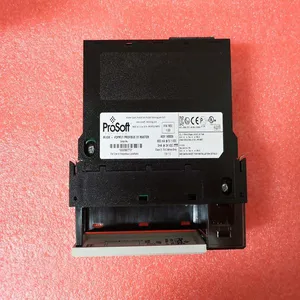
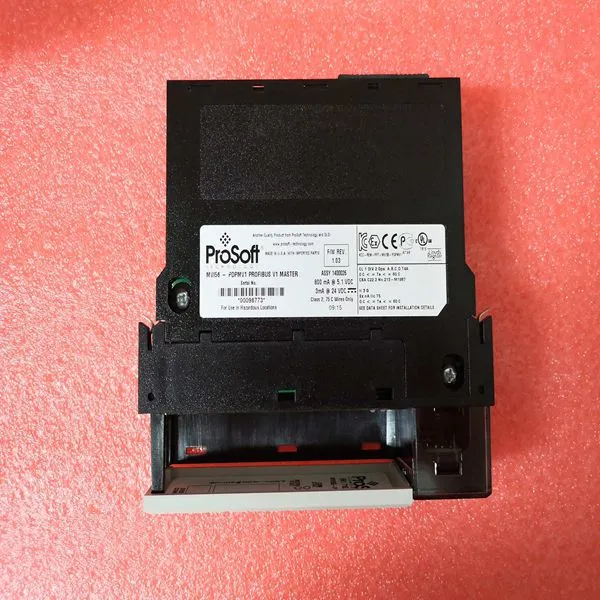
PROSOFT MVI56-PDPMV1


Related Products
Brand:PROSOFT
Type:MVI56-PDPMV1
Origin: the United States
Warranty: 365 days
Colour: new/used
Shipping method: Courier delivery
Spare parts spare parts, the main DCS control system of PLC system and the robot system spare parts,
Brand advantage: Allen Bradley, BentlyNevada, ABB, Emerson Ovation, Honeywell DCS, Rockwell ICS Triplex, FOXBORO, Schneider PLC, GE Fanuc, Motorola, HIMA, TRICONEX, Prosoft etc. Various kinds of imported industrial parts
Designation/Color Function F(ault) /Red Unit error detected. Controlled by Control Software. Set and cleared by the Hardware during controller Reset. R(un) /Green Operational. Controlled by the Control Software. Cleared by the Hardware during controller Reset. ACCESS EN(abled) /Yellow Access Enable switch active. DEGR(aded) MODE /Yellow Reserved for future use. PRIM /Yellow Indicates that the unit is used as the primary SM811. SYNC(hronized) /Yellow Indicates that the SM811 is synchronized. Flashes during SM811 synchronization. Table 73. SM811 Specifications Item Value Memory • 4 MB flash PROM (firmware storage). • 32 MB of SDRAM. Galvanic isolation Yes Connectors • One 7 pin screw connector • One RJ45 connector (SM Link) Current consumption (from CEX-Bus 24 V DC) 160 mA typical (250 mA max) Power dissipation 3.8 W typical
The High Integrity controller is able to run SIL3 applications using SM811. Performing a Hot swap or inserting an additional/replacement SM811 into a running system affects SIL3 applications. The Module should be configured in order to get synchronized. When running SIL3 applications, the start of the synchronization must be accepted by the user, to configure the inserted module. If one or more SIL3 applications are running in the controller, they are temporarily interrupted in order to get a consistent state of the application to the newly inserted SM811. The user must acknowledge the application stop by creating a edge on digital input 3 on the primary, already running, Safety Module.This is performed by connecting a physical push-button to the digital input. The system waits for 30 minutes for the acknowledgement, if acknowledgement is not received the inserted SM811 will shut down. To recover, a new hot insert needs to be initiated i.e. the SM811 has to be removed and inserted again. Synchronization of the SM811 includes: 1. Make sure that the synchronization link between the SM811s is in place, that is, the enclosed TK852V010 cable is properly connected into both SM Link connectors respectively. 2. Insert the SM811 in its position. 3. When the SM811 starts the synchronization LED flashes, and later it continues to blink with 3 blinks and a pause in a sequence. 4. Push the button (create an edge on digital input 3 on the already running Safety Module), once it starts blinking repeatedly with 3 blinks and a pause sequence. 5. The Sync LED flashes faster until the synchronization is complete. 6. The Sync LED turns yellow when the module is synchronized

Send Inquiry to This Supplier


You May Also Like
-
 PFEA112-65 3BSE050091R65US$ 1154 - 2054MOQ: 1 Piece
 -
TEWS TVME200US$ 1155 - 2055MOQ: 1 Piece
-
TOSHIBA USIO21US$ 1155 - 2055MOQ: 1 Piece
-
VMIVME-1128US$ 1155 - 2055MOQ: 1 Piece
-
VMIVME-2510BUS$ 1155 - 2055MOQ: 1 Piece
-
VMIVME-2536US$ 1155 - 2055MOQ: 1 Piece
-
BENTLY 3500/45US$ 1156 - 2056MOQ: 1 Piece
-
ABSOLUTE API4380GUS$ 1156 - 2056MOQ: 1 Piece
-
IS220PDOAH1AUS$ 1156 - 2056MOQ: 1 Piece
-
IS420UCSBH4AUS$ 1156 - 2056MOQ: 1 Piece


