








 Contact Platform Support
 Help Center
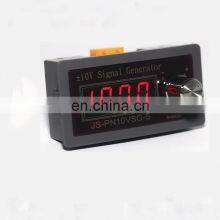
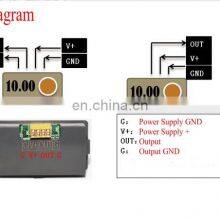
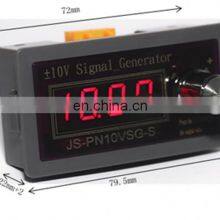
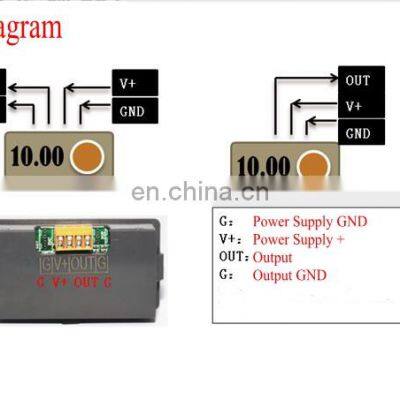
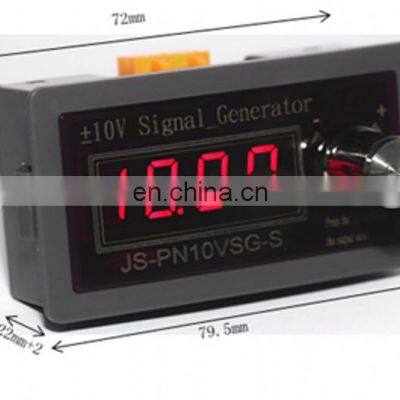
DC7-28V High Precision Adjustable Voltage Analog Simulator -10v/+10V+5V/0-10V Signal Generator Signal Sources DAC Output


Related Products
-
 DR-15 15W Single Output 5V 12V 15V 24V Din Rail Switching Power SupplyNegotiableMOQ: 1
 -
4 Digital Red Green Blue LED Tachometer RPM Speed Meter+Hall Switch Proximity Switch Sensor 12V Measure Range 10-9999RPM CounterNegotiableMOQ: 1
-
85C1-mA DC Pointer Analog Ammeter Panel 1mA 2mA 3mA 5mA 10mA 20mA 30mA 50mA 100mA 150mA 100mA 150mA 200mA 300mA 500mANegotiableMOQ: 1
-
91c4 Ammeter DC Analog Current Meter Panel Mechanical Pointer 1A/2A/3A/5A/10A/20mA/30mA/50mA/100mA/200mA/300mA/500mANegotiableMOQ: 1
-
69L17 Pointer Needle AC 0-450V Volt Tester Panel Analog Voltmeter 85mm x 45mm, Ammeter Current AC Analog Voltage MeterNegotiableMOQ: 1
| NAME | Signal Generator |
1 Features:
1.1 Small jitter: 0.1mV jitter change, suitable for controlling the occasions with high ripple requirements, at the output and some
Capacitors may work better ( pay attention to capacitor polarity);
1.2 Can be set to a variety of outputs: dual output ± 10.00V / ± 5.00V single output 0-10.00V / 2-10.00V...0-1.00V and so on;
1.3 When single output is 0V can really reach 0, it is suitable for this output occasion of small signal such as 0-1.00V;
1.4 Digital Encoder Knob, how much is output when it is rotated;
1.5 Knob rotates the coarse and fine adjustment dual mode, the number of turns can be set to 1-100 circles;
1.6 4-digit digital tube, 0.01 change;
1.7 setting and adjustment value power-down storage;
2 Technical indicators:
2.1 Power supply voltage: DC8-28V, power 1W;
2.2 Maximum output voltage range: ±10V Maximum load current: 20mA; Accuracy: 0.01V
2.3 encoder knob one pulse number 20;
2.4 4-digit 0.4 inch digital tube;
3 system operation:
(The knob is pressed to "OK"], the clockwise rotation is "+<plus>", and the counterclockwise rotation is "-<<min> >"):
5.1 After the knob adjusts the output, there is no operation for 3 seconds, the output value is automatically saved; or short press the enter key to save the output immediately.
After the value is released, the screen displays "..." and the save is successful;
5.2 Parameter settings:
5.2.1 Press and hold the confirmation button on the normal operation screen for 2 seconds to enter the setting state, and display “F001” (parameter number 001);
5.2.2 Rotate the knob to change the parameter number (the first time you enter F002, you need to enter the password “+ - - + (rotate knob)”);
5.2.3 Parameter number interface, press the enter key to enter the corresponding parameter value setting, and rotate the knob to modify the parameters;
5.2.4 Press the Enter key to save the parameter, exit the parameter setting, and display the next parameter number (no password F001 is entered)
After the value is set, it will enter the normal operation screen);
5.2.5 Rotate the knob directly to the last parameter number, press the OK button, and the setting is completed to enter the normal operation screen;
5.2.6 After the parameter setting screen has not been operated for more than 10s, it will exit the setting state and enter the normal operation screen.

Send Inquiry to This Supplier

You May Also Like
-
Gradient Meter, Gradiometer,inclinometer SensorNegotiableMOQ: 1 Piece
-
4-20ma 0-10v Signal Generator Good SaleUS$ 10 - 50MOQ: 1 Piece
-
TC1420 Synthesized GeneratorNegotiableMOQ: 1 Set
-
Analog 24V 0-5V 0-10V 0-20mA 4-20mA Signal Simulator Passive 0-22mA Current Source 0-12V 0.3% Accuracy LED Signal GeneratorUS$ 20.68 - 28.88MOQ: 1 Piece
-
HS6103F 48Position Single Phase Energy Meter Test BenchNegotiableMOQ: 1 Set
-
SIGLENT SDG1032X/SDG1062X/1022 Function Arbitrary Wave Generator Signal Source High Precision Frequency CounterNegotiableMOQ: 1 Combo
-
Acrel ASG100 Signal GeneratorNegotiableMOQ: 1
-
Keysight Signal Generator N5181B N5183B N5182BNegotiableMOQ: 1 Unit
-
2 Channel Analog and Digital Arbitrary Waveform GeneratorUS$ 350 - 760MOQ: 1 Piece
-
4-20mA PT100 Signal GeneratorUS$ 75.3 - 85.3MOQ: 1 Piece


