








 Contact Platform Support
 Help Center
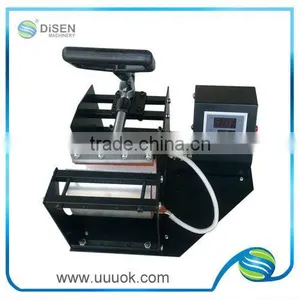
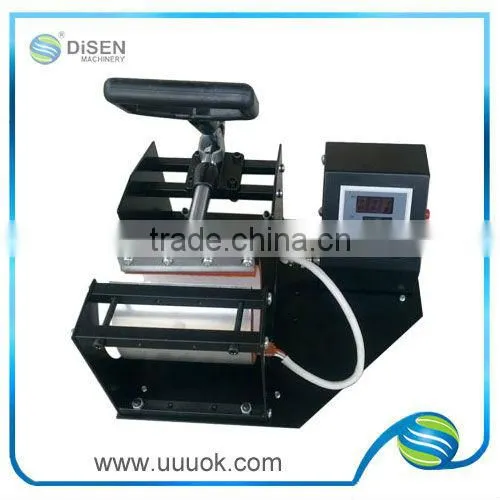
Digital Low Price Mug Heat Press Machine


Related Products

|
Customer First Service First |
|
Product video: /watch?v=HfZ1dnWmN9k Detailed Product Description 1.heat sensitive mug press machine;
|
|
Customer First Service First |
|
Digital low price mug heat press machine
Digital low price mug heat press machine
Digital low price mug heat press machine
Digital low price mug heat press machine
Digital low price mug heat press machine
|
|
Customer First Service First |
|
Feature:
Opearation: 1,Place a shaped mug, close the handle with appropriate pressure and then plug the power Caution! The machine must to be protective earthing properly before operating. Avoid excessive pressure. 2,Cut the picture size to be large as the mug surface and then put it to the mug by adhesive tape. 3,Setting the temperature to an appropriate (between 180°C- 200°C) by turning the temperature knob; 4,Setting appropriate time, approximate 30 seconds, the temperature rising time is 2 to 4 minutes; 5,Place the picture-wraged mug, close the handle and then turn on the power, red indicator lighting; Caution! The size of picture should be large enough to cover the whole mug surface to avoid singe and impress. 6,The machine shall start the timer automatically and enter the status of constant temperature when the temperature rises to the setting degree; 7,Release the handle when the buzzer rings and take out the mug; Get rid of the picture paper 3 seconds after the mug to be took out from the machine. Caution! For protecting the heating mat, place the shaped mug all the time and close the handle when the machine is not being used. Another piece of paper should be used to cover the mug surface to avoid the direct touch of the mug surface with the heating mat, when the picture is too small to cover the whole mug surface. Adjustion Pressure To adjust the handle to increase or reduce the pressure. Time To set the timer to the appropriate time, around 30 seconds. Temperature Turn the temperature knob to set the appropriate temperature, between 180°C- 200°C Caution The machine needs 2 minutes break every 60 minutes working period when in mass production. Problems shooting Color too light The baking time is not enough, so add more baking time which will get the real color. Blurred image The baking time is too long, just reduce the baking time will make the image distinct. Partly color light Caused by the short pressure or the coating is uneven, need to increase the pressure or replace mug with uneven coating. Blurred image caused by heating mat replace the heating mat. Scar on image The baking time is much too long, just reduce the baking time largely to remove.
Accessories (1)The Printer. Choose any normal Ink Jet photo printer and Epson series printer is recommended. (3)The sublimation ink. Make sure to pull out the color soft plug on the top of the ink cartridges before putting them into the printer. The sublimation ink is easy to dry and better to furnish with one printer until the ink use up.
Warranty and Maintenance:
1,One-year guarantee.
Notice:
|
|
Customer First Service First |
|
|

Send Inquiry to This Supplier

You May Also Like
-
Multifunction Mug Heat Press Machine With Standard Insert (11oz - 15oz)US$ 90 - 92MOQ: 100 Sets
-
Hot Stamping MachineNegotiableMOQ: 2000 Sets
-
Large Format Sublimation Heat Press for Carpet / BlanketUS$ 1,538 - 1,538MOQ: 2 Sets
-
Wrought Iron FurnitureUS$ 10.99 - 50.99MOQ: 100 Pieces
-
High Quality Heat Press Machine Made in ChinaUS$ 155 - 450MOQ: 1 Set
-
New Heat Transfer Paper Printing MachineUS$ 3,000 - 15,000MOQ: 1 Set
-
Manual Coding Machine/manual Printing Machine/manual Marking Machine Quality ChoiceUS$ 50 - 200MOQ: 1 Set
-
Warehouse 24 Inch DTF Powder Shaking Machine 4 Heating Tubes Shaker Dryer Machine T-shirts Sweatshirts Throw Pillows PrinterUS$ 11000MOQ: 1 Unit
-
H-400 Automatic Hot Foil Stamping Machine Flat Bronzing for Plastic & Auto PartsUS$ 4553.85 - 4584.62MOQ: 1 Unit
-
Sell Mug Press,digital Design Machine,image Printer,Advanced Cap Transfer,5 in 1 TransferUS$ 55 - 75MOQ: 5 Pieces


