








 Contact Platform Support
 Help Center
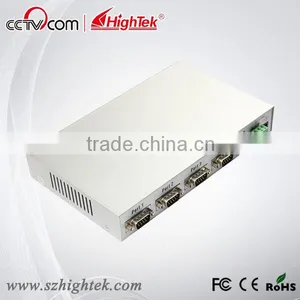
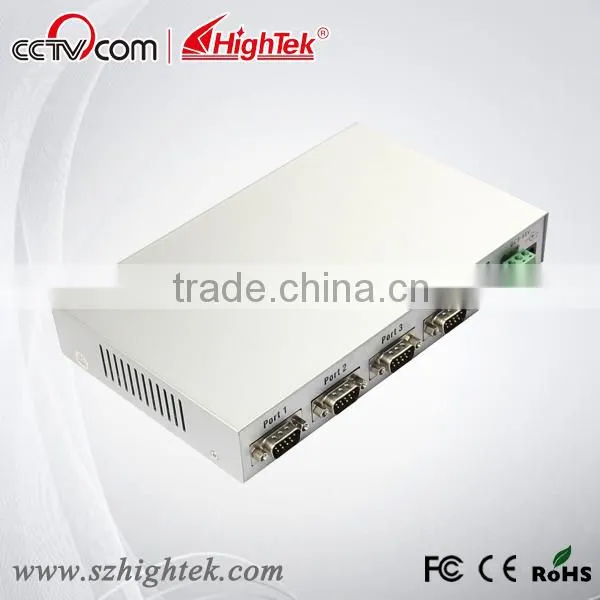
4 Port Optically Isolated USB to RS232 Adapter


Related Products
-
 Usb2.0 to 8 Port RS232 Serial Db9 ConverterUS$ 158 - 260MOQ: 1 Piece
 -
Usb to Isolated Rs485 / Rs422 Serial Db9 Male AdapterUS$ 14.8 - 22MOQ: 1 Piece
-
OEM Supported Rs232-usb Adaptor Converter American ChipUS$ 10 - 15MOQ: 1 Piece
-
Industrial Usb to 4-port Rs485 Rs422 Serial Hub ConverterUS$ 60 - 120MOQ: 1 Piece
-
Usb to Dual Channel Can Bus Protocol Converter AdapterUS$ 30 - 50MOQ: 1 Piece
Specifications
4 port Optically Isolated USB to RS232 adapterUK FTDI chip
Industrial grade
Lightning and surge protection
15KV ESD protect
4 port Optically Isolated USB to RS232 adapter details:
With rapid development of computer industry, USB is taking the place ofvarious kinds of traditional low speed peripheral interfaces. However, RS-232interface designs are still used in many of the important facilities undercurrent industrial environment; therefore, converter is used by many users toimplement the data transmission from USB of a computer to RS-232 equipment.
HighTek HK-5204A is a universal USB/RS-232 interface converter. No external powersupply needed. Compatible with USB and RS-232 standards, HK-5204Aiscapable to perform the conversion from single-ended USB signal into UARTsignal of RS-232. DB9 male connectors are used for connection from RS-232interface. The unique I/O circuit of the internal zero delay auto transceivercontained in the converter controls the data stream direction automatically.
The converter is plug-and-play. All these features ensure a universalapplication on all the existing communication software and hardware interfaces.
The data communication rate can be as high as 300-921.6Kbps by the point-to-pointcommunication by HK-5204A interface. Power indicator light and datatraffic indicator light are also available with the converter for malfunctionindication. Conversion fromUSB to RS-232 is supported.
Functions
HK-5204A interface converter supports the following communication mode:
1. Point-to-point communication mode.
Hardware installment and application
Read the user manual carefully before installing the HK-5204A interfaceconverter. Put the signal cable of the equipment into the USB socket.USB/DB9 male connectors are adopted for input/output interfaceconnection for this product.
Performance parameters
1. Standards: conforming to USBV1.0, 1.1 and 2.0 and EIA RS-232.
2. USB signals: VCC, DATA+, DATA-, GND and FG..
3. RS-232 signals: DCD RXD TXD DTR GND DSR RTS CTS RI
4. Working mode: asynchronous point-to-point.
5. Direction control: adoption of automatic data stream control for automatic recognition and control of data transmission direction.
6. Baud rate: 300-921.6Kbps, automatic detection of the transmission rate of the serial interface signal.
7. Transmission distance: 5 meters for RS-232 and less than 5 meters for USB.
8. Interface protection: +-15KV electrostatic protection.
9. Interface forms: B interface female connector and DB9 male connector for USB.
10. Signal indication: 9 indicator lights for Power (PWR), Send (TXD) and Receive (RXD).
11. Transmission media: twisted-pair cable or shielded cable.
12. Dimensions: 159mmX130mmX33mm.
13.Working environment: -40 to 85 , relative humidity 5% to 95%.
14. Windows95/98/2000/XP/Vista and IMAG are supported.
15. Both BUS and external power supply are supported.
Connector and signal
1. DB9 PIN: RS-232 output signals and PIN assignment.
| DB9 Female (PIN) | RS-232C Interface Signal |
| 1 | Protective grounding DCD |
| 2 | Receivig data SIN(RXD) |
| 3 | Sending data SOUT(TXD) |
| 4 | Data terminal preparing DTR |
| 5 | Signal grounding GND |
| 6 | Data equipments preparation DSR |
| 7 | Request sending RTS |
| 8 | Clear sending CTS |
| 9 | Ring indication RI |
2. USB-B female: USB output signals and PIN assignment
Communication Connection Chart
1. DCD 2,RXD 3,TXD 4,DTR 5,GND 6,DSR 7,RTS 8,CTS 9,RI
Problems and troubleshooting
1. Data communication failure
A. Check to make sure USB cable is OK.
B. Make sure RS-232 output interface connection is correct.
C. Make sure power supply is OK.
D. Make sure the wire terminal connection is OK.
E. Make sure the indicator lights flash when receiving.
F. Make sure the indicator lights flash when sending.
2. Data missing or incorrect
A. Check to see whether the data rate and format at both ends of thecommunication equipment are consistent.

Send Inquiry to This Supplier

You May Also Like
-
Clean Room TelephoneUS$ 140 - 160MOQ: 1 Piece
-
Hot Sale Hdpe 40/33 Pipe for Fiber Optic CableUS$ 0.63 - 0.98MOQ: 30000 Meters
-
S42024-L5101-A120-02 Control Rectifier Switch Service BoardUS$ 100 - 3,000MOQ: 1 Piece
-
FC-FC Fiber Optic Patch CordUS$ 1.12 - 2.6MOQ: 10 Pieces
-
Anritsu Site Master S331L PROMOTION PriceNegotiableMOQ: 1 Set
-
Strong Controllability 1310 Nm/1550 nm Wavelength FTTH Optical Receiver With Double WavelengthUS$ 10 - 50MOQ: 1 Set
-
Just for You Fiber Optics Light Up Paper Bag Vase, Paper Flower VaseNegotiableMOQ: 5000 Pieces
-
CYLINDRICAL MUTINATION PLUGSNegotiableMOQ: 1
-
USB AF-MINI USB 5P-B M Adapter VK2-0055NegotiableMOQ: 5000 Pieces
-
25.6V20Ah LiFePO4 for Communication DevicesNegotiableMOQ: 50 Packs


