








 Contact Platform Support
 Help Center
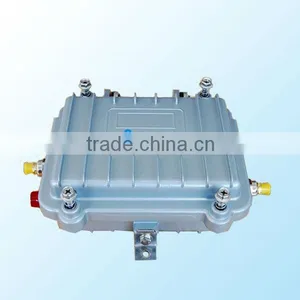
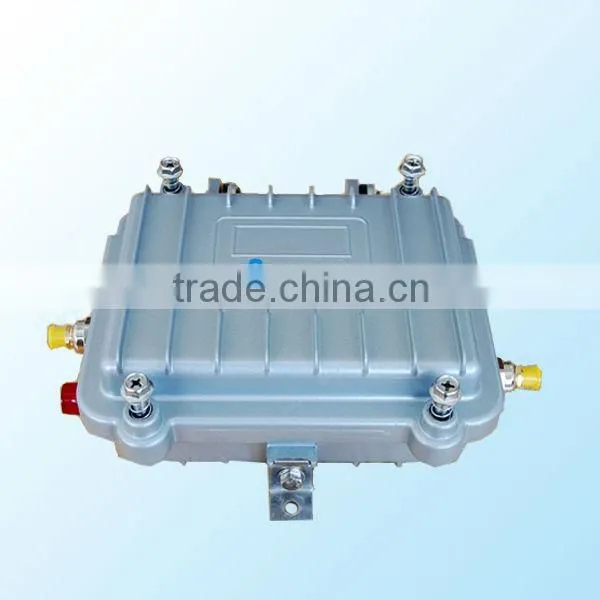
2.4G 4W Outdoor Uses Wlan Repeater RF600



Related Products
-
 2W 2.4G Small Size Wifi Signal Amplifier RF610NegotiableMOQ: 2 Pieces
 -
Long Distance 2 Watt 2.4Ghz Wifi Signal Booster Indoor Signal AmplifierNegotiableMOQ: 5 Pieces
-
2400-2500MHz 33dbm Output Power Wifi Mini Cell Phone Signal Booster KW30D-WIFINegotiableMOQ: 2 Pieces
-
2.4G Wlan Network Mini Wifi Signal Booster KW30D-WIFINegotiableMOQ: 2 Pieces
-
High Power 4W Wifi Booster Signal Repeater RF600NegotiableMOQ: 5 Pieces
Specifications
wlan repeater1:Antenna Interface:RP-SMA Male
2: High receiving sensitivity and high transmitting power
2.4G 4W outdoor uses wlan repeater RF600
| Operating frequency | 2400-2483.5MHz |
| Operating mode | TDD (Time-division duplex) |
| Signal standard | IEEE 802.11b/g/n |
| Minimum input power | 3dBm |
| Maximum output power | 36 dBm(4w) |
| Uplink gain | 15±1dB |
| Downlink gain | 10dB - 17dB adjustable |
| (8dB attenuation range in 1dB steps) | |
| Noise figure | ≤ 2.5dB |
| Delay | <1uS |
| Operating temperature | 25°C to + 60°C |
| Weight | 0.6kg |
| AP/Router Interface | SMA Female |
| Antenna Interface | RP-SMA Male |
Instructions :
1: Connect Antenna to the Wi-Fi Booster.
Caution: The Booster antenna interface can only connect antenna, Don’t connect to any other wireless products in any case, otherwise it will result in equipment malfunction or damage.
2: Connect Wireless AP/Router or Wireless Network Card to the Wi-Fi Booster.
Tips: Users can also use other shielded cables to connect, but the cable length should be as short as possible, preferably not exceeding 3m.
3: Power up the Wi-Fi Booster.
At first, the Light of the LED is very dark. When the data is being transmitted, the light will become very bright. The more dense data transmission, the more bright light.
Caution: Before Power up the Wi-Fi Booster, you must Power up the AP/Router first.
4: Adjust the Antenna position and angle, make the Wi-Fi Booster achieve the best performance.
The adjustment method of the Downlink Gain :
Attention
1: The default Downlink gain is 13dB, It is not the higher the better, You must ensure that the final transmit power must not be larger than 36dBm (4w).
2: The Downlink gain is too high may cause the booster not work correctly, The wireless link cannot be successfully connected, or even lead to the booster damage.
3: You need to reduce the Downlink gain when it's combined with a high-power AP/Router.
4: You need to increase the Downlink gain when it's combined with a low-power AP/Router.

Send Inquiry to This Supplier

You May Also Like
-
2.4G 4W Outdoor Wifi Network Repeater RF600NegotiableMOQ: 2 Pieces
-
Best Seller Wireless Signal Repeater Power 33dbm Gain 16dbUS$ 24 - 59MOQ: 5 Pieces
-
Outdoor Wifi Signal Booster Office Signal Amplifier RepeaterUS$ 100 - 105MOQ: 5 Pieces
-
2.4G 4W Booster Signal Wifi RF600NegotiableMOQ: 2 Pieces
-
2.4G 4W Outdoor Wifi Signal Repeater Wifi Booster RF600NegotiableMOQ: 5 Pieces
-
High Coverage Demands Led 4g Wifi RepeaterNegotiableMOQ: 2 Pieces
-
Indoor Coverage External Wifi RepeaterNegotiableMOQ: 2 Pieces
-
Good Signal Outdoor Wifi Hotspot for Many UsersUS$ 100 - 105MOQ: 5 Pieces
-
2.4ghz Wireless Signal Amplifier for Access Point RouterNegotiableMOQ: 5 Pieces
-
Wifi Signal Amplifier Works With Access Point /routers or Network CardNegotiableMOQ: 5 Pieces


