








 Contact Platform Support
 Help Center
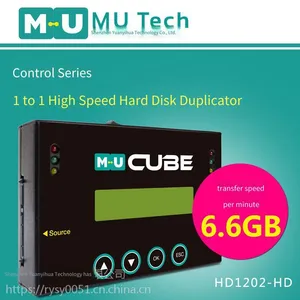
mu Hard Drive Copier in Stock - Hd1202 One-to-one Fast Copy Hard Drive Forensic Backup Machine, Offline Copying. Fastest Delivery in 1 - 3 Days, Free sf Express Shipping



Related Products
-
 mu Original Factory in Taiwan, Or1202 Read-only Lock Hard Disk Copier. it Can be Connected to a Computer via Usb 3.0 Interface, With Write Protection, Deletion Prevention, and Formatting Prevention. in Stock and Free ShippingUS$ 384.62 - 461.54MOQ: 1 Piece
 -
Original mu Taiwan Factory Er1201 Single-port Hard Disk Eraser, Supports Eight Erasing Modes, Special Eraser for Sata/ide Interfaces, in StockUS$ 384.62MOQ: 1 Piece
-
mu Original From Taiwan Ht800 Hard Drive Copier Allows Serial Connection, no Plugging and Unplugging Required, One-key Fast Copy, Automatically Eliminates Slow Disks. in Stock, Free Shipping by sf ExpressUS$ 1307.69 - 1461.54MOQ: 1 Piece
-
Original Ht400 Tower Connectable Hard Drive Copier From Taiwan mu Factory, Supports Mutual and Offline Copying Between Sata and Ssd Solid State Drives, in Stock and Free ShippingUS$ 700 - 846.15MOQ: 1 Piece
-
mu Original Taiwan-made Sh2504 Portable High-speed Hard Drive Copier, One-to-three Offline Fast Copy, Supports Inter-copy Between Ngff and Msata, in Stock and Free ShippingUS$ 523.08 - 615.38MOQ: 1 Piece
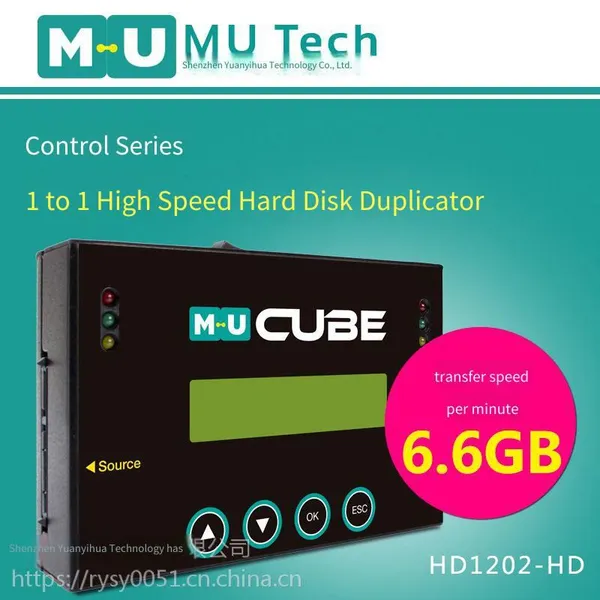
Product Name: One-to-One Portable Hard Drive Copier
Product Model: HD1202-HD
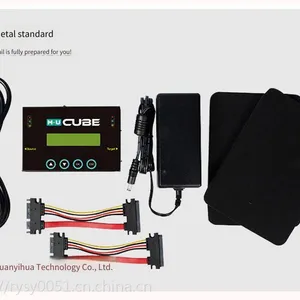
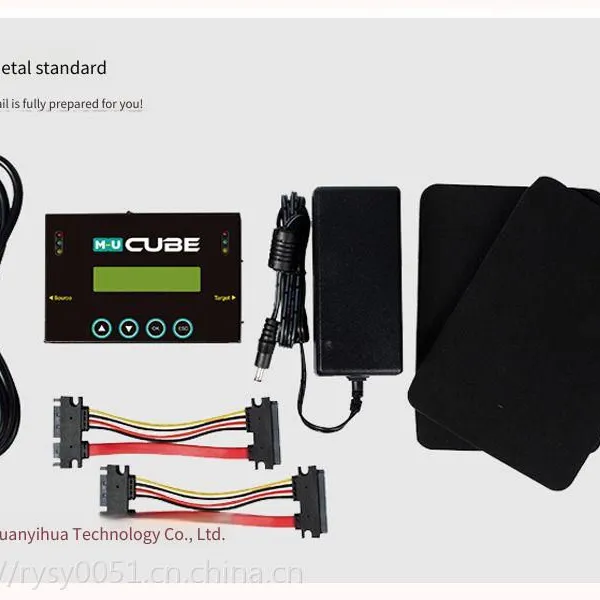
Supported Interfaces: Supports various interfaces such as 2.5-inch and 3.5-inch SATA hard drives, SSDs, MSATA, ESATA, CFAST, NGFF, etc. (through adapter boards)
Product Color: Black
Product Functions: Fast copy/Full disk copy/Effective partition copy/Percentage copy, Fast erase/Complete erase/DOD erase
Number of Copy Ports: One-to-One
Copy Speed: 6.6GB per minute
Product Advantage: Can copy encrypted/hidden data (automatically decrypt and encrypt)
Product Features:
1. Supports UDMA7, with a speed of 120MB/S. (The actual speed is related to the on-site test environment)
2. Can truly copy the data area without full disk copy, greatly improving the copy speed.
3. Can copy hidden data, encrypted files and formats that cannot be copied by the computer.
4. Supports all operating systems and partitions on the market, including unknown partitions.
5. DoD erase, compliant with the US Department of Defense data deletion specification.
6. Can display the number of bad sectors on the master disk.
7. Ignores bad sectors, up to 65,000 entries.
8. Actively analyzes and displays the number of bad blocks on the master disk and the target disk during copying.
9. Automatic power control and protection to avoid damage when replacing hard drives.
10. Supports SATA hard drives and SSDs, and through adapter boards, supports IDE and MSATA.
11. Supports four copy modes: "Fast copy (copy of data and system area)", "Full disk copy", effective formatted area copy, and 100% copy under Liunx (Ext2/Ext3/Ext4), NTFS, and FAT formats.
System area copy)" "Full disk copy" and effective formatted area copy, 100% copy
12. Fast copy intelligently identifies the data area and skips blank areas, greatly improving the copy efficiency.
13. Automatic detection and display of bad blocks function.
14. No need to connect to a computer, supports independent hard drive copying.
15. Display of working status/working mode/copy progress
16. The slot design allows users to quickly replace hard drives.
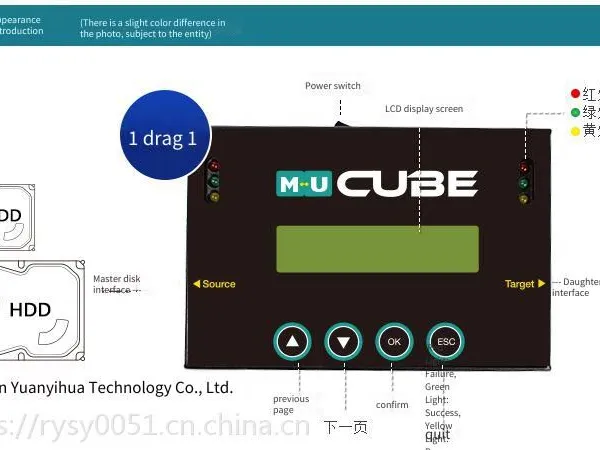
17. A user-friendly operation interface, supporting LCD operation display.
18. Hard drive data backup can be completed without any other hardware or software requirements.
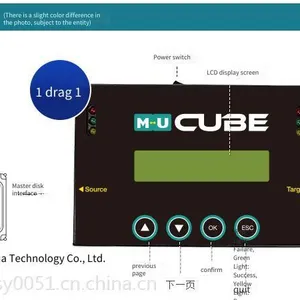
19. User-friendly working indicator lights (Yellow light: Power; Green light: In progress or success; Red light: Error/failure)
20. Supports 2.5/3.5-inch SATA serial hard drives or SSD solid-state drives.
21. Supports 2.5/3.5-inch IDE parallel hard drives or mSATA; (An IDE/mSATA adapter board needs to be purchased separately)
22. Easy to carry, compact design; simple to operate.
23. Supports operating systems Windows 2000/XP/Vista/7/8/8.1/10, Mac 10.3 or later, Linux
24. Power supply support: 100 - 240V 50 - 60Hz
Editor's review:
HD1202 is a high-speed hard drive copier with a completely independent operating system. It can complete tasks independently without connecting to a computer or purchasing additional software. This makes its operation simpler and reduces the troubles caused by compatibility issues after software installation. The entire copying process uses LED display and has sound prompts, which greatly facilitates users to monitor the data backup process. This copier has a compact and portable design, providing a solution for portable business. Recommended!
Operation steps
1. After connecting the power supply, connect the source drive to the left interface of the copier and the target drive to the right interface.
2. On the copier, directly select the "1. Copy" function option and press it to start copying.
3. After the copying is completed, directly unplug the hard drive.
Frequently asked questions:
1. Will it damage my original master drive?
Answer: The master drive ports of the copier are all designed to be read-only. They only read the data from the master drive and do not perform any write operations on the master drive. The master drive will not be tampered with or damaged.
2. Does the original data in the target disk need to be formatted or cleared?
Answer: As long as you confirm that the source is correct, the data in the target disk does not need to be formatted or cleared. You can directly copy it on the copier, and the copier will automatically overwrite the original data in the target disk.
3. How to know if the copying is completed?
Answer: The copier is equipped with a working indicator light, or there will be a "beep" prompt sound after the copying is completed. The green light flashing indicates that it is working, and the green light staying on indicates that the work is completed. The red indicator light coming on indicates that there is an abnormality in the copying, and the yellow indicator light coming on indicates the power-on state.
4. Can you copy when the master disk is small and the target disk is large?
Answer: You can copy. If it is used on an industrial computer, it is recommended to use the same capacity as the master disk. Some old industrial computers cannot recognize large-capacity disks. If the target disk used is larger than the master disk, then after the copying is completed, the capacity of the target disk will also become the same as that of the master disk. For example, if the master disk is 4GB and the target disk is 16GB, after the copying is completed, the target disk will also become 4GB (the extra space is displayed as an unallocated area. You only need to partition the unallocated area once in "My Computer - Disk Management" to restore the original capacity).
5. Can you copy when the master disk is large and the target disk is small?
Answer: It depends on the specific situation of the master disk. If the data partitions of the master disk are all arranged at the front and the actual data size does not exceed the actual capacity of the target disk, it can be copied; otherwise, it cannot be copied. (This method has certain requirements for the hard disk format, and it is not recommended to use this method for operation.)

Send Inquiry to This Supplier


You May Also Like
-
mu Original Flash tf Card Copier From Taiwan, 1-to-47 Batch Fast Copy, Synchronous and Asynchronous, h2 Quality Detection, Formatting and Erasing, in Stock, Free Shipping via sf ExpressUS$ 2923.08 - 3384.62MOQ: 1 Piece
-
mu Original Flash tf Card Copier From Taiwan, 1-to-39 Ports, Batch Fast Copy, Synchronous and Asynchronous, Quick h2 Detection, Erasing and Formatting, in Stock, Free Shipping by sf ExpressUS$ 2461.54 - 2923.08MOQ: 1 Piece
-
Original Flash tf Card Copier From Taiwan's mu Factory, 1-to-31 Ports for Batch Copying, h2 Fast Quality Inspection, Synchronous and Asynchronous Erasing and Formatting, in Stock, Free Shipping by sf ExpressUS$ 1969.23 - 2307.69MOQ: 1 Piece
-
mu Original Flash tf Card Copier From Taiwan Factory, 1-to-23 Ports, Batch Fast Copy, Supports Synchronous and Asynchronous Copy, tf Card h2 Detection, Formatting and Erasing, in Stock and Free ShippingUS$ 1692.31 - 2000MOQ: 1 Piece
-
Original Taiwan-made mu Sh2502 Portable One-to-one High-speed Hard Drive Copier Supporting Inter-copying Between Msata and Sata. in Stock, Free Shipping via sf ExpressUS$ 369.23 - 407.69MOQ: 1 Piece
-
mu Original Flash tf Card Copier From Taiwan, 1-to-15 Batch Fast Copy, Synchronous and Asynchronous Data Fast h2 Detection, Erasing and Formatting, in Stock, Free Shipping by sf ExpressUS$ 1353.85 - 1538.46MOQ: 1 Piece
-
mu Taiwan Original tf Card Flash Copier 1-to-7 Batch Fast Copy, Synchronous and Asynchronous Copy, h2 Fast Detection and Formatting for tf Cards. in Stock, Free Shipping by sf ExpressUS$ 738.46 - 815.38MOQ: 1 Piece
-
mu Original tf Card Flash Copier From Taiwan, 1-to-64 Ports, for Batch Production, Offline Copying With Synchronous and Asynchronous Data Copying, h2 Detection and Formatting, in Stock and Free ShippingUS$ 3846.15 - 4307.69MOQ: 1 Piece
-
mu Taiwan Original Factory Genuine Industrial Control Maintenance Professional cf Card Copier, Supports Reading cf Card Sn/id Serial Number, Copy Machine in Stock, Free Shipping by sf ExpressUS$ 284.62MOQ: 1 Piece
-
mu High-speed Portable Server Sas Hard Drive Copier, Original From Taiwan, Offline Copying, Supports Sas and Sata Copying, in Stock, Free Shipping via sf ExpressUS$ 861.54 - 953.85MOQ: 1 Piece
