








 Contact Platform Support
 Help Center
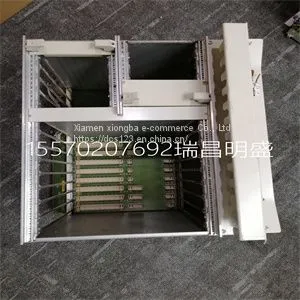
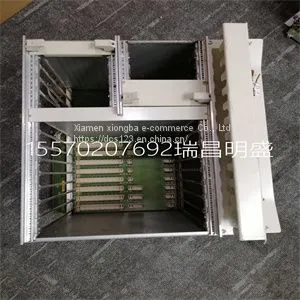
Module Spare Parts RF533 3BSE014227R1



Related Products
-
 Module Spare Parts RV33-1US$ 1 - 100000MOQ: 1 Piece
 -
Module Spare Parts S710D-EST2US$ 1 - 100000MOQ: 1 Piece
-
Module Spare Parts S710D-EST2US$ 1 - 100000MOQ: 1 Piece
-
Module Spare Parts R901325866US$ 1 - 100000MOQ: 1 Piece
-
Module Spare Parts REXROTH R911335435 CSH01.1C-SE-EN2-NNN-NNN-NN-S-XP-FWUS$ 1 - 100000MOQ: 1 Piece
Focus on DCS, PLC, robot control system and large servo system.
Main products: various modules / cards, controllers, touch screens, servo drivers.
Advantages: supply of imported original products, professional production parts,
Fast delivery, accurate delivery time,
The main brands include ABB Bailey, Ge / fuanc, Foxboro, Invensys Triconex, Bently, A-B Rockwell, Emerson, ovation, Motorola, xyvom, Honeywell, Rexroth, KUKA, Ni, Deif, Yokogawa, Woodward, Ryan, Schneider, Yaskawa, Moog, prosoft and other brands
RF533 3BSE014227R1
On Configured state The NI USB-4350 is configured. Off Off or in the low-power, suspend mode The NI USB-4350 is powered off or in the low-power, suspend mode. 1 blink Attached state The NI USB-4350 is recognized, but not configured. 2 blinks Addressed state The host computer detects the NI USB-4350, but cannot configure it because NI-DAQ is improperly installed or system resources are unavailable. Check the software installation. 3 blinks Power supply failure The internal power supply shut down. Refer to the Power Considerations for the NI USB-4350 section in the NI 435X User Manual for more information. 4 blinks General error state Contact NI. Refer to the Technical Support Resources section for contact information. The LED blinks in one-second intervals during each cycle. The LED then waits three seconds before repeating the cycle You can install the NI PXI-4351 in any available 5 V peripheral slot in the PXI or CompactPCI chassis. Note The NI PXI-4351 does not have connections to reserved lines on the CompactPCI J2 connector. Therefore, you can use the NI PXI-4351 in a CompactPCI system that uses J2 connector lines for purposes other than PXI. 1. Write down the NI PXI-4351 serial number for future reference. 2. Plug in, but do not power on, the PXI or CompactPCI chassis. Caution To protect both yourself and the computer from electrical hazards, do not power on the computer until you finish installing the NI PXI-4351. 3. Choose an unused PXI or CompactPCI 5 V peripheral slot. 4. Remove the filler panel for the peripheral slot you selected. 5. Touch a metal part on the chassis to discharge any static electricity that might be on your clothes or body. Caution The NI PXI-4351 is ESD/contamination sensitive. Handle the device using the metal bracket or edges.

Send Inquiry to This Supplier


You May Also Like
-
Module Spare Parts Schneider 140CPU67160US$ 1 - 100000MOQ: 1 Piece
-
Module Spare Parts SCM-1US$ 1 - 100000MOQ: 1 Piece
-
Module Spare Parts SCXI-1001US$ 1 - 100000MOQ: 1 Piece
-
Module Spare Parts SCXI-1102US$ 1 - 100000MOQ: 1 Piece
-
Module Spare Parts SCXI-1102BUS$ 1 - 100000MOQ: 1 Piece
-
Module Spare Parts SCXI-1104CUS$ 1 - 100000MOQ: 1 Piece
-
Module Spare Parts SCXI-1121US$ 1 - 100000MOQ: 1 Piece
-
Module Spare Parts SCXI-1140US$ 1 - 100000MOQ: 1 Piece
-
Module Spare Parts SCXI-1141 182610D-01US$ 1 - 100000MOQ: 1 Piece
-
Module Spare Parts SCYC51010 58052515GUS$ 1 - 100000MOQ: 1 Piece


