








 Contact Platform Support
 Help Center
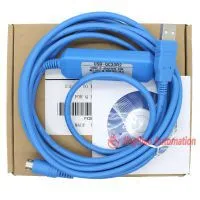
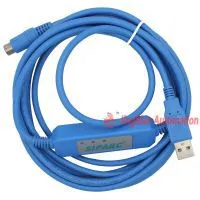
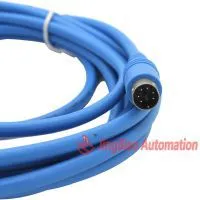
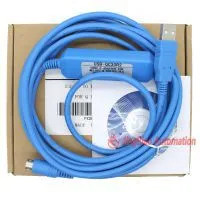
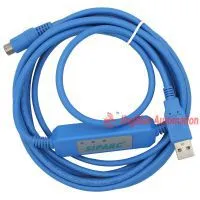
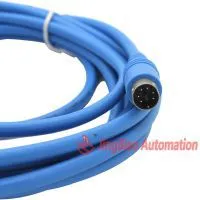
2011 Smart Optical Isolated USB-QC30R2 Programming Cable for Mitsubishi Q Series PLC, Support WIN7



Related Products
-
 LE3U 14MR6AD2DA 8 Input 6 Relay Output 6 Analog Input 2 Analog Output Plc Controller RS485 MODBUS RTU RTCNegotiableMOQ: 1 Piece
 -
LE3U 24MR6AD2DA 14 Input 10 Relay Output 6 Analog Input 2 Analog Output Plc Controller RS485 MODBUS RTU RTCNegotiableMOQ: 1 Piece
-
LE3U 24MR6AD2DA 14 Input 10 Relay Output 6 Analog Input 2 Analog Output Plc Controller RS485 MODBUS RTU RTCNegotiableMOQ: 1 Piece
-
LE3U 56MR6AD2DA 32 Input 24 Relay Output 6 Analog Input 2 Analog Output Plc Controller RS485 MODBUS RTU RTCNegotiableMOQ: 1 Piece
-
LE3U FX3U 48MR 24 Input 24 Relay Output 6 Analog Input 2 Analog Output Plc Controller RS485 MODBUS RTU RTCNegotiableMOQ: 1 Piece
Descriptions:
This USB-QC30R2 cable is a suitable replacement of USB programming cable for Mitsubishi Q series PLC, with reliable performance and reasonable price.
This cable simulate USB port as traditional serial port (usually COM3), which enables existing programming software to communicate through simulated traditional port and PLC devices. Embedded with this cable is the necessary data conversion equipments to communicate between PLC end to and PC USB end.
Features
Support GT DESIGNER2 or higher.
Support Windows 7/2000/Windows XP (WinNT4/95/98/Me/DOS NOT SUPPORTED).
Smart LED indicator. Auto identification of optical isolation status.
baud rate: 300 bps ~ 1Mbps automatically adaptive.
USB bus-powered, with current consumption of 50 mA
Each PC Support multiple cables
Support UART data format: Data bit: 7, 8, stop bit: 1, 2, Parity: odd / even / no parity
Compatible with USB V1.1 and V2.0
Operation temperature: -20~+70 °c
Usage:
USB device drivers should be installed before using programming cable, which are available on the CD-ROM sold together with the cable. And for the specific installation steps, please refer to the instruction files on the CD-ROM drivers, and details are not necessarily listed here.
After completing Driver installation, the corresponding COM port for the programming cable will be displayed in the Device Manager of Window. The step next is just to choose this COM port in the programming software and other application software and keep other communication parameters as in the Default settings. And the following steps are exactly the same as in the traditional programming cables with RS232 interfaces.
Package info
1 x USB-QC30R2 PLC Programming Cable
1 x Software CD

Send Inquiry to This Supplier

You May Also Like
-
LE3U 40MT 24DI 16DO 2AD 2DA Analog for PLC RS485 Modbus 4 Axis High-Speed Pulse 100KHz Output Stepper MotorNegotiableMOQ: 1 Piece
-
LE3U 32MT6AD2DA 16 Input 16 Relay Output 6 Analog Input 2 Analog Output Plc ControllerNegotiableMOQ: 1 Piece
-
LE-200 CPU224XP Programmable Logic ControllerNegotiableMOQ: 1 Piece
-
EC2N-40MT/MR-4AD(PT/EK)-2DA Programmable Controller for Mitsubishi FX2n PLC by GX Developer LadderNegotiableMOQ: 1 Piece
-
FX2N-40MT/MR-4AD(PT/EK)-2DA Stability Control RS232 and RS485 Relay PLC by GX Developer LadderNegotiableMOQ: 1 Piece
-
EC2N-40MT/MR With Speed Pulse Control Stepper Servo 100K Compatible for Mitsubishi FX2n PLC by GX Developer LadderNegotiableMOQ: 1 Piece
-
FX2N-40MT/MR With 2-way High-speed Input/output Compatible With Mitsubishi Fx2n by GX Developer LadderNegotiableMOQ: 1 Piece
-
24MT Packed Stepping Pulse Speed Counting 485 Domestic PLC Industrial Control Panels by GX Developer LadderNegotiableMOQ: 1 Piece
-
FX2N-13MT 8 Input/5 Output,PLC With RS232 Cable by Mitsubishi FX2N GX Developer LadderNegotiableMOQ: 1 Piece
-
18MT-2T 10 Input/8 Output,PLC With 2-channel Temperature Modules RS232 by Mitsubishi FX2N GX Developer LadderNegotiableMOQ: 1 Piece


