








 Contact Platform Support
 Help Center
JUKI JX-200 SMT Part
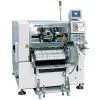
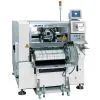
Negotiable
MOQ: 1 Piece (Price negotiable depending on order volume and customization)
Key Specifications
Get Latest Price
Business Type:
Trading Company
Total Employees:
101 - 200 People
Main Markets:
North America, South America, Eastern Europe
Payment & Shipping
Payment Methods:


Port of Shipment:
China
Delivery Detail:
7 days
Related Products
| ) | |||||||
| OFF ( | |||||||
| To the next page | |||||||
| 4 | |||||||
| Press | |||||||
| in the main menu. | |||||||
| 5 | |||||||
| Press | |||||||
| in the main menu. | |||||||
| . The <Machine adjustment menu> screen is displayed. | |||||||
| 6. Press [Output check]. | |||||||
| . The <Output check> screen is displayed. | |||||||
| UNLOCK | |||||||
| 7. Press | |||||||
| + [Vacuum Pump Start] to turn it ON. | |||||||
| . The vacuum pump starts operation. | |||||||
| 8 | |||||||
| Turn OFF the servo switch. | |||||||
| 9 | |||||||
| Open the rear safety cover. | |||||||
| 1E3C-E-MMB03-A01-00 Page 3-9 3.1 Checking the Operation of Each Sensor | |||||||
| OFF ( ) ON ( SERVO ) 10. Close the rear safety cover. | |||||||
| 11. Turn ON the servo switch. | |||||||
| OFF ( ) ON ( SERVO ) 13. Turn OFF the servo switch. | |||||||
| 14. Open the rear safety cover. | |||||||
| 1D3C-444E | |||||||
| 15. Check the indicated value with no board put on the box. | |||||||
| . | |||||||
| The unit is kPa. | |||||||
| . | |||||||
| Normally, the value is between -6 and -10 approximately. | |||||||
| To the next page | |||||||
| Page 3-10 1E3C-E-MMB03-A01-00 3.1 Checking the Operation of Each Sensor | |||||||
| 16. Check the indicated value with board put on the box. | |||||||
| . | |||||||
| The unit is kPa. | |||||||
| . | |||||||
| Normally, the value, which varies with the board, is between -80 and -98 approximately. | |||||||
| . If this value is extremely small, there is much clearance between the board vacuum box and the board. Check that there is no warp in the board. | |||||||
| 17. Press | |||||||
| key for two seconds or more. | |||||||
| . The mode is switched to the initial setting | |||||||
| mode, and “ ” is displayed. | |||||||
| 1D3C-445E 1D3C-446E | |||||||
| 18. Press | |||||||
| key. | |||||||
| . “ | |||||||
| ” is displayed. | |||||||
| 1D3C-446E 1D3C-447E | |||||||
| 1D3C-447E | |||||||
| 19. Press | |||||||
| key for two seconds or more. | |||||||
| . The initial setting is complete. | |||||||
| To the next page | |||||||
| 1E3C-E-MMB03-A01-00 Page 3-11 3.1 Checking the Operation of Each Sensor | |||||||
| 1D3C-448E 1D3C-449E | |||||||
| 1D3C-450E | |||||||
| 1D3C-450E 1D3C-451E | |||||||
| 1D3C-450E | |||||||
| 1D3C-450E | |||||||
| To the next page | |||||||
| 20. Press | |||||||
| key. | |||||||
| . The mode is switched to the pressure setting mode, and “ | |||||||
| ” and the preset ON point of OUT1 are displayed alternatively. | |||||||
| 21. Set the lower-limit value (OUT1) using | |||||||
| and | |||||||
| keys. | |||||||
| . Normally, the value, which varies with the board, should be approximately between -70 and -80. | |||||||
| 22. Press | |||||||
| key. | |||||||
| . The displayed ON point is selected; then “ | |||||||
| ” and the preset OFF point of OUT1 are displayed alternatively. | |||||||
| 23. Set the lower-limit value (OUT1) using | |||||||
| and | |||||||
| keys. | |||||||
| . Normally, the value, which varies with the board, should be approximately between -70 and -80. | |||||||
| 24. Press | |||||||
| key for two seconds. | |||||||
| . The lower-limit value is set and the mode returns to the measurement mode. | |||||||
| Page 3-12 1E3C-E-MMB03-A01-00 3.1 Checking the Operation of Each Sensor | |||||||
| 25. Ensure that the LED indication c is orange. | |||||||
| 1D3C-445E | |||||||
| 26. Remove the board, and ensure that the LED indication c turns out. | |||||||
| 1D3C-444E | |||||||
| SERVO | |||||||
| ) ON (OFF ( | |||||||
| 1E3C-E-MMB03-A01-00 Page 3-13 3.1 Checking the Operation of Each Sensor | |||||||
| 3.1.3 Cleaning Solvent Empty Sensor | |||||||
| This part describes how to adjust the cleaning solvent empty sensor. | |||||||
| . Sensor installation location | |||||||
| At the left-rear side of the machine | |||||||
| Name | |||||||
| c | |||||||
| Light-emitting sensor | |||||||
| d | |||||||
| Light-receiving sensor | |||||||
| 1D3C-408E | |||||||
| . Names of each part | |||||||
| Light-receiving sensor | |||||||
| Name | |||||||
| cOperation indicating lamp | |||||||
| d | |||||||
| Light-receptive area | |||||||
| e | |||||||
| Stability indicating lamp | |||||||
| f | |||||||
| Sensitivity control knob | |||||||
| g | |||||||
| Light-ON/Dark-ON selection switch |

Send Inquiry to This Supplier

* Email
Want the best price?
Post an RFQ now!
Business Type
Trading Company
Total Employees
101 - 200 People
Main Markets
North America, South America, Eastern Europe
Location
Baoji, Shaanxi, China
You May Also Like
-
 Professional Portable Teeth Whitening Led LightUS$ 1 - 280MOQ: 1 Set
 -
Multifunctional Dental Equipment Dental Care Teeth Whitening MachineNegotiableMOQ: 1 Unit
-
OraTek Power Tooth Stain Remover and Tooth WhitenerUS$ 1.8 - 3.99MOQ: 1 Unit
-
Tooth Whitening KitNegotiableMOQ: 1 Piece
-
Toothpick With HolderUS$ 0.06 - 0.1MOQ: 10 Cartons
-
Finger Teeth Whitening WipeUS$ 0.04 - 0.05MOQ: 1000 Pieces
-
Huge Dental Sonning Full Set Acrylic Denture TeethNegotiableMOQ: 1 Box
-
Luma Smile Tooth Polisher Electric Tooth PolisherUS$ 1.3 - 1.5MOQ: 1
-
Pink Oral Care Sponge Swab for Bed-Bound, Elderly, Disabled, Post-Operative, And Icu PatientsNegotiableMOQ: 1000 Packs
-
Portable Dental Oral Water Irrigators Dental Floss Water Flosser Pick for Teeth IrrigationUS$ 1 - 100000MOQ: 1 Piece

