








 Contact Platform Support
 Help Center
Home > Manufacturing & Processing Machinery > Laser Equipment > Laser Welding Machine > The BGA Irda Rework Station of T890
The BGA Irda Rework Station of T890
US$ 890 - 940
MOQ: 1 Piece
Key Specifications
Get Latest Price
Place of Origin:
Guangdong, China
Brand Name:
Telesailor
Model Number:
T890
Payment & Shipping
Payment Methods:


Port of Shipment:
EMS DHL UPS Fedex
Delivery Detail:
Delivery time depends on order quantity.
Related Products
-
 The BGA Rework Station of Preheating Oven for T8120US$ 74 - 80MOQ: 1 Piece
 -
BGA IRDA Welder of Preheating Oven for HP-T8120US$ 118 - 130MOQ: 1 Piece
-
BGA Rework Station of T870AUS$ 525 - 550MOQ: 1 Piece
-
Infrared IC Heater and Infrared Reflow Oven for T962US$ 220 - 235MOQ: 1 Piece
-
BGA IRDA-Welder Rework Station for T862US$ 216 - 235MOQ: 1 Piece
Place of Origin
Guangdong, China
Brand Name
Telesailor
Model Number
T890
Voltage
220V 110V
Rated Duty Cycle
50HZ/60Hz
Dimensions
32*41*29cm
Weight
10kg
Usage
Suitable to repair mobile phone ,computer
Specifications
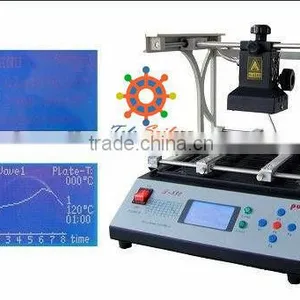
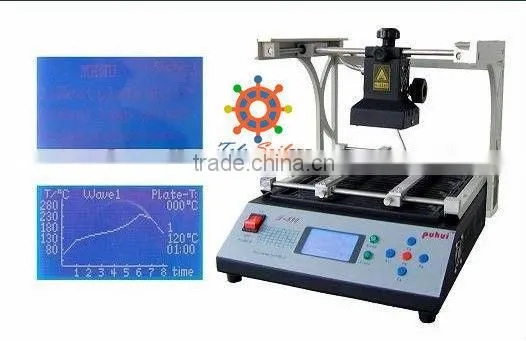
has the strong and perfect function selection, with eight temperature waves in the memory software. BGA IRDA WELDER T890
Features.
1. This machine has the strong and perfect function selection, with eight temperature waves in the memory software, you can select the right temperature wave according to the solder/unsolder request.
2.Intelligent temperature wave heating, can achieve the solder/unsolder automatically.
3. Three-dimensional adjustable lamp body, use laser light, suitable for unsoldering any-angle components.
4. PID intelligent temperature control can avoid the IC damage due to the fast or uninterrupted warming up.
5. This machine has a super hot melt system, use infrared welding technology which is developed independently, heat is easy to pierce and distribute evenly, can suit for a variety of computer, notebook, play station’s BGA components, especially in a Northbridge/ Southbridge chipset of computer.
6. Friendly human-machine operation interface, perfect LCD display, you can watch the whole repairing process very clearly.
7. Ergonomic design, practical and easily operated. Good build quality but at the same time light weight and a small footprint allows the T-890 to be easily bench positioned, transported or stored.
Technical parameters
Complete machine power |
1500W |
Rated voltage and frequency |
AC 110-230 V 60/50Hz |
Infrared lamp body power |
300 W |
Preheating chassis power |
1200 W |
Working bench size |
320 X 330 mm |
Infrared lamp body heating size |
60 X 60 mm |
Preheating chassis preheating size |
245 X 260 mm |
Preheating chassis temperature range |
0 °C-350 °C |
Size |
316mm X 410mm X 290mm |
Net weight |
9.3 kg |
Main parts
Welding table main body |
1 |
Infrared lamp body |
1 |
Portal frame |
2 |
Power line |
1 |
User manual(Compact disc) |
1 |
Operating instructions.
1. Examination and operation,
1). Place this machine on an even surface with good ventilation and no combustible items nearby. Leave at least 20mm on either side because the machine will emit heat when in use. Check the power supply voltage, connect the machine with the power supply, turn on the power switch, the LCD screen will display as follows.
5-1;Main manu page
2) Press “F1” button (about 2 seconds) the preheating chassis starts to work, press “F1” button again to stop.
3). Press “F3” button enters to the PCB temperature adjusting page, press “F2” select different page, press “F3” select the temperature wave. The example shows wave 3.
5-2;Temperature wave selecting page
4). Press “F2” button, the infrared lamp start to heat up as the presupposed temperature wave.
The lamp temp |
The preheater temp |
5-3;the LCD screen display page
5). When the process finished, return the previous page automatic. If you want to stop in the process, press “F3” button.
2. The wave selection and setting
1). Press “F2” button enters to the select/set page, firstly, set the preheating chassis preheat temperature, press “F3/F4” buttons up and down to select different temperature, press “F1” button to save. When save succeed, the LCD screen displays as follows:
The preheater temperature |
2). Press “F5” button, come to the Main Manu page, press “F2” button enters to the select/set page, the LCD screen displays as follows:
3). Press “F2” button enters to the select/set page, following we provide eight different wave cycles, please choose one according to your request, press “F1” to confirm the wave you choose, press “F2” button, come to the Main Manu page
4). If you want to reset the wave, press “F5” button, when it flicker the grid, you can set. Press “F3/F4” buttons up and down to select different temperature, press “F1/F2” buttons forward and backward to select different time, press “F5” button to save.(the grid disappear, change to the previous flicker status), press “F4” button come to next
Segment, the same method to set the wave, press “F1” button to save the current wave.

Send Inquiry to This Supplier

* Email
Want the best price?
Post an RFQ now!
Business Type
Trading Company
Year Established
2011
Factory Size
Below 1,000 square meters
Total Employees
51 - 100 People
You May Also Like
-
High Precision 150W 200W Jewelry Laser Welder Portable Gold Silver Chain Laser Spot Welding Soldering Repairing MachineNegotiableMOQ: 1 Set
-
CE Certified Pulse Inverter Welding Machine 85% Inverter WeldersNegotiableMOQ: 1
-
Automatic Welding MachineUS$ 6,200 - 9,800MOQ: 1 Set
-
Vertical Milling MachineUS$ 8 - 10MOQ: 1 Piece
-
Ballscrew Laser Cutting MachineNegotiableMOQ: 1 Set
-
SUDA SL4030 MINI Laser MachineUS$ 1,800 - 2,100MOQ: 1 Set
-
Temperature Indicating Stick for Welding Equipments /THERMO CRAYON/Made in JapanUS$ 1,000 - 2,000MOQ: 5 Pieces
-
Scanning Laser Welding MachineUS$ 500 - 10,000MOQ: 1 Unit
-
Jewellery Laser Spot WeldingNegotiableMOQ: 1 Set
-
HUA KUAI OEM High Quality Pulse Argon Welding MachineUS$ 4,000 - 4,500MOQ: 1 Piece


