








 Contact Platform Support
 Help Center
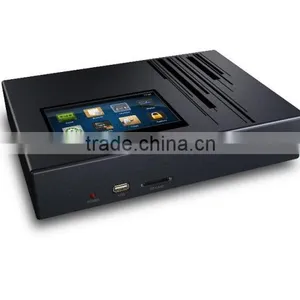
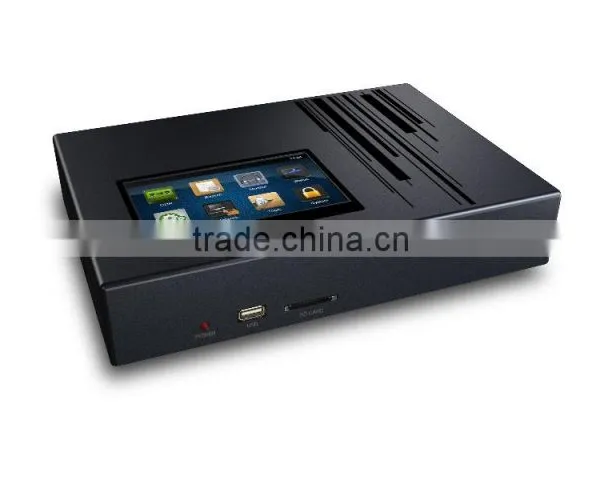
4CH Standalone Network Voice Logger Embedded SMDR Telephone Recorder


Related Products
-
 Telephone Recorder Standalone Supports 32G SDUS$ 40.00 - 40.00MOQ: 10 Units
 -
16CH Telephone Recording Card DAR-16E PCI-E CardUS$ 148 - 180MOQ: 1 Piece
-
8 Lines Standalone Network Voice Logger 8CH PBX SMDR Telephone RecorderUS$ 305.00 - 335.00MOQ: 1 Piece
-
4 Lines Standalone Network Telephone Logger 4CH PBX SMDR Voice RecorderUS$ 215.00 - 235.00MOQ: 1 Piece
-
8lines Telephone Recording BoxNegotiableMOQ: 1 Unit
4ch Standalone Telephone Recorder with Touch screen, in SD or HDD. Support RS232 TCP/IP PABX, SMDR Data, Network Control.
| Channel | 4,8 |
| Storage | HDD or SD card (Max.SD 64G or 2.5’ HDD500GB) |
| LCD | 5”TFT800 *480 Touch Screen |
| Recording Format | ADPCM |
| Compression Ratio | 4KB/S |
| Recording Trigger Mode | Voltage/ Voice/ Hot key |
| Off hook detect voltage | 3-80V |
| On hook detect voltage | 10-100V |
| Support CID | DTMF/FSK |
| CID detect intensity range | 0 dB to –32dB |
| Recording Frequency range | 100 Hz to 3400 Hz |
| Input impedance | AC: 100K,DC:5.1M |
| S/N ratio | >60 dB |
| Signal-to-crosstalk ratio | >70 dB |
| Input voltage | DC19V |
| Rating operating current | 1.5A |
| Maximum current | 3A |
| Rating power consumption | 30W |
| Operating Temperature | 0℃ to 40℃ |
| Operating Humidity | 10% to 90 % |
| Network interface | RJ-45 |
| Accessory | RJ11 cord,RS232 cable, power adaptor, CD |
| Dimension L*W*H | 25.2cm*17.6cm*4.6cm |
NAR4000Features
- System boots in 20 sec
- Support high capacity SATA HDD 500G/1T/2T
- Optional SD card model, max 64GB
- Expandable from 8 to 16, 24 and 32 channels
- Touch screen operation
- Optional model without touch screen (SD/HDD)
- Remote control by network
- Instant playback through speNAR5000er
- Full embedded device, no PC required
- Lower power dissipation supports 7x24x365 running
NAR4000 HDD Recording Hour /SD Recording Hour
- 1. 500GB 36,000 Hour
- 2. 1000GB(1T) 72000 Hour
- 3. 2000GB(2T) 144000 Hour
- 4. 8GB 560 Hour(SD Card)
- 5. 32GB 2240 Hour(SD Card)
- 6. 64GB 4480 Hour(SD Card)
Program System Requirement
1. Windows7/Vista/XP/2000
2. Pentium 400MHZ CPU
3. 256MB RAM
4. 1GB HDD
5. Network RJ45 port
6. Audio output (Play & Monitor)
PABX SMDR
There are 2 methods to gain the SMDR data from PABX
1. RS232
2. TCP/IP
User needs to analyze original data of PABX channel number, extension number from followed main parameters and input them to program setting.
Outbound call
1. Call symbol: The mark to distinguish the call type (Outbound/Inbound call) in character string. Most PABX show “TO “ to indicate outbound call.
2. Extension position: User have to count the extension number starting position in character strings.
3. Extension number length: Extension number length.
4. PABX channel number position: User has to count the channel number starting position in character strings.
5. Channel number length: PABX channel number length.
From followed example, user can read out outbound call information
- Call symbol: $TO
- Extension position: 14th
- Extension number length: 2.
- PABX channel position: 24th
- Channel number length: 2
PABX SMDR Protocol
Please refer PABX user’s manual about serial communication configuration for windows HyperTerminal operation
Gain SMDR data through TCP/IP
Most PABX support TCP/IP SMDR. Please refer PABX user’s manual about SMDR output parameter.
- PABX IP address: The IP address assigned to PABX
- Connect Port: Port for PC connection (Provided by PABX)
- Output Port: Normally it is same as connection port. Otherwise, user can set separately.
- User Name: User name to login PABX.
- Password: Password to login PABX
Carton
One year warranty

Send Inquiry to This Supplier

You May Also Like
-
RF1.13 Coaxial Cable RF0.81 RF0.64 RF1.37 Silver Plated Copper 50ohmUS$ 0.8MOQ: 5000 Meters
-
Communication CableNegotiableMOQ: 2300 Meters
-
High Quality Single Mode Fiber Optic Patch Cord Jumper CableNegotiableMOQ: 1
-
High Qualiy Black /Red Test Lead Set for MultimeterUS$ 0.2 - 0.9MOQ: 500 Pieces
-
Solid Copper FTP Cat5e LAN Cable/Network CableUS$ 1 - 20MOQ: 10 Boxes
-
N Female to Right Angle Mmcx Pigtail Coaxial Cable With 179 Cable 8cmUS$ 0.67 - 1.27MOQ: 100 Pieces
-
Fiber Optical Patch Cord SC-FCNegotiableMOQ: 1 Piece
-
Roto Mold Magazine HolderNegotiableMOQ: 1 Set
-
Mineral Insulated Thermocouple CableUS$ 2 - 10MOQ: 10 Pieces
-
Bare Copper Cat6 Unshielded Patch CableUS$ 0.5 - 2.5MOQ: 10 Pieces


