








 Contact Platform Support
 Help Center
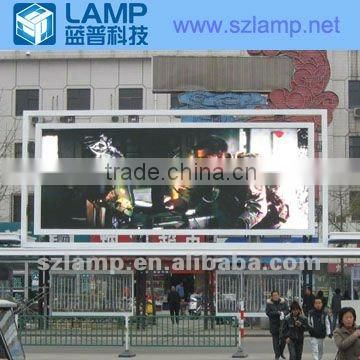
Roadside Led Display


Related Products
-
 P10 Colorful Video Matrix Led Outdoor ScreenUS$ 1 - 8,000MOQ: 1 Square Meter
 -
LAMP Matrix Video Outdoor Advertising LED Display ScreenUS$ 1 - 8,000MOQ: 1 Square Meter
-
LP-O-P12RGB Outdoor Commercial Led ScreenNegotiableMOQ: 1 Set
-
LAMP Full Color Led Display Advertising BoardUS$ 1 - 8,000MOQ: 1 Square Meter
-
LAMP P10 Outdoor LED Road Standing SignUS$ 1 - 8,000MOQ: 1 Square Meter
Specifications
1)competitive price2)unique design structure
3)rich engineering experience
4)CE and RoHS certification
Product Features:
1, High brightness and be adjustable. Built-in functional card support brightness automatically adjustment.
2, a turn-key solution including professional sports software and hardware.
3, rich advertising LED display engineering experience both in domestic and oversea market.
4, Unbeatable product stability through strict Quality Control System.
Product Specification:
| Pixel Pitch: | 16 mm | 25 mm |
| Pixel Density: | 3906 pixels/sqm | 1600 pixels/sqm |
| Pixel Configuration: | 1R1G1B | 2R1G1B |
| Module Dimension: | 256*128 mm | 200*200 mm |
| Module Resolution: | 16*8 pixels | 8*8 pixels |
| Cabinets Dimension: | 1024*768 mm | 1000*1000 mm |
| Cabinets Resolution: | 64*48 pixels | 40*40 pixels |
| Brightness: | 7500 cd/sqm | 5000 cd/sqm |
| Best Viewing Distance: | > 16m | > 25m |
| Average Consumption: | 450 W/sqm | 264 W/sqm |
| Max Consumption: | 900 W/sqm | 550 W/sqm |
| Viewing Angle: | Horizontal angle: 120 degree; Vertical angle: 60 degree | |
| Processing: | 12 bit | |
| Ingress Protection: | Front IP65; Rear IP54 | |
| Refresh Rate: | 300 to 4800Hz | |
| LED lifetime: | 100,000 hours | |
| Input Voltage: | 90 to 260VAC, 50/60Hz | |
| Operation Humidity: | 10% to 99 |
|
All product specifications are for reference only and subject to change without prior notice; Please contact sales for details.
At the same time, we can design according to customer requirements and production.
LED display installation steps:
1. Assemble the cabinets on the structure.
2. Connect the UTP cables between cabinets.
3. Connect the AC cables between cabinets.
4. Install Sending Card.
5. Connect the DVI cable between Sending Card and Graphic Card.
6. Connect the COM cable between Sending card and computer.
7. Connect the UTP cables between Sending Card and Receiving Card.
8. Turn on control computer.
9. Install LED studio software (see attached CD and serial number is 888888)
10. Turn on LED display.
11. Set the display mode in “clone mode” in the window of Graphic Card properties.
12. Use the LED studio to control the display.

Send Inquiry to This Supplier

You May Also Like
-
2715P-B10CD Touch Screen Rockwell Allen-Bradley New Stock 2715PB10CDNegotiableMOQ: 1 Piece
-
P1.9-P3.91 Intelligent LED Display Screen, Suitable for Indoor/outdoor Use, Suitable for WeddingsNegotiableMOQ: 1 Piece
-
China Full Color Slim Rental LED Screen/Indoor/Outdoor HD Video LED DisplayUS$ 100 - 600MOQ: 1 Square Meter
-
High Quality Full Color Led Modules For Outdoor Shop Signs AdvertisingNegotiableMOQ: 5 Square Meters
-
WIFI Control 2015 Taxi Top Led Xxx Video Xxx 2015 NEW ProductUS$ 1 - 500MOQ: 1 Piece
-
Led Sign Product Display BoardUS$ 0.7 - 1MOQ: 1000 Pieces
-
China Wholesale Digital Vedio Seamless Superior Photography Paper Stage Background Led Display Big ScreenUS$ 1 - 999MOQ: 1 Square Meter
-
Highway Safety Variable Speed Limit Sign Traffic Led Road SignUS$ 120 - 2,400MOQ: 1 Piece
-
Led Number Display Outdoor IP65US$ 295 - 378MOQ: 1 Set
-
Full Color Indoor P5 Hire Led Display With Fact Lock CabinetsUS$ 1,500 - 10,000MOQ: 1 Square Meter

