








 Contact Platform Support
 Help Center
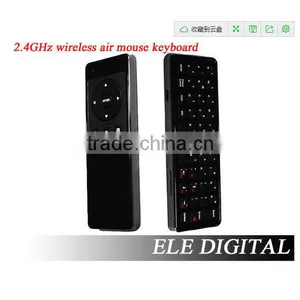
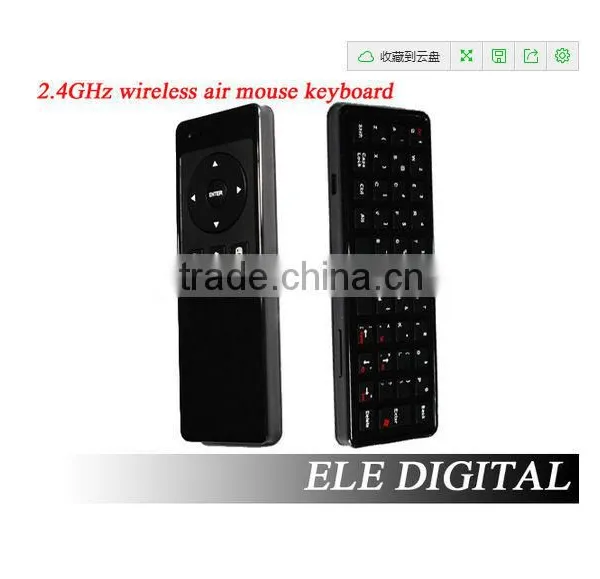
Mini Keyboard With Mouse for Android TV Box and Smart tv


Related Products
-
 Mini PC RK3066 A9 Dual Core tv Stick 1G RAM 8G ROM Android 4.2.2 MK808 TV BoxNegotiableMOQ: 1 Piece
 -
Android 4.4 KitKat Amlogic S802 Quad Core tv BoxNegotiableMOQ: 1 Piece
-
Cheap!! Android 4.4.2 Quad Core TV Box&Sticks Bluetooth V4.0 Mk888 TV BoxNegotiableMOQ: 1 Piece
-
Google Android Tv Box Quad Core Android 4.2 Google Smart tv Box Media Player Support XMBC Legoo Mk888 Android tv BoxNegotiableMOQ: 1 Piece
-
Wireless Presenter With Laser Pointer and MouseUS$ 8 - 10MOQ: 1 Piece
Specifications
2.4Ghz wireless communicationWireless distance 10-20 meters
Radio frequency 2.400-2.483Ghz
Mini Keyboard with Mouse for Android TV box and smart tv
1 Product Overview
This product is a set of air mouse, keyboard, remote control and somatosensory Andrews control functions as one-sided multifunctional smart remote control.
2 Features
a : perfect touch, the classic double-sided, full keyboard curve design;
b : 2.4G wireless connectivity with low-power, anti-stem worry ability, has a connection status LED indicator;
c : supports low-voltage operation: 3.3-4.5V;
d : intelligent anti-shake algorithm, smooth mouse cursor stability;
3 Functional Description
4 Specification
The acceleration sensor 3-axis gyroscope
Gyro sensor 3-axis acceleration sensor
2.4 Ghz wireless communication
Wireless distance 10-20 meters
Radio frequency 2.400-2.483Ghz
Current << 20mA
<< 20uA standby current
Battery Rechargeable Lithium Battery
Two-color LED indicator lights
Remote control Dimensions 146 * 53 * 15mm (L * W * H)
Receiver Size 18.58 * 14.59 * 6.7mm (L * W * H) mini-receiver
Weight 80g
USB Type USB2.0
System requirements compatible with Windows, Mac OS, Linux, Android
5 ways for code
Warning: This operation may destroy the original pairing, non-special circumstances please use caution.
1) while pressing the left mouse button over 3 seconds, LED1 flash
2) the product close to the receiver wants pairing, put on the table to maintain the level still around LED1 lit three seconds, LED1 flash
3.) LED1 stops blinking rapidly, then the pairing is successful.
6 mouse cursor calibration
Under normal circumstances the following actions need to use: If you find that the cursor has a drift (voltage state indicates normal)
1) while pressing the left mouse button over 3 seconds, LED1 flash
2) the product close to the receiver wants pairing, put on the table to maintain the level still around LED1 lit three seconds, LED1 flash
3.) LED1 stops blinking rapidly, then the cursor calibration was successful.
Note: When absolute calibration still keep a handle, if there is movement, calibration data may be incorrect, need to re-operate.
7 Sleep and Wake
To save power to extend battery life, the remote control without any operation goes to sleep after 10 seconds, press any key to wake up empty rats during sleep.
8 cursor speed adjustment
The mouse pointer speed adjustment: Press the left arrow key / direction right three seconds adjustable pointer speed, total third gear speed.
9 working condition Description
After the rat somatosensory air terminal device pairing connection is successful, LED1 will be with the keys
Press and bright, loosen that off.
Lithium-powered, when the power is low, LED1 LED2 lights flashing, you need to recharge.
10.Attention.
1 battery power: Make sure the battery is fully charged, when the battery voltage is low, the cursor stability will be affected.
2 The use of distance: the distance of the actual use of the product will vary affected by electromagnetic fields, make sure that the receiver is not blocked metal objects.
3 LED: This product has a left-color LED lights, green and red respectively, and charge status indication under running state:
Green: long light indicates that the connection is normal, flashes to indicate when the connection is lost, check the receiver is properly connected to the host, or metal barrier.
Red: long light is charging.

Send Inquiry to This Supplier

You May Also Like
-
Set Top BoxNegotiableMOQ: 2500 Pieces
-
Android 4.0 VIA8850 Cortex A9 Jelly Bean Android TV BoxNegotiableMOQ: 10 Pieces
-
2015 Christmas Popular Newest China Set Top Craft ToolsUS$ 0.6 - 1MOQ: 2000 Pieces
-
Novelty Items for Sell Mobile Wireless Transmitter and ReceiverUS$ 0.3 - 0.6MOQ: 5000 Pieces
-
OPTIBOX 8501AUS$ 500 - 2,000MOQ: 1 Piece
-
DVB-T HDTV Digital Freeview TV Tuner USB Receiver+Antenna (GF-AVC-901)NegotiableMOQ: 1 Piece
-
13dBI 2.4g Magnetic Mount Antenna Wifi Antenna With SMA/MCX/CRC9 Varied Types for You OptionalUS$ 1.5 - 2.5MOQ: 3 Chains
-
HD Satellite Finder SATHERO SH-500GNegotiableMOQ: 1 Piece
-
Professional and High Quality TV Signal Level Meters HSV-128NegotiableMOQ: 1 Set
-
Car Maintain Top BoxUS$ 7.00 - 7.00MOQ: 100 Pieces


