








 Contact Platform Support
 Help Center
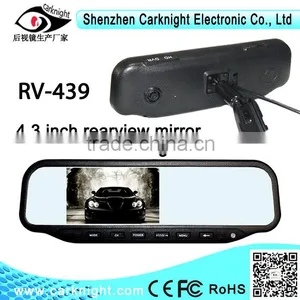
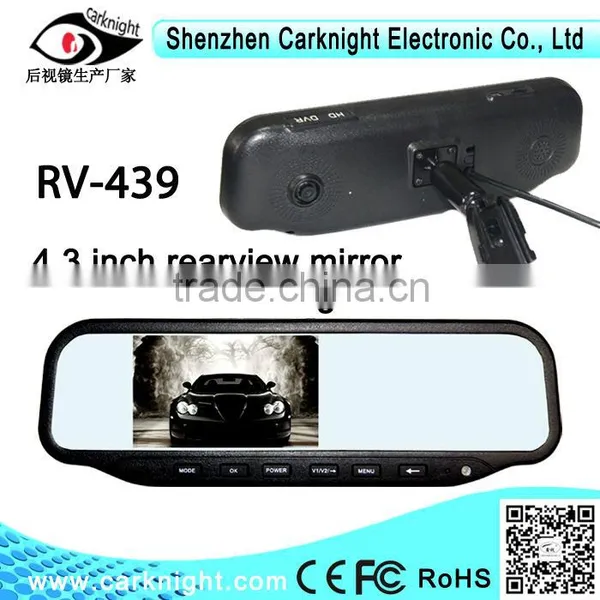
4.3 Inch DVR Rear View Mirror ,Best Selling DVR Rear View Mirror

Related Products
-
 Car Accessories 1080P HD Night Vision Car Camera Car Dvr Mirror Bracket Rearview MirrorUS$ 80 - 120MOQ: 500 Pieces
 -
OEM Car Black Box FULL HD 1080p Car Dvr Mirror With Auto Dimming Rearview MirrorUS$ 90 - 120MOQ: 500 Pieces
-
Hongkong Electronics Fair Booth #: 5G 10 (2014 Autumn Edition) Hotsale 2.7 Inch Dual Recording Car Dvr Rearview MirrorUS$ 80 - 120MOQ: 10 Pieces
-
1080P HD Night Vision Car Camera Multifunctional Car Dvr Rearview MirrorUS$ 80 - 120MOQ: 10 Pieces
-
Multifunctional DVR Mirror With Night Vision Camera and Dual RecordingUS$ 44 - 48MOQ: 1 Piece
Specifications
Support AV input, can be accessed by reversing camera and parking sensorVideo compression: H.264Maximum support 32G SD card4.3 inch DVR rear view mirror
Key functions:
1.Power light
2.Mode:record,take photo,palyback
3.OK:Comfirm/Pause
4.Power:Power switch
5.V1/V2 →:Front and back camera switching/PIP picture,Down to select
6.MENU:menu setting
7.←Up to select
Display parameters:
4.3-inch TFT LCD LCD
1/2 inch HD COMS 140-degree wide-angle lens
Focal length range> 10CM
Built-in microphone, speaker
Video resolution: HD: 720P (1280 * 720) at 30 fps
VGA: (640 * 480) at 30 fps
Support AV input, can be accessed by reversing camera and parking sensor
Video compression: H.264
Maximum support 32G SD card (SDHC), the video does not leak seconds
Voltage :6-18V
Reversing automatically switch
Power and memory function: not manually shut down the case, start the car automatic recording
Motion Detection Function
Humane settings: the optional front lens video, reversing camera recording, dual-lens video
Feature Sets:
Function is set to pause the video mode to operate state press the OK button to pause, press MODE to enter the mode selection switch to video mode state, press MENU to enter the video menu settings, press MODE select the right and left arrow up and right arrow down to select.
Icon of 1.MP: Resolution: VGA, 720P
2 clock icon: set the video length: 1 minute, 2 minutes, 5 minutes, turn off the
3 recording modes: front lens video
After the lens recording
Dual-lens video
Menu settings: White balance: automatic, sunny, fluorescent, cloudy, incandescent light
Exposure: -3, -2, -1, 0, 1
Color: No, monochrome, negative, retro, light green
Aspect protection: 15 seconds, 30 seconds, 45 seconds, turn off the
IR LED: off, on, automatic
G-sensor: high, medium, low, close
Motion Detection: closed, open
Time Watermark: closed, open
Recording: closed, open
Boot video: closed, open
Languages: Chinese Simplified, Chinese Traditional, English
Frequency: 50Hz, 60Hz
After the lens input: PAL, NTSC
Set the date: year / month / day, hour / minute / second
Formatting: OK, Cancel
Restore the factory settings: OK, Cancel
Wiring instructions

Send Inquiry to This Supplier

You May Also Like
-
Car Decorative LightNegotiableMOQ: 1
-
Wireless Charging Car HUD (or Vehicular HUD Heads up Display + Mobile Wireless Charging Base)US$ 35.84 - 50MOQ: 1 Piece
-
New 7" TFT Car LEC Monitor Digital Color Screen Car Headrest Monitor Car Monitor for Backup Rear View CameraUS$ 1 - 100MOQ: 100 Pieces
-
SPC Microphone CableUS$ 0.1 - 2.99MOQ: 1000 Pieces
-
Electronic Musical Car HornsNegotiableMOQ: 500 Sets
-
19" Touch Screen LCD Monitor (Plastic Case)NegotiableMOQ: 1 Set
-
Subwoofer 2.1NegotiableMOQ: 10 Pieces
-
HYUNDAI CAR ELECTRICAL PARTSNegotiableMOQ: 1
-
Multi Cigarette Socket 1+2NegotiableMOQ: 3000 Pieces
-
New Bus Digital Led Clock CZ-10US$ 15 - 20MOQ: 10 Pieces


