








 Contact Platform Support
 Help Center
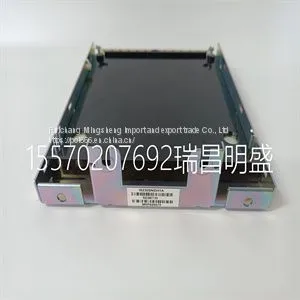
Module Spare Parts IS230SNIDH1A



Related Products
-
 Module Spare Parts IS230STAOH2AUS$ 1 - 10000000MOQ: 1 Piece
 -
Module Spare Parts IS230TDBTH6AUS$ 1 - 10000000MOQ: 1 Piece
-
Module Spare Parts IS420UCSBH1AUS$ 1 - 10000000MOQ: 1 Piece
-
Module Spare Part s IS420UCSBH4AUS$ 1 - 10000000MOQ: 1 Piece
-
Module Spare Part s IT94-3 HESG440310R2 HESG112699BUS$ 1 - 10000000MOQ: 1 Piece
Focus on DCS, PLC, robot control system and large servo system.
Main products: various modules / cards, controllers, touch screens, servo drivers.
Advantages: supply of imported original products, professional production parts,
Fast delivery, accurate delivery time,
The main brands include ABB Bailey, Ge / fuanc, Foxboro, Invensys Triconex, Bently, A-B Rockwell, Emerson, ovation, Motorola, xyvom, Honeywell, Rexroth, KUKA, Ni, Deif, Yokogawa, Woodward, Ryan, Schneider, Yaskawa, Moog, prosoft and other brands
IS230SNIDH1A
The transmitter has two display regions active while in the measure mode of operation. The primary display region shows the measured variable. The secondary display region can show a multitude of process, sensor, or transmitter information: process temperature, current output value, sensor type, sensor cell constant, compensated conductivity (useful for concentration configurations), user-defined text description (concentration configuration only), spike mode status, and software revision. All of these are viewable in the secondary display region using the secondary display mode. Any of these can be set as the displayed value while in the measure mode of operation. SECONDARY DISPLAY STATES OF OPERATION The secondary display mode contains eight states. These provide information on the process temperature, transmitter settings, and transmitter status. As shown in Figure 10-1, each secondary state can be sequentially viewed by pressing the NEXT smart key. Any given secondary display state can be continually shown in the measure mode by pressing the ENTER smart key when the desired state is shown. The transmitter proceeds to the measure mode and displays the entered secondary display state in the secondary display region. SECONDARY DISPLAY OPERATION To use the secondary display mode and states of operation: 1. Press the MENU smart key until DISPLAY is highlighted on the display. 2. Press the SELECT smart key to enter the secondary display mode. 3. Press the NEXT smart key to sequentially view each secondary display state. 4. Press the ENTER smart key to have the desired secondary display state appear during the measure mode

Send Inquiry to This Supplier


You May Also Like
-
Module Spare Part s IW93 HESG440356R1US$ 1 - 10000000MOQ: 1 Piece
-
Module Spare Part s IW93-2 HESG440356R1 HESG216678BUS$ 1 - 10000000MOQ: 1 Piece
-
Module Spare Parts MRP643486 IS200VSVOH1BDCUS$ 1 - 10000000MOQ: 1 Piece
-
Module Spare Parts MRP646218 IS200TVBAH2ACCUS$ 1 - 10000000MOQ: 1 Piece
-
Module Spare Parts MRP680489 IS200VTCCH1CBBUS$ 1 - 10000000MOQ: 1 Piece
-
Module Spare Parts MRP768176 IS200TDBTH6ABCUS$ 1 - 10000000MOQ: 1 Piece
-
Module Spare Parts MS-NAE5510-1US$ 1 - 10000000MOQ: 1 Piece
-
Module Spare Parts MTL5053US$ 1 - 10000000MOQ: 1 Piece
-
Module Spare Parts MVI56-MNETCUS$ 1 - 10000000MOQ: 1 Piece
-
Module Spare Parts MVI56-PDPSUS$ 1 - 10000000MOQ: 1 Piece


