








 Contact Platform Support
 Help Center
Home > Auto, Motorcycle Parts & Accessories > Vehicle Repair Equipment & Tools > Diagnostic Tool > AUTEL APB112 Smart Key Simulator Support ID464DH Chip

Negotiable
MOQ: 1 Piece (Price negotiable depending on order volume and customization)
Key Specifications
Get Latest Price
Business Type:
Manufacturer
Year Established:
2005
Annual Export Value:
US$2.5 Million - US$5 Million
Payment & Shipping
Payment Methods:


Port of Shipment:
China
Delivery Detail:
Delivery time depends on order quantity.
Related Products
-
 Autel MaxiAP AP200 Bluetooth OBD2 Code Reader With Full System Diagnoses AutoVIN TPMS IMMO Service for DIYers Simplified Edition of MK808 Www.obdfamily.netNegotiableMOQ: 1 Piece
 -
AUTEL MaxiSys MS906BT Advanced Wireless Diagnostic Devices for Android Operating System Www.obdfamily.netNegotiableMOQ: 1 Piece
-
Autel MaxiCOM MK808 OBD2 Diagnostic Scan Tool With All System and Service Functions (MD802+MaxiCheck Pro) Www.obdfamily.netNegotiableMOQ: 1 Piece
-
Autel MX-Sensor 433MHz/315MHZ Universal Programmable TPMS Sensor Specially Built for Tire Pressure Sensor Replacement Www.obdfamily.netNegotiableMOQ: 1 Piece
-
Autel PowerScan PS100 Electrical System Diagnosis Tool Www.obdfamily.netNegotiableMOQ: 1 Piece
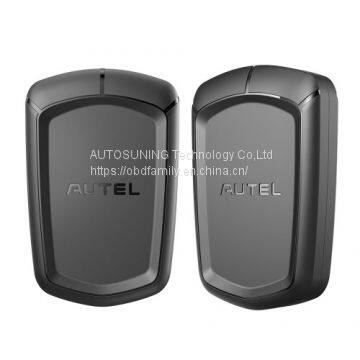
AUTEL APB112 Smart Key Simulator
Autel APB112 smart key simulator is used to collect the data sent from the ignition coil, aiming to identify the ignition coil troubles and decode the data of the vehicle key chip.
It can also simulate the vehicle key chip.
AUTEL APB112 Function List:
1. Smart key simulator
2. Compatible with IM608, IM508, and MX808IM
3. Compact but would need to be used with the XP400
4. Cannot be used with the XP200
5. 46, 4D data collection
6. 46 smart key password calculation
7. 46 chip simulation
8. Toyota 4D (94/ D4, 98) smart key simulation
9. Toyota H (88/ A8, A9, 39) smart key simulation
10. Collects data from the ignition coil
11. Identify ignition coil troubles
12. Decode vehicle key chip data
13. Simulate vehicle key chip (ex - 4D chip)
14. Must be used with an Autel diagnostic tool
15. Toyota/ Lexus smart key all key lost
16. Chip decoding (Hyundai 46)
AUTEL APB112 Smart Key Simulator Overviews:
1. Status Indicator - Indicates The Current Status
1) Lights Solid Blue - the power supply is working properly and in default state;
2) Falshes Green - the data interaction status;
3) Flashes Red - the status of upgrading;
4) Lights Solid Red - the boot status
2. USB Interface - Provides power and data communication
How to Use Autel APB112?
1. Connect the APB112 Smart Key Simulator to Autel Diagnostic Device using the supplied USB cable.
2. After connection, the status indicator lights solid blue,indicating that the APB112 Smart Key Simulator is working properly and then automatically communicates with the Diagnostic Device.
3. The APB112 Smart Key Simulator application is automatically upgraded on Autel Diagnostic Device according to the selected vehicle system function.
4. Place the Smart Key Simulator close to the ignition coil for data collection, which is used for decoding the chip.After decoding, the original car chip data can becopied.
5. The emulator key chip can generate various types ofkey chips with subsequent upgrades according to requirements.
Notes:
1. Not work alone, but works together with any of the Autel Diagnostic Device i.e MaxiIM IM608, Autel MaxiIM IM508, and MX808IM
2. Compact but would need to be used with the XP400, not with XP200.
3. Do Not disconnect the USB Cable when use
AUTEL APB112 Package List:
1pc x APB112 Smart Key Simulator
1pc x USB cable
1pc x Quick Reference Guide
Kellie Deng
Sales Manager
Email : kellie@obdfamily.net
Whatsapp: +86 15323473652
Website :
Autel APB112 smart key simulator is used to collect the data sent from the ignition coil, aiming to identify the ignition coil troubles and decode the data of the vehicle key chip.
It can also simulate the vehicle key chip.
AUTEL APB112 Function List:
1. Smart key simulator
2. Compatible with IM608, IM508, and MX808IM
3. Compact but would need to be used with the XP400
4. Cannot be used with the XP200
5. 46, 4D data collection
6. 46 smart key password calculation
7. 46 chip simulation
8. Toyota 4D (94/ D4, 98) smart key simulation
9. Toyota H (88/ A8, A9, 39) smart key simulation
10. Collects data from the ignition coil
11. Identify ignition coil troubles
12. Decode vehicle key chip data
13. Simulate vehicle key chip (ex - 4D chip)
14. Must be used with an Autel diagnostic tool
15. Toyota/ Lexus smart key all key lost
16. Chip decoding (Hyundai 46)
AUTEL APB112 Smart Key Simulator Overviews:
1. Status Indicator - Indicates The Current Status
1) Lights Solid Blue - the power supply is working properly and in default state;
2) Falshes Green - the data interaction status;
3) Flashes Red - the status of upgrading;
4) Lights Solid Red - the boot status
2. USB Interface - Provides power and data communication
How to Use Autel APB112?
1. Connect the APB112 Smart Key Simulator to Autel Diagnostic Device using the supplied USB cable.
2. After connection, the status indicator lights solid blue,indicating that the APB112 Smart Key Simulator is working properly and then automatically communicates with the Diagnostic Device.
3. The APB112 Smart Key Simulator application is automatically upgraded on Autel Diagnostic Device according to the selected vehicle system function.
4. Place the Smart Key Simulator close to the ignition coil for data collection, which is used for decoding the chip.After decoding, the original car chip data can becopied.
5. The emulator key chip can generate various types ofkey chips with subsequent upgrades according to requirements.
Notes:
1. Not work alone, but works together with any of the Autel Diagnostic Device i.e MaxiIM IM608, Autel MaxiIM IM508, and MX808IM
2. Compact but would need to be used with the XP400, not with XP200.
3. Do Not disconnect the USB Cable when use
AUTEL APB112 Package List:
1pc x APB112 Smart Key Simulator
1pc x USB cable
1pc x Quick Reference Guide
Kellie Deng
Sales Manager
Email : kellie@obdfamily.net
Whatsapp: +86 15323473652
Website :

Send Inquiry to This Supplier

* Email
Want the best price?
Post an RFQ now!

Business Type
Manufacturer
Year Established
2005
Annual Export Value
US$2.5 Million - US$5 Million
Port of Shipment
Shenzhen, Guangzhou, Shanghai
You May Also Like
-
Autel MaxiCheck Pro EPBABSSRSSAS Function Special Application Diagnostics Update Online Www.obdfamily.netNegotiableMOQ: 1 Piece
-
AUTEL MaxiSys MS908 MaxiSys Diagnostic System Update Online Www.obdfamily.netNegotiableMOQ: 1 Piece
-
Original AUTEL MaxiCom MK906 Update Version of MS906 Online Diagnostic and Programming Tool Www.obdfamily.netNegotiableMOQ: 1 Piece
-
Autel Maxisys Pro MS908P One Year Update Service Www.obdfamily.netNegotiableMOQ: 1 Piece
-
Autel MaxiTPMS TS601 TPMS Diagnostic and Service Tool Free Update Online Lifetime Www.obdfamily.netNegotiableMOQ: 1 Piece
-
Autel AutoLink AL301 OBDIICAN Code Reader Clear DTCs Easiest-To-Sse Tool For DIY Customers Www.obdfamily.netNegotiableMOQ: 1 Piece
-
Autel Wireless Diagnostic Interface Bluetooth VCI Device for Maxisys Tool Www.obdfamily.netNegotiableMOQ: 1 Piece
-
Autel MaxiTPMS® TS401 TPMS Diagnostic and Service Tool V5.22 Update Online Www.obdfamily.netNegotiableMOQ: 1 Piece
-
OBD2 16Pin Main Test Cable For Autel MaxiTPMS TS501TS601 Www.obdfamily.netNegotiableMOQ: 1 Piece
-
Original Autel MaxiDAS® DS708 Update Service Www.obdfamily.netNegotiableMOQ: 1 Piece


