








 Contact Platform Support
 Help Center
Home > Auto, Motorcycle Parts & Accessories > Vehicle Repair Equipment & Tools > Diagnostic Tool > LAUNCH CR-HD Pro Car and Truck OBD2 HOBD Code Reader Scanner Www.obdfamily.net
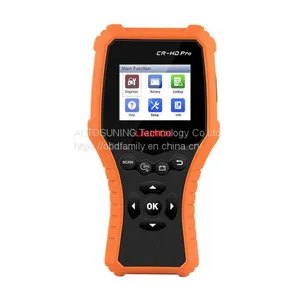
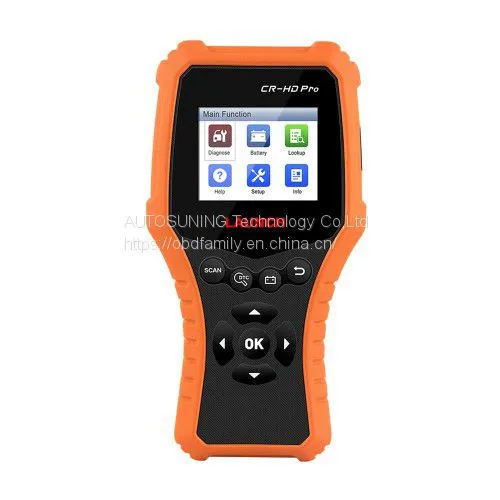
LAUNCH CR-HD Pro Car and Truck OBD2 HOBD Code Reader Scanner Www.obdfamily.net
Negotiable
MOQ: 1 Piece (Price negotiable depending on order volume and customization)
Key Specifications
Get Latest Price
Business Type:
Manufacturer
Year Established:
2005
Annual Export Value:
US$2.5 Million - US$5 Million
Payment & Shipping
Payment Methods:


Port of Shipment:
China
Delivery Detail:
Delivery time depends on order quantity.
Related Products
-
 Original Launch X431 Pocket Tech Portable Device Launch Pocket Tech Code Reader Www.obdfamily.netNegotiableMOQ: 1 Piece
 -
Newest Launch Creader 619 Code Reader Full OBD2/EOBD Functions Support Data Record and Re Play Diagnostic Scanner Www.obdfamily.netNegotiableMOQ: 1 Piece
-
LAUNCH CRP123X OBD2 Code Reader for Engine Transmission ABS SRS Diagnostics With AutoVIN Service Lifetime Free Update Online Www.obdfamily.netNegotiableMOQ: 1 Piece
-
Launch CReader 5001 Code Reader Full OBDII/EOBD Diagnostic Functions Scan Tool Www.obdfamily.netNegotiableMOQ: 1 Piece
-
Launch CReader 6011 OBD2/EOBD Diagnostic Scanner With ABS and SRS System Diagnostic Functions Www.obdfamily.netNegotiableMOQ: 1 Piece
LAUNCH CR-HD Pro Car and Truck OBD2/ HOBD Code Reader Scanner
Language: English, French, Spanish, German, Russian, Portuguese
Functions for 24V Truck:
Support System: Engine system, transmission system, instrument panel system etc.
Function: Read trouble codes, clear trouble codes and read data stream information
Support protocols: J1939,J1708,SAE J1979 (OBDII)
Functions For 12V Car:
Read fault, Delete Fault code, Live Data, Read Vehicle information,
O2 Sensor Test, EVAP System Test, On-board monitor Test,
DTC Code lookup, IML Fault indicator, View Freeze frame, I/M Readiness
Battery: Reads the vehiclersquo battery voltage.
Lookup: Retrieves the desired diagnostic, trouble code (DTC) from the DTC library.
Help: Lets you have a general knowledge of the OBD II, HD OBD and I/M readiness.
Info: Includes the tool information, including software & hardware version, and serial number etc.
Support OBD2 Protocols Cars:
1.SAE J1850 PWM (41.6Kbaud)
2.SAE J1850 VPW (10.4Kbaud)
3.ISO9141-2 (5 baud init,10.4Kbaud)
4.ISO14230-4 KWP (5 baud init,10.4 Kbaud)
5.ISO14230-4 KWP (fast init,10.4 Kbaud)
6.ISO15765-4 CAN (11bit ID,500 Kbaud)
7.ISO15765-4 CAN (29bit ID,500 Kbaud)
8.ISO15765-4 CAN (11bit ID,250 Kbaud)
9.ISO15765-4 CAN (29bit ID,250 Kbaud)
LAUNCH CR-HD Pro Car List:
American Car: Need standard OBD2 protocols from 2000 to now
European Car: Need standard OBD2 protocols from 2003 to now
Japanese/Korean Car: Need standard OBD2 protocols from 2006 to now
Chinese Car: Need standard OBD2 protocols from 2009 to now
LAUNCH CR-HD Pro Truck List:
How to Update LAUNCH CR-HD Pro?
LAUNCH CR-HD Pro Updated via data cable. Make sure the PC has an Internet connection.
1. Download the update tool to the computer.
2. Decompress and install it on your computer (compatible with Windows XP, Windows 7, Windows8 & Windows 10).
3. After installation, connect one end of the data cable to the USB port of PC, and the other end to the tool.
Note: If the tool is properly connected to the pc, the no DTC led illuminates green and the DTC led goes out. Otherwise, the red led illuminates and the green led lights off.
4. Launch the update tool on your pc, the system starts reading the tool. Once it obtains the tool information, it will directly navigate to the update center.
5. The update process is complete and your tool is now ready for use.
Note: To enjoy more and functions, you are suggested to check for updates on a frequent basis and keep synchronized with the latest available software.
Package includes:
1pc x Diagnostic Cable
1pc x OBD-6 Adaptor Cable
1pc x OBD-9 Adaptor Cable
1pc x Data Cable
Kellie Deng
Sales Manager
Email : kellie@obdfamily.net
Whatsapp: +86 15323473652
Website :
Language: English, French, Spanish, German, Russian, Portuguese
Functions for 24V Truck:
Support System: Engine system, transmission system, instrument panel system etc.
Function: Read trouble codes, clear trouble codes and read data stream information
Support protocols: J1939,J1708,SAE J1979 (OBDII)
Functions For 12V Car:
Read fault, Delete Fault code, Live Data, Read Vehicle information,
O2 Sensor Test, EVAP System Test, On-board monitor Test,
DTC Code lookup, IML Fault indicator, View Freeze frame, I/M Readiness
Battery: Reads the vehiclersquo battery voltage.
Lookup: Retrieves the desired diagnostic, trouble code (DTC) from the DTC library.
Help: Lets you have a general knowledge of the OBD II, HD OBD and I/M readiness.
Info: Includes the tool information, including software & hardware version, and serial number etc.
Support OBD2 Protocols Cars:
1.SAE J1850 PWM (41.6Kbaud)
2.SAE J1850 VPW (10.4Kbaud)
3.ISO9141-2 (5 baud init,10.4Kbaud)
4.ISO14230-4 KWP (5 baud init,10.4 Kbaud)
5.ISO14230-4 KWP (fast init,10.4 Kbaud)
6.ISO15765-4 CAN (11bit ID,500 Kbaud)
7.ISO15765-4 CAN (29bit ID,500 Kbaud)
8.ISO15765-4 CAN (11bit ID,250 Kbaud)
9.ISO15765-4 CAN (29bit ID,250 Kbaud)
LAUNCH CR-HD Pro Car List:
American Car: Need standard OBD2 protocols from 2000 to now
European Car: Need standard OBD2 protocols from 2003 to now
Japanese/Korean Car: Need standard OBD2 protocols from 2006 to now
Chinese Car: Need standard OBD2 protocols from 2009 to now
LAUNCH CR-HD Pro Truck List:
How to Update LAUNCH CR-HD Pro?
LAUNCH CR-HD Pro Updated via data cable. Make sure the PC has an Internet connection.
1. Download the update tool to the computer.
2. Decompress and install it on your computer (compatible with Windows XP, Windows 7, Windows8 & Windows 10).
3. After installation, connect one end of the data cable to the USB port of PC, and the other end to the tool.
Note: If the tool is properly connected to the pc, the no DTC led illuminates green and the DTC led goes out. Otherwise, the red led illuminates and the green led lights off.
4. Launch the update tool on your pc, the system starts reading the tool. Once it obtains the tool information, it will directly navigate to the update center.
5. The update process is complete and your tool is now ready for use.
Note: To enjoy more and functions, you are suggested to check for updates on a frequent basis and keep synchronized with the latest available software.
Package includes:
1pc x Diagnostic Cable
1pc x OBD-6 Adaptor Cable
1pc x OBD-9 Adaptor Cable
1pc x Data Cable
Kellie Deng
Sales Manager
Email : kellie@obdfamily.net
Whatsapp: +86 15323473652
Website :

Send Inquiry to This Supplier


Business Type
Manufacturer
Year Established
2005
Annual Export Value
US$2.5 Million - US$5 Million
Port of Shipment
Shenzhen, Guangzhou, Shanghai
You May Also Like
-
LAUNCH CR3008 Universal Full OBD 2 Engine Code Reader Scan Tool Free Update Online Www.obdfamily.netNegotiableMOQ: 1 Piece
-
Original Launch Cresetter Oil Lamp Reset Tool Update Online Www.obdfamily.netNegotiableMOQ: 1 Piece
-
New Launch DIY Scanner CReader 9081 CR9081 Full OBD2 Scanner+ABS+Oil+EPB+BMS+SAS+DPF Www.obdfamily.netNegotiableMOQ: 1 Piece
-
Launch Creader 3001 OBDII / EOBD Code Reader Scanner Support Multilanguages Same as Al419 Www.obdfamily.netNegotiableMOQ: 1 Piece
-
Mini Printer for Launch X431 V/V+/X431 V 8inch Www.obdfamily.netNegotiableMOQ: 1 Piece
-
Launch CRP818 Full-System OBD2 Diagnostic Tool for European Cars Free Update Online Www.obdfamily.netNegotiableMOQ: 1 Piece
-
Original LAUNCH Creader CRP129 Professional Auto Code Reader Scanner Www.obdfamily.netNegotiableMOQ: 1 Piece
-
Launch CRP123 Launch CReader Professional 123 New Generation Of Core Diagnostic Product Www.obdfamily.netNegotiableMOQ: 1 Piece
-
Launch X431 Diagun IV Powerful Diagnostic Tool With Full Connectors Free Update Online for 2 Years Www.obdfamily.netNegotiableMOQ: 1 Piece
-
Launch Creader CR-HD Heavy Duty Code ScannerNegotiableMOQ: 1 Piece


