








 Contact Platform Support
 Help Center
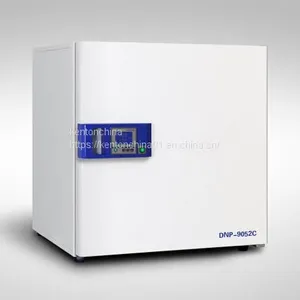
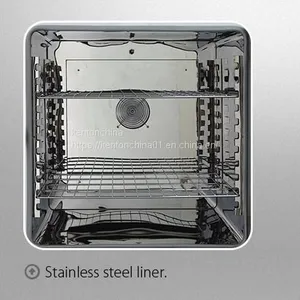
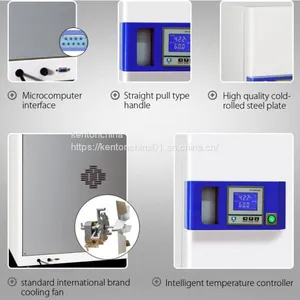
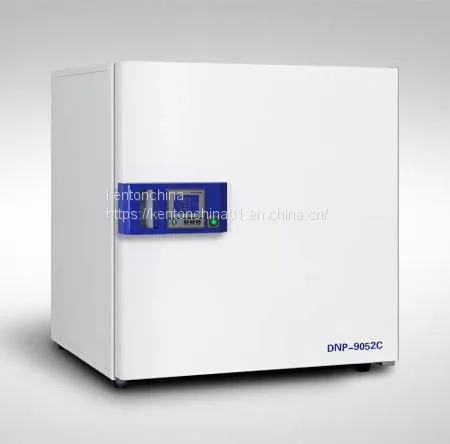
Incubator Temperature Setting, Incubator Laboratory Equipment Brand Manufacturers Kenton



Related Products
-
 Incubator Brand Manufacturers, Intelligent Digital Display Electric Heating IncubatorUS$ 380 - 616MOQ: 1 Case
 -
Constant Temperature Incubator Biobase, Choose Kenton High Quality ManufacturersUS$ 597 - 852MOQ: 1 Case
-
Laboratory Incubator Price, Wholesale & SuppliersUS$ 400 - 419MOQ: 1 Case
-
Seed Plant Incubator, Laboratory Equipment ManufacturersUS$ 500 - 542MOQ: 1 Case
-
Microbial Incubator Special Thermostatic Equipment for Breeding ExperimentUS$ 899 - 929MOQ: 1 Case
Incubator temperature setting, incubator laboratory equipment brand manufacturers Kenton.
Operation method
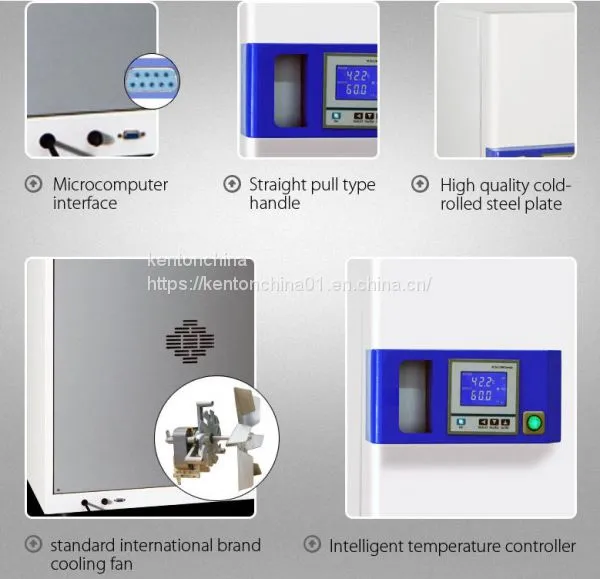
1. The controller is powered on, and the row on the display window displays "index number and version number", while the row on the display window displays "range value" about 3 seconds before entering the normal display state.
2. Reference and setting of temperature and constant temperature time
1) without constant temperature and timing function:
Click the "setting" key to enter the temperature setting state. The lower row of the display window displays the prompt "SP", and the upper row displays the temperature setting value (the unit value flashes first). Click "Settings" again to exit the setting state, and the modified Settings will be saved automatically. In this setting state, if no key is pressed within 1 minute, the controller will automatically return to the normal display state.
2) if there is a constant temperature and timing function
Click the "setting" button to enter the temperature setting state. The lower row of the display window displays the prompt "SP", and the upper row displays the temperature setting value (the unit value flashes first). Click the "setting" button to enter the setting state of constant temperature time. The lower row of the display window displays the prompt "ST", and the upper row displays the setting value of constant temperature time (first the unit value flashes). Click "Settings" again to exit the setting state, and the modified Settings will be saved automatically.
When the constant temperature time is set to "0", it means that there is no timing function. When set to "0", display window bottom running time or temperature set point (see seven. The internal parameters of the running time display mode in table - 2 (the value of the parameters of the NDT)), when the running time is displayed lower bits decimal point light, such as measuring temperature reach the set temperature, the timer timing starts, lower bits decimal point, time to time, run over, display window bottom "End", buzzer di chirping, beep after 1 minute to stop singing. After the end of the operation, long press the "reduce" button for 3 seconds to restart the operation.
Note: if the temperature setting value is increased in the process of timing, the meter will start from 0 and start timing again. If the temperature setting value is decreased, the meter will continue timing.
3. Sensor abnormal alarm
If "-- --" is displayed on the display window, it means that the temperature sensor fails or the temperature exceeds the measured range or the controller itself fails, and the controller automatically disconnects the heating output, the buzzer keeps on ringing, and the alarm light is always on. Please carefully check the temperature sensor and its wiring.
4. When the upper deviation overtemperature alarm is given, the buzzer beeps and beeps, and the "ALM" alarm lamp is always on. When the next deviation alarm occurs, the buzzer beeps and beeps, and the "ALM" alarm lamp flashes. If the overtemperature alarm occurs due to changing the temperature setting value, the "ALM" alarm lamp is on, but the buzzer does not sound.
5. The buzzer can press any key to cancel the sound.
6. "Shift" key: click this key in the setting state to make the set value shift and blink for modification.
7. "Decrease" key: click this key in the setting state to make the set value decrease, long press this key to make the set value decrease continuously.
8. "Increase" key: click this key in the setting state to gradually increase the set value; long press this key to continuously gradually increase the set value.
9. In the setting state, if no key is pressed within 1 minute, the controller will automatically return to the normal display state.
E-mail: cnkenton@kentonchina.com
After-sales: service@kentonchina.com
more:/

Send Inquiry to This Supplier


You May Also Like
-
Anaerobic Cell Bacteria and Microorganisms CO2 Thermostatic IncubatorUS$ 1366 - 1955MOQ: 1 Case
-
New Cultivation Cabinet Laboratory Test Chamber Mold Culture ChamberUS$ 1408 - 1508MOQ: 1 Case
-
Humidities Incubator Water Analysis, Industrial Product Performance TestUS$ 1185 - 1692MOQ: 1 Case
-
Laboratory Equipment Bacterial Incubator Culture of Plant Germination Accelerating Bacteria, Microorganism and MoldUS$ 2376 - 2970MOQ: 1 Case
-
Artificial Climate Chamber, Insect Breeding Seed Culture EquipmentUS$ 4082 - 4382MOQ: 1 Case
-
Led Lighting Incubator, Professional Lighting Incubator ManufacturersUS$ 2200 - 3500MOQ: 1 Case
-
Small Constant Temperature Incubator Price, Manufacturer Brand Quality and ReliableUS$ 595 - 852MOQ: 1 Case
-
Lab Incubator Thermostat Small Incubator ,the Factory Supplies Reliable QualityUS$ 890 - 1026MOQ: 1 Case
-
Mold Incubator-WS(MJ) Seed Plants Germinate Mold Cell CulturesUS$ 2079 - 2970MOQ: 1 Case
-
Factory Supply Mold Incubator WS-250MJ,Plant Cell Seed Mold Culture, Reliable QualityUS$ 2376 - 2970MOQ: 1 Case


