








 Contact Platform Support
 Help Center
Home > Consumer Electronics > Entertainment Electronics > Other Entertainment Electronics > FS18084 3in1 Wireless Keyboard Controller Remote for Playstation 3 PS3
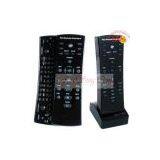
FS18084 3in1 Wireless Keyboard Controller Remote for Playstation 3 PS3
Negotiable
MOQ: 100 Pieces (Price negotiable depending on order volume and customization)
Key Specifications
Get Latest Price
Brand Name:
Place of Origin:
China
Model Number:

Payment & Shipping
Payment Methods:


Port of Shipment:
China
Delivery Detail:
7 days
Related Products
-
 FS18043 for PS3/PC 2IN1 Wired ControllerNegotiableMOQ: 100 Pieces
 -
FS18019 Console Organizer and Travel Case for PS3NegotiableMOQ: 100 Pieces
-
FS18094 HDMI to HDMI Cable For PS3NegotiableMOQ: 100 Pieces
-
FS18079 Controller Dual Charge Stand for PS3NegotiableMOQ: 100 Kilograms
-
FirstSing 2 in 1 Wired Game Guitar for PS3/PS2NegotiableMOQ: 100 Pieces
Place of Origin
China
3in1 Wireless Keyboard Controller Remote for Playstation 3 PS3
* Symbols: To make use of symbols, hold down the SYMB key while depressing the key which contains the symbol you would like to type.
* F1-F10: To make sure of any of the F key functions; while holding down the FN key, depress the key which contains the appropriate
F key function directly above it.
* Space/Backspace: These two functions share the same key-located between the SYMB and FN keys at the bottom of the Wireless Thumb Pad.
To perform the Space function; depress the Space/Backspace Key. To perform the Backspace function; while holding down the SYMB key,
depress the Space/ Backspace Key.
* Shift/Caps Look: These two functions share the same key-located between the M and Enter keys at the bottom of the Wireless Thumb Pad.
To perform the Shift function; depress the Shift/ CapL key then depress the key(s) you‘d like to capitalize. To perform the Caps Lock function;
while holding down the SYMB key, depress the Shift/ CapL key.
* Symbols: To make use of symbols, hold down the SYMB key while depressing the key which contains the symbol you would like to type.
* F1-F10: To make sure of any of the F key functions; while holding down the FN key, depress the key which contains the appropriate
F key function directly above it.
* Space/Backspace: These two functions share the same key-located between the SYMB and FN keys at the bottom of the Wireless Thumb Pad.
To perform the Space function; depress the Space/Backspace Key. To perform the Backspace function; while holding down the SYMB key,
depress the Space/ Backspace Key.
* Shift/Caps Look: These two functions share the same key-located between the M and Enter keys at the bottom of the Wireless Thumb Pad.
To perform the Shift function; depress the Shift/ CapL key then depress the key(s) you‘d like to capitalize. To perform the Caps Lock function;
while holding down the SYMB key, depress the Shift/ CapL key.

Send Inquiry to This Supplier

* Email
Want the best price?
Post an RFQ now!
Business Type
Trading Company
Year Established
2000
Total Employees
101 - 200 People
Main Markets
North America, South America, Eastern Europe
You May Also Like
-
P4 PlugNegotiableMOQ: 1
-
Travel Charger Adapter AC Power Plug EU for Nintendo 3DS DSi NDSi XL DSi LLUS$ 1 - 100MOQ: 100 Pieces
-
Temperature Control Sticker for 8 Level/Irreversible/Waterproof/Made in JapanUS$ 250 - 500MOQ: 40 Pieces
-
X-BOX 360 Game Cable Kinect Male to Kinect FemaleUS$ 1 - 2MOQ: 500 Pieces
-
Game Accessory for WiiUS$ 0.3 - 3MOQ: 200 Pieces
-
Replacement Lcd Screen Display For PSPNegotiableMOQ: 1 Piece
-
Funny Game Bar Game Bar EntertainmentUS$ 2.2 - 2.5MOQ: 2000 Pieces
-
Power Amplifier CK Series(3U)NegotiableMOQ: 1
-
2 Channel HDMI/SDI HD 1920*1080P 60FPS PCIe Video Capture CardNegotiableMOQ: 5 Pieces
-
Factory Supply!Portable GGBS-8100 VGA to CGA / CVBS / S-VIDEO High Definition Converter BoardNegotiableMOQ: 10 Pieces


