Home > Packaging & Printing > Printing Machinery > Heat Press Machine > 40*60cm Heat Transfer Papers Printing Machines
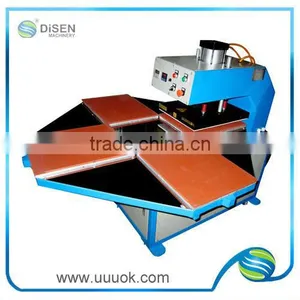
40*60cm Heat Transfer Papers Printing Machines
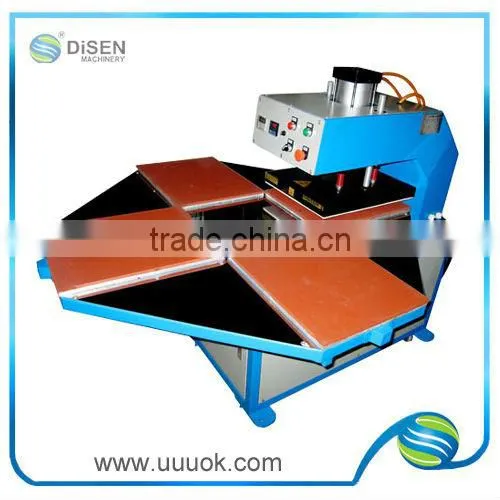
40*60cm Heat Transfer Papers Printing Machines photo-1
Negotiable MOQ: 1 Set (Price negotiable depending on order volume and customization)
Key Specifications
Get Latest Price
Condition:
New
Plate Type:
Flatbed Printer
Place of Origin:
Guangdong, China
Payment & Shipping
Payment Methods:
Port of Shipment:
Guangzhou Shenzhen Hongkong
Delivery Detail:
Delivery time depends on order quantity.
Condition New
Plate Type Flatbed Printer
Place of Origin Guangdong, China
Brand Name Disen
Model Number DS-4-heat-2
Usage Paper Printer
Automatic Grade Automatic
Voltage 220V
Gross Power 3200w
Dimensions(L*W*H) 170*80*160CM
Weight 190kg, 190kg
Certification CE
After-sales Service Provided Engineers available to service machinery overseas

40*60cm heat transfer papers printing machines

40*60cm heat transfer papers printing machinesCustomer First  Service First     
 

40*60cm heat transfer papers printing machines

1. Four working tables, rotary automatic
2. Digital control, time and temperature, working pressure can adjust.
3. Air operated, pneumatic, need a air compressor to work together.
4. Can do 60*80cm size, accept OEM.
5. Get CE certificate, one year warranty.
6. Well-suited for transferring graphics to textiles, large canvas bag, small format flags, banners, awnings; Canopies, etc.

Specificatiaon:


Voltage

220V

Power

2200w

2700w

3200w

Temperature Range

0~399

0~399

0~399

Time Range

0~999 second

0~999 second

0~999 second

Air Pressure

0~8kg/cm²

0~8kg/cm²

0~8kg/cm²

Printing Area

40*40 cm

40*50 cm

40*60cm

Packing Size

150*80*160 cm

160*80*160 cm

170*80*160CM

Weight

150kg

160kg

190kg


Application and feature
1.It adopts automatic motor rotation, saving time and labor; and is convenient for operation
2.Digital time and temperature display, with high stability and accuracy temperature error is±2°C
3.Stable structure, free from distortion, running stably,low noise
4.Automatic control,with stable and even pressure up to 8KG/CM2.


Advantage
1. Digital controller, working procedure indication, high veracity;

2.Incorporate heater pipe and heater, safe and durable, equal distributing;
3.Control timer automatically;
4.Convenient to adjust pressure; suitable to pipelining in the factory
5.Beautiful structure


Product description

  • Wholly digital time and temperature display and control, The accuracy is high, with the precision to be ±1-2.
  • Adopt the advanced electric technology control elements, 4 revolve working tables, automatic to fix on space, which is safe and accurate.
  • This machine is your best choice for assembly in operation line.


40*60cm heat transfer papers printing machinesCustomer First Service First   


 40*60cm heat transfer papers printing machines

40*60cm heat transfer papers printing machines

40*60cm heat transfer papers printing machines


40*60cm heat transfer papers printing machines


40*60cm heat transfer papers printing machines


40*60cm heat transfer papers printing machines


40*60cm heat transfer papers printing machines


40*60cm heat transfer papers printing machines  


40*60cm heat transfer papers printing machinesCustomer First Service First     


40*60cm heat transfer papers printing machines


For metal material board, the heating temperature should be approx. 170-200°C,the heating time around 60 seconds;For ceramic board, the heating temperature should be approx. 200-220°C,the heating time around 60 seconds; For the fabric, the heating temperature should be approx. 120-140°C,the heating time around 5-10 seconds. Please take the below information for example:


Thermal Sublimation Printing Time and Temperature

Article

Printing Material

Temperature

Time

(second)

Remark

1.Ceramic

Sublimation ink, normal photo print paper (or sublimation paper)

220

60

1. Mirror print the picture

2. Count the time when reach constant temperature

3. Stick the picture on the ceramic properly

4. Put the ceramic on the holder horizontally

5. Adjust low pressure to avoid broken of the ceramic

2. Pearl Metal Board

Sublimation ink, normal photo print paper (or sublimation paper)

180

60

1. Mirror print the picture

2. Count the time when reach constant temperature

3. The temperature should not be too high

4. Tear away the film on the cover before heat transferring and then put the pearl metal board on the holder horizontally

5. Adjust high pressure

3. Metal Catch Lock

Sublimation ink, normal photo print paper (or sublimation paper)

180

60

1. Mirror print the picture

2. Count the time when reach constant temperature

3. Stick the picture on it as close as you can

4. Tear away the film on the cover before heat transferring

5. Adjust high pressure

4. Half Cotton Light Color T-shirt

Sublimation ink, normal photo print paper (or sublimation paper)

180-190

120-130

1. Mirror print the picture

2. Count the time when reach constant temperature

3. Only for light color, half cotton T-shirt

4. High pressure

5. Half Cotton Dark Color T-shirt

Sublimation ink, normal photo print paper (or sublimation paper)

180-190

120-130

1. Print the picture

2. Count the time when reach constant temperature

3. Only for dark color, half cotton T-shirt

4. High pressure

6. Pure Cotton Light Color T-shirt

Sublimation paper, normal ink

180-190

30

1. Mirror print the picture

2. Count the time when reach constant temperature

3. Only for pure cotton Light Color T-shirt

4. High pressure

7. Pure Cotton Dark Color T-shirt

Sublimation paper, normal ink

180-190

30

1. Print the picture

2. Count the time when reach constant temperature

3. Only for pure cotton Dark Color T-shirt

4. High pressure

8. Shell Necklace Ring

Sublimation ink, normal photo print paper (or sublimation paper)

180

60

1. Mirror print the picture

2. Count the time when reach constant temperature

3. Stick the picture on it as close as you can

4. High pressure

9.Imitative Ceramic Necklace Ring

Sublimation ink, normal photo print paper (or sublimation paper)

180

60

1. Mirror print the picture

2. Count the time when reach constant temperature

3. Stick the picture it as close as you can

4. High pressure


Accessories


(1)The Printer. Choose any normal Ink Jet photo printer and Epson series printer is recommended.
(2)To achieve the best quality of the photo printing, the following printer setting for your reference:
a.Choose the “Best Photo” and the “Photo Quality Ink Jet Paper” under “Main” as shown in figure b.Click “Advanced” under “Main” to achieve more setting as shown in figure

c.Choose “Mirror Image” under “ Page Layout” as shown in figure 3 while printing photo for ceramic board and metal board, shell board and imitative ceramic necklace etc.


(3)The sublimation ink. Make sure to pull out the color soft plug on the top of the ink cartridges before putting them into the printer. The sublimation ink is easy to dry and better to furnish with one printer until the ink use up.


3d sublimation heat press machine, large format heat press transfer machine, 3d sublimation vacuum machine.
 (4)Ink and printer maintenance.
a.Choose “ Maintenance” under the “Property” of the printer to make maintenance for the printer as shown in figure 4.


3d sublimation heat press machine, large format heat press transfer machine, 3d sublimation vacuum machine.
b.Use the three buttons on the printer. Ink empty hint. The power light and the ink button are on. (if the ink button keep on flashing, the ink is going to be used up but not yet empty. Replace the empty ink cartridge. Press the ink button. The print head moves to the ink cartridge check position and the power light begins to flash. The ink cartridge indicated by the mark is either empty or low. If more than one ink cartridge is empty or low, the print head moves to the mark. This occurs each time the ink button is pressed until all empty or low ink cartridges have been indicated. Once all of the empty or low ink cartridges have been indicated, the print head moves to the ink cartridge replacement position when the ink button is pressed. Cleaning the print head. Press the ink button for more than three seconds and the printer starts cleaning the print head.


3d sublimation heat press machine, large format heat press transfer machine, 3d sublimation vacuum machine.
(5)Photo printing. Select the image you need in the computer to print out. Make sure the pixel of the photo is more than 200 to achieve the better heat transferring effect. Please do not touch the printing side of the sublimation paper after printing within 1 minute.


3d sublimation heat press machine, large format heat press transfer machine, 3d sublimation vacuum machine.
(6)Ink leak. Take tissue to absorb the ink or need to get maintenance from Epson shops.
(7)The printed color is not matched with the original color of the photo. Clean the print head or change a new ink cartridge.
(8)One printer can fill with sublimation ink and normal photo printing ink. But the better way is only fill with one kind of ink in one printer.


Warranty and Maintenance:


1,One-year guarantee.
2,Pressure: Adjust pressure screw clockwise to increase the pressure, counter clockwise to decrease the pressure
3,Time: Check and adjust the position of the jiggle switch in the rear machine case if the buzzer not warn or keep warning when time is out.
4,If press the pressure handle,the handle would be spring back automatically, please adjust the adjusting screw downward. After finished the printing, the handle may be too heavy to hold up, please adjust the adjusting screw upward.
5,Please check the circuit while the heat board is not available after the machine was on several minutes.
6,The natural life of the Silica Gel Board is 10000 times working.
7,The natural life of the Heat Board is 10000 times working.
8,Please feel free to contact us without any delay if there is any problem in the quality.


Notice:
1. The machine must be connected with the ground wire!
2. Do not touch the heat board while heating!
3. Do not touch the heat board once finish working as time is needed to cool down.
4. Please keep children away from the machine!
5. Please use the heat insulation glove to pick the finished goods.


40*60cm heat transfer papers printing machinesCustomer First Service First     

40*60cm heat transfer papers printing machines

40*60cm heat transfer papers printing machines


Send Inquiry to This Supplier

Message
0/5000

Want the best price? Post an RFQ now!
Business Type
Manufacturer, Trading Company, Agent
Year Established
2010
Factory Size
1,000-3,000 square meters
Total Employees
51 - 100 People