








 Contact Platform Support
 Help Center
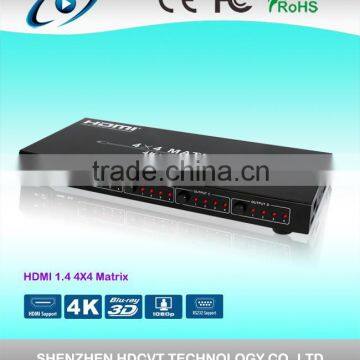
High Quality HDMI Matrix 4 x HDMI 1.4 4K *2K


Related Products
-
 Newest HDMI 1.4 HDMI Matrix 4 x 4NegotiableMOQ: 10 Units
 -
HDMI 4X4 Seamless Matrix With Video Wall ControllerNegotiableMOQ: 1 Piece
-
Professional HDMI HDBaseT Matrix Switch 8X8, Single CAT6 / 3D, Ethernet, POE and IR With 4K SupportNegotiableMOQ: 1 Set
-
High Quality HDMI HDBaseT Matrix Switch 8X8, Single CAT6 / 3D, Ethernet, POE and IR With 4K SupportNegotiableMOQ: 1 Set
-
HDMI HDBaseT Matrix Switch 8X8, Single CAT6 / 3D, Ethernet, POE and IR With 4K SupportNegotiableMOQ: 1 Set
Specifications
1. Supports display resolutions up to 4K x 2K@30Hz,1080P@120Hz,and 1080P 3D@60Hz2. 3D HDMI 1.4a video format support.
-
Introduction
HDM-944 is a 4-by-4 DVI/HDMI matrix supporting output resolution up to 4Kx2K. It allows any source (Blue-Ray player, HD DVD player, satellite receiver, game system, etc.) to be shown on any of four displays simultaneously, no matter the source is HDCP encryption or not. Extra infrared receiver port is supplied for remote control. HDM-944 offers solutions for digital entertainment center, HDTV retail and show site, HDTV, STB, DVD and projector factory, data center control, information distribution, conference room presentation, school and corporate training environments, etc.
Features
Supports display resolutions up to 4K x 2K@30Hz,1080P@120Hz,and 1080P 3D@60Hz
3D HDMI 1.4a video format support.
3D video support including Frame Packing for all 3D formats up to a 297MHz TMDS clock.
Supports deep color up to 48-bit per pixel.
HDCP 1.4 support (INPUT), HDCP v1.4a protocol compliant (OUTPUT).
Supports reception of any audio data conforming to the HDMI specification 1.4 such ad L-PCM at up to 192kHz,compressed audio(IEC 61937),DSD,DST,DTS and HBR.
Full colorimetry including sYCC601, Adobe RGB, Adobe YCC601, xvYCC extended gamut color.
Operates for TMDS clock frequencies up to 300MHz.
Package
HDMI Matrix ------------------------------------------------------------------------------------ 1PCS
Adaptor ------------------------------------------------------------------------------------------- 1PCS
Operation Manual ------------------------------------------------------------------------------- 1PCS
Remote Controller---------------------------------------------------------------------------------1PCS
Specifications
Frequency Bandwidth 2.97Gbps
Input Ports 4 x HDMI Female input ports
Output Ports 4 x HDMI Female output ports
Power Supply DC 12V, 2A
-
ESD Protection Human Body Model: ± 8kV (air-gap discharge)
± 4kV (contact discharge)
Dimensions (mm) 113(W) X 260 (D) X 26 (H)
Weight(g) 750
Operating Temperature 0°C ~ 40°C / 32°F ~ 104°F
Storage Temperature -20°C ~ 60°C / -4°F ~ 140°F
Relative Humidity 20 ~ 90% RH (Non-condensing)
Power Consumption (Max) 20W
-
Operation Controls and Functions
Front Panel
ON/OFF: Power on/off switch.
POWER:This red LED illuminates when the device is connected with power supply.
IR IN: Remote control signal receive.
OUTPUT A:Press this button to select the input source to HDMI OUTPUT A, and these red LED illuminate when the output select to the corresponding input.
OUTPUT B:Press this button to select the input source to HDMI OUTPUT B, and these red LED illuminate when the output select to the corresponding input.
OUTPUT C:Press this button to select the input source to HDMI OUTPUT C, and these red LED illuminate when the output select to the corresponding input.
-
OUTPUT D:Press this button to select the input source to HDMI OUTPUT D, and these red LED illuminate when the output select to the corresponding input.
Rear Panel
-
INPUT PORTS: LED1-4 illuminate when the HDMI signal plug in INPUT 1-4 port.
INPUT 1-4 ports are where you connect the HDMI source.
-
OUTPUT PORTS: LED A-D illuminate when the TV plug inOUTPUT A-D ports.
OUTPUT A-D ports are where you connect the HDTV or monitor with HDMI cable
RS232: This port can control the matrix via PC.
-
DC 12V: Plug the 12V DC power supply into the unit and connect the adaptor to AC wall outlet.
Right Panel
1. EDID Selector: SelectHDMI output signal format via EDID Selector.
VI. Application Example
VII. Remote control
Remote control
OUT A: Press 1234 button will to select input source to HDMI OUT A, and the LED will indicate the corresponding input source.
OUT B: Press 1234 button to select input source to HDMI OUT B, and the LED will indicate the corresponding input source.
OUT C: Press 1234 button to select input source to HDMI OUT C, and the LED will indicate the corresponding input source.
OUT D: Press 1234 button to select input source to HDMI OUT D, and the LED will indicate the corresponding input source.
VIII. Matrix controller user guide
-
Installation
Matrix controller is green software. Just use a cable to connect the PC via RS232 port and copy “MatrixController.exe” to PC to complete installation.
Preparation
-
Connect PC and Matrix by RS232 cable (headers of both sides of cable should be FEMALE)
Power-up Matrix
-
Double click MatirxController.exe icon to run it
Introduction
“General” Page:

Send Inquiry to This Supplier

You May Also Like
-
CCTV Monitoring SystemNegotiableMOQ: 2300 Sets
-
WIFI Camera Wireless Indoor Camera 2 Way Audio Baby Care Monitor Tuya Version CCTV Camera 2 Wifi Smart HomeNegotiableMOQ: 1
-
2013 New Arrival PIR-100D Wireless Out-door PIR Motion Sensor DetectorUS$ 1.5 - 5.5MOQ: 1 Unit
-
8 ch Fiber Optic Audio Video Transmitter Receiver Mini Fiber Optic Audio Video Transmitter ReceiverUS$ 1 - 120MOQ: 1 Pair
-
Hot USB Rechargeable Security Guard Checkpoint SystemUS$ 110 - 140MOQ: 1 Set
-
Fiber Optic Video Transmitter and Receiver for CCTVUS$ 69 - 245MOQ: 1 Piece
-
BNC PIN CONNECTOR Gold Plated for CCTV CameraUS$ 0.1 - 10MOQ: 1 Piece
-
16 CH NVRUS$ 78.7 - 78.7MOQ: 1 Set
-
Home Automation Network Wirless IP CameraUS$ 180 - 230MOQ: 1 Piece
-
Multi-Channel Audio/Video Encoder For Surveillance System SC8916US$ 0.2 - 1MOQ: 1 Pack


