








 Contact Platform Support
 Help Center
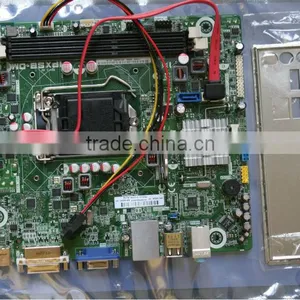
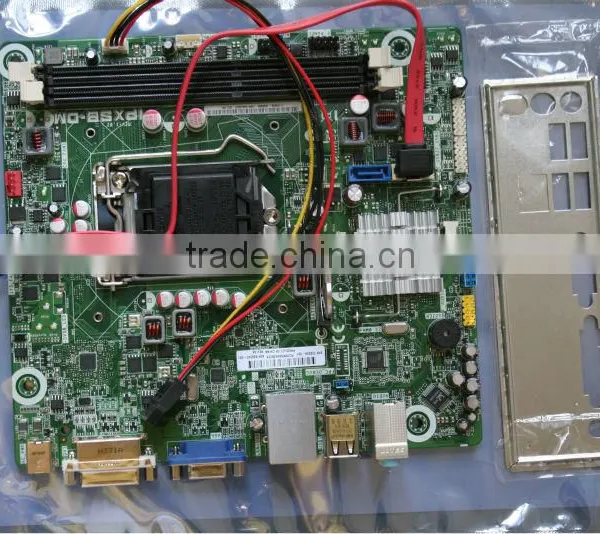
H61 IPXSB-DM 1155 22 Nanometer Low-power Mini Board Intel 35w

Related Products
Specifications
3month warranty
Motherboard description
Manufacturer's motherboard name: Pegatron
Motherboard name: IPXSB-DM
HP/Compaq name: Cork
Form Factor
Mini-ITX : 17 cm (6.7 inches) x 19 cm (7.5 inches)
Chipset
Intel H61
Front-side bus speed
Not applicable
Processor upgrade information
Socket type: LGA 1155
Motherboard supports the following processor upgrades:
Celeron G440 (Sandy Bridge)
Celeron G530T (Sandy Bridge)
Core i3-2100T (Sandy Bridge) dual core
Pentium G6xxT (Sandy Bridge) dual core
Memory upgrade information
Dual channel memory architecture
Two 240-pin DDR3 UDIMM sockets
Supports DDR3 UDIMMs
PC3 8500 (1066 MHz)
PC3 10600 (1333 MHz)
Non-ECC memory only, unbuffered
Supports up to 4 GB on 32-bit* systems
Supports up to 16 GB on 64-bit systems (with 8 GB UDIMMs)
NOTE: 32-bit systems cannot address a full 4.0 GB of memory
Video
Intel PCH Integrated graphics
*Integrated video is not available if a graphics card is installed.
VGA port
DVI port
VGA and DVI ports can be used at the same time
Audio
Integrated Realtek ALC662 Audio
*Integrated audio is not available if a sound card is installed
6 channel audio
Realtek ALC662 CODEC
Network
LAN: 10-Base-T
Technology: Atheros AR8152 ethernet controller
Data transfer speeds: up to 10/100 Mb/s
Transmission standards: 10-Base-T Ethernet
I/O Ports
Back I/O ports
1 - DC power
2 - DVI-D port
3 - VGA port
4 - LAN
5 - USB 2.0: 4
6 - Audio: Line in
7 - Audio: Line out
8 - Audio: Microphone
Internal Connectors
1x CPU fan connector
1x System fan connector
2x SATA connectors
2x SATA power connectors
2x USB 2.0 connectors
1x Front panel audio connector
1x ROM recovery connector
1x Front panel connector
Clearing the CMOS settings
CAUTION: Do not change any jumper setting while the computer is on. Damage to the motherboard can result.
This motherboard has a jumper to clear the Real Time Clock (RTC) RAM in CMOS.
Turn OFF the computer and unplug the power cord.
Move the jumper to from pins 6-4 (default) to pins 4-2 for 5 to 10 secs, then move the jumper back to default.
Plug the power cord and turn ON the computer.
During the start-up process, enter BIOS setup to re-enter user settings
Clearing the PASSWORD settings
The BIOS password is used to protect BIOS settings from unwanted changes.
To erase the BIOS password follow these steps:
Turn OFF the computer.
Move the jumper to Clear from pins 5-3 (default) to pins 3-1.
Turn ON the computer to POST screen.
Turn OFF the computer.
Move the jumper back to default.
Enter BIOS setup to verify or configure new settings.

Send Inquiry to This Supplier

You May Also Like
-
Brand New Pcb Circuit A16B-2203-0881 Cnc A20b-3300-0638 Motherboard Mainboard FanucNegotiableMOQ: 1
-
SP MAIN BOARDNegotiableMOQ: 10 Pieces
-
Optical Network Mainboard Board SFP-10G-ER 80KmUS$ 1 - 2,000MOQ: 1 Piece
-
Desktop Motherboard 865GNegotiableMOQ: 1
-
Integrated Intel 1037 u MotherboardNegotiableMOQ: 1 Piece
-
DV6000 434722-001 Laptop Motherboard Intel Non-integratedNegotiableMOQ: 1 Piece
-
Electronic Components Microcontroller Board Super Motherboard ARDUINO MEGA2560 REV 3 Mini Wifi Module WiFi Shield 101 A000067US$ 0.1 - 10MOQ: 1 Piece
-
Phytium D2000 - 8 6u Vpx High - Performance Computing Module (blade), Completely Domestic, Original ManufacturerNegotiableMOQ: 0 Piece
-
Allwinner A133 Cloud Photo Frame Motherboard | MIPI | DF-A133NegotiableMOQ: 1 Piece
-
XZZ ISocket for IPhone 16 Plus/16 Pro Max Motherboard Layering TestUS$ 169.99MOQ: 1 Unit


