








 Contact Platform Support
 Help Center
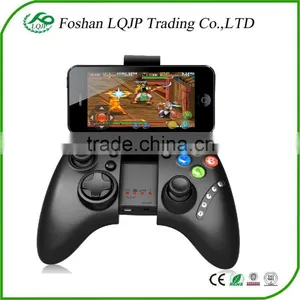
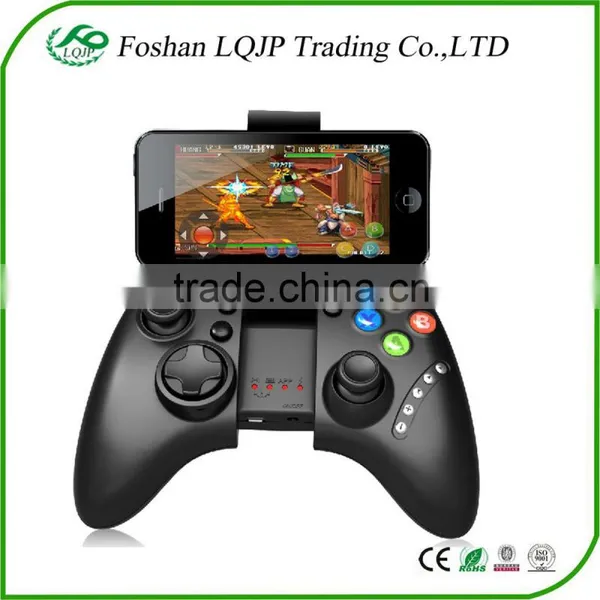
Ipega PG-9021 Wireless Bluetooth Gaming Game Controller Gamepad Gamecube Joystick for Android Phone Tablet PC Laptop TV BOX


Related Products
-
 IPEGA PG-9025 Bluetooth Wireless Game Controller Gamepad Joystic for Phone/Android Phone/Tablet PCUS$ 12 - 15MOQ: 10 Pieces
 -
Gold 3.5mm Male to 2.5mm Female Stereo Audio Headphone Jack Adapter ConverterUS$ 0.1 - 1MOQ: 100 Pieces
-
Gold 3.5mm Male to 2.5mm Female Headphone Jack Adapter ConverterUS$ 0.1 - 1MOQ: 100 Pieces
-
3.5mm Maleto 2.5mm Female Stereo Headphone Headset Adapter ConverterUS$ 0.1 - 1MOQ: 100 Pieces
-
2M MHL Micro USB to HD MI 1080P Media HD TV HDTV Cable Charger for HTC for Samsung for Android Phone & TabletUS$ 0.1 - 2MOQ: 1 Piece
Ipega PG-9021 Wireless Bluetooth Gaming Game Controller Gamepad gamecube Joystick for Android Phone Tablet PC Laptop TV BOX
-
Kindly Note: This game controller don't support MTK CPU smarphone
Introduction
This product is a new wireless Bluetooth controller which supports different Android/ IOS/ PC games.
-Exclusive gaming application platform, the classic hand travel under control (ipega game lobby only for Android platform).
-Built-in lithium battery. After charging, it can be sustainable for 20 hours. Safe and stable.
-With the telescopic stand, the phone can be put in the stand (maximum support for 6-inch mobile phone). Easy for playing games.
- With "volume +, -,"last ","next ""Play / Pause", total 5 multimedia function keys (This function is imcompatible with Y key mode.)
-Bluetooth 3.0 wireless transmission can support 6-8 meters wide range of control from the operation.
-User-friendly software designed to enter the power saving mode with no connection state.
-Support Android 3.2, iOS 4.3 above system.
-Compatible with iPod/iPhone/iPad as well as the vast majority of Android tablet PCs.
Game Support Description
Under Android system, it supports the vast majority of games and simulator games (such as MC4, Wild blood, Dungeon Hunter, Zombie, FC simulator, GBA emulator, arcade emulator, SFC simulator, N64 emulator, Shadowgun, Sonic CD, Cordy, Soulcraft, Zenonia4, 9 Innings 2013, Riptide GP, etc.)
Download method of games that are compatible: Enter itunes and App Store to search for "iCade". The handle can be compatible with the vast majority of games, such as Gunman Clive, Helium Boy, League of Evil League of Evil 2, Muffin Knight Free Stardash, Temple the Run and so on.
User Manual
X.GamePad Mode: ;">(Only Android 3.2 + versions supports this mode ;">) when the handle turn-off, first press the "X" key, then press the HOME key, Bluetooth LED indicator flash, the handle enter into the pairing mode, turn-on the phone and search for Bluetooth devices "ipega classic gamepad" and pairing, if the pairing is successful, the LED indicator will be bright, the
handle will be in the GamePad mode.
A.Keyboard Mode: (suitable for Android system) When the handle turn-off, first press the "A" key, then press the HOME key, the Bluetooth LED indicator flash, the handle enter into pairing mode, turn-on the phone and search for Bluetooth devices "ipega classic gamepad" and pairing, if the pairing is successful, the LED indicator will be bright, the handle will be in the keyboard mode.
B.iCade modes: (suitable for IOS system) When the handle turn-off, first press the "B" key, then press the HOME key, the Bluetooth LED indicator flash, the handle enter into the pairing mode, turn-in the phone and search for Bluetooth devices "ipega classic gamepad" and pairing, if it is success, the LED light will be bright, the handle will be in the iCade mode.
About input method setting: Using the controller to play game should set the phone or notebook input method to be default as English language input (For the iOS system, be sure to switch the input method, and then pairing. If not, the handle does not work properly.)
Charging controller: When the controller is a low battery condition, the charge indicator is start blinking, please accessing the controller to 5V power supply for charging(PC device or mobile phone power adapter). Process of charging, the charge indicator of the handle is Orange and keep long bright, saturated power LED goes.
Switch on/off the controller: Press "HOME" button for 3 seconds until the Bluetooth LED is off, it means shutdown is successful. If the phone is not unpaired connection when controller shutdown. Just do it again
Press the "HOME" button for about five seconds, until the LED red light flashes slowly. It means that the handle is turned on (the default the last boot mode), the boot handle will automatically paired with the phone connection. If the connection fails, the handle will automatically shut down.
Connect the PC: Open the device's Bluetooth PC program, and select the "X, A" in either mode can be paired with (and does not have a Bluetooth PC devices need to use the Bluetooth receiver).
Note: To change the controller function mode, please turn off the controller firstly and cancel the Bluetooth pairing, then in accordance with the operation mode to replace the steps.
The Reset Switch: When the controller can't operate normally, please use the papperclip to touch the reset switch on the left corner of the grip back when the grip cannot shut down or crash.
About compatibility:
Our Ipega gamepad controller works well with a varierty of simulation games on Android system.
However, it has not much games supported games on IOS(unless jailbreak). We have listed
some tested games that are available on your IOS device.
Entre iTune→App Store→searching iCade→dowload the games as below:
Testing Games for IOS device(No Jailbreak)1.Midway Arcade-Warner Bros 2.PAC-MAN for iPad-Namco Networks America Inc.Games 3.Super Lemonade Factory-Shane Brouwer 4.Blast Ball-UNCADE 5.Gold Runner-YOMEN,Inc. 6.Kung Fu Rabbit-Bulkypix 7.Retro Racing-Me Qwak Limited 8.Muffin Knight-Angry Mob Games 9.Minotron:2112-Llamasoft 10.Velocispider-Retro Dreamer 11.No Gravity-Realtech VR 12.Super Mega Worm-Deceased Pixel LLC 13.Space Inversion-Silverline Arts 14.Sideways Racing-Bjango 15.Emerald Mine-Les Bird 16.Freeesh-Realtech VR 17.Commodore64-Manomio LLC 18.The Exteriminator-SUMO Productions 19.IronStar Arena-Appracatappra 20.Compression HD-Little White Bear Studios,LLC 21.Mos Speedrun-Physmo 22.Warblade HD-Edgar Vigdal 23.Plum Crazy-Claymore Games 24.HungryMaster-xionchannel 25.Cyborg Livestock-PopArcade 26.Space Inversion2-Silverline Arts 27.Stardash-OrangePixel 28.GoatUP-Llamasoft 29.Mintotaur Rescue-Llamasoft 30.Bob's Action Racing-VariaMedia GmbH 31.Silverfish MAX-Chaptic Box 32.Retroid-Flat Black Films 33.Box Cat-Rusty Moyher 34.Fruity The Snake HD-22Moo 35.AirAttack HD-Art In Games 36.Temple Run-Imangi Studios,LLC(only support 1st version) 37.HyperBowl-Technicat,LLC 38.Haunted Hallway-UNCADE 39.Battlestation-CrushCrumble 40.Jungool-Headsoft 41.Influx-Half Fast Games
Kindly reminder: To play more games on IOS, you need to have your iPhone jailbroken. Then your phone
would support them, but please do it via correct way or you may get a brand new Brick.Package Includes:
1x Bluetooth Controller
1x Charging cable
1x Manual
Item |
Ipega PG-9021 Wireless Bluetooth Gaming Game Controller Gamepad gamecube Joystick for Android Phone Tablet PC Laptop TV BOX |
Quality: |
All be tested before delivery by our professional QC team. |
Packing: |
Anti-static bags/bubble bag + foam box + outer cartons |
Payment: |
T/T, Western Union, Escrow,paypal |
Delivery Time: |
1-3 days after payment confirmation |
Shipping |
Express courier -DHL ,UPS,FEDEX,TNT- 3-5 Days EMS,China Post ,Hong Kong post - 10-20 Days Air cargo - 5-10 Days Sea cargo - 15-30 Days |
Warranty: |
Most products offer 3-6 month warranty but it depends on the merchandise in question (please read specific note on the PI). |
Returns |
All returned parts are requested to be packaged as originally delivered, and original labels marked by us must not be removed, nor can any of the parts have been used or damaged deliberately. |
Samples: |
Samples for quality test are available, but we kindly ask you to pay for samples and the freight. |
Serivice: |
All questions response in 24 hours. Latest information will be updated to you |

Send Inquiry to This Supplier

You May Also Like
-
for PS1 Wire Controller (original New)NegotiableMOQ: 10 Pieces
-
NEW USB Charging Cable USB Charger For Xbox 360 Wireless Game ControllerUS$ 1 - 100MOQ: 100 Pieces
-
Accessory Set for New 3DS LL / New 3DS LLUS$ 0.05 - 5MOQ: 3000 Pieces
-
i8 Mini 2.4GHz Wireless Touchpad Keyboard Air Mouse for PC, PAD, XBox 360, PS3, Android TV Box, HTPC, IPTVUS$ 9.7 - 9.7MOQ: 100 Pieces
-
Phase Controller Module S-073N 3BHB009884R0021US$ 458 - 894MOQ: 1 Bag
-
Gs5 Pro Game Station 64 Bit Retro Tv Video Game Console Built In 15000 Games Hd Output Classic Gaming Console For Ps1/nesUS$ 29.5 - 30.6MOQ: 10 Pieces
-
Mini Wireless Bluetooth Game Controller Joystick Gamepad Joypad for Ipad Iphone 5 5s 4 4s 3 3gUS$ 9.68 - 16.82MOQ: 10 Pieces
-
Mini Bluetooth Game Controller for Google Carboard 3D GlassesUS$ 1 - 4.8MOQ: 500 Pieces
-
Wholesale Usb Joystick Drivers Welcome, Joypad, Joystick pcUS$ 24.17 - 25.17MOQ: 100 Pieces
-
Nintendo Game Controller Wireless Vibration Body Sense Switch Handle TransparentUS$ 16 - 17MOQ: 200 Pieces


