








 Contact Platform Support
 Help Center
Smart Cctv Rotating Bracket 255 Degrees Rotate Motorized Pan Tilt Heads


Related Products
-
 Wall Mount Bracket 255 Degrees Rotating Pan Tilt for Cctv CamerasNegotiableMOQ: 1
 -
Pan Tilt Bracket for Cctv Camera OutdoorUS$ 8.5 - 11MOQ: 2 Pieces
-
255 Degree Cctv Camera Rotating Brackets Rotation Holder Pan Tilt HeadNegotiableMOQ: 1
-
Original Factory 255 Degree Motorized Outdoor Cctv Brackets Rotation Smart HolderUS$ 8.5 - 11MOQ: 2 Pieces
-
Pan Tilt Head Rs485 255 Degree Outdoor Cctv Rotating BracketsUS$ 8.5 - 11MOQ: 2 Pieces
255 Degree Rotating Bracket RatingSecu Original Factory design CCTV camera bracket
wall mount bracket
Hot selling 255 Degrees rotating bracket for CCTV Camera electronic Rotate wall mounting bracket 2014
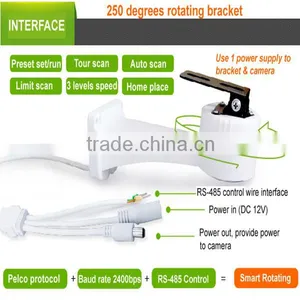
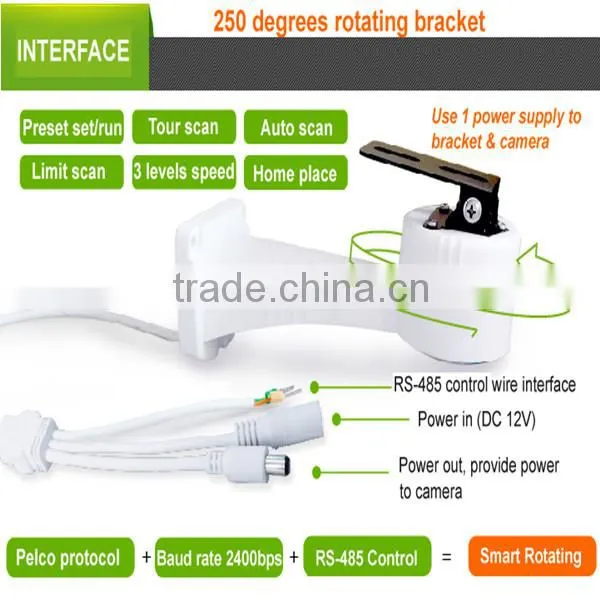
* The rotating bracket can perfectly work with our megapixel HD IP camera, directly connect to the IP module's RS-485 wires, no need wiring, can be controlled by NVR / platform clients software / smart phone's clients software.
* Can simply change a fixed camera can be moved by RS-485 control, low cost and simple work.
* Can decrease camera quantity in project, then decrease project cost, let integrator have more advantages than their competitor.
* The 255 degrees rotating bracket for camera is specially suitable for indoor, change camera's visible range to be wide and improve definition.
E.g. When you want wide angel indoor, you often choose a 3.6mm lens camera, but the definition can not be very good, if you choose a 6mm lens camera with this PT bracket, definition is better, although the 6mm lens can not reach the angle of 3.6mm lens, but the PT bracket make the biggest monitoring range to be 250 degrees.
* Competitive price, only designed by us, unique but easy to use, help your installation to be easier,
gain more praises from users.
* With built-in decoder, without power supply.
Operation of the 255 degree rotating bracket:
Please note, this bracket with below functions:
(1) Use RS-485 control, but RS-485 + / - is universal, no need to distinguish.
(2) Configuration will not be lost after power off, means when the bracket is working of a scan action,
but the power is off, then when you reboot the bracket, it will continue the action before power off.
(3) Manual set address code of camera.
1. Set address code of rotating bracket:
User need to set the address code of this bracket before use it, address code can be set of 01 - 10,
each bracket only can use 1 address code, default address code is “01”.
Steps of set address code of rotating bracket as follows:
(1) Enter setting status: set preset of NO.25.
(2) Start to set address code (e.g. Set add NO.02): press “set preset” on keyboard, then type the address
number of “ 02 “, then press key of “ENTER” to confirm the set.
(3) Change address code of control keyboard: because now the bracket use the address code as “02”,
so you need to change your control keyboard to use address code of “02” to control the bracket.
(4) Save the address code of bracket: after you change the control keyboard’s address code,
now please SET preset of NO.26, and save this command, then reboot the bracket.
(if you don’t do this step to save address code, the bracket will bact to the 01 address code after reboot.)
2. Limiting Scan of rotating bracket:
Set left limiting position: set preset of NO.09.
Set right limiting position: set preset of NO.10.
Run limiting scan: run / go preset of NO.12.
Delete limiting scan: set preset of NO.12.
Set scan speed: can set 3 levels, 10°/ sec; 18°/sec; 25°/sec.
Command: set preset of NO. 15 ; NO. 16 ; NO. 17.
3. Tour scan of rotating bracket:
This bracket can set 1 tour scan route, can set 8 preset position in 1 tour scan.
Run tour scan: run / go preset of NO.13.
Delete tour scan: set preset of NO.13.
After the bracket run tour scan for 50 times, it will auto back to the initial position for check positions.
User also can manual adjust it to do this check.
Manual check initial position: run / go preset of NO.18.
4. Home position of rotating bracket
Set home position: move bracket to the position you want, then use command of “set preset position # 11” .
Run home position: go / run preset #14 to make home position working.
Stop home position: set preset #14 to close home position function.
5. Back to factory set of rotating bracket:
set preset of NO.20.
P.S. Use our keyboard to SET preset / RUN preset of rotating bracket, steps:
press “SET PRE” / “GO PRE” -- press number keys -- press “ENTER”.
Accessories of rotating bracket:
Bracket x 1 ; manual x 1 ; certificate / warranty card x 1; screens x 2.
Common faults and exclusion of rotating bracket:
If the bracket can not start auto checking (base part rotate) after powered on, and without any action,
please check if the power supply is right, please check the power polarity voltage, current, and connection.
255 Degree Rotating Bracket RatingSecu Original Factory
255 Degrees Electronic Rotating Bracket (Model: R-YZ100)
Thank you for you time.
For more information about our products, please feel free to contact me:
Email : ratingsecu14(at)
Skype : cristina-jiang
Contact: Cristina Jiang

Send Inquiry to This Supplier

You May Also Like
-
Electronic Alarm Safety ComponentNegotiableMOQ: 2500 Pieces
-
3ft Premium Shielded HD15 VGA/SXGA Male to Female Cable With 45 Degree Angled Female ConnectorUS$ 1 - 2MOQ: 500 Pieces
-
BNC SOCKET SQUAREUS$ 0.1 - 10MOQ: 1 Piece
-
600M Transmition Vedio BalunNegotiableMOQ: 1 Pair
-
WD‑300U Single‑Sided Operation Walk‑Through Metal DetectorNegotiableMOQ: 1 Combo
-
IR LED Board for Hunting Camera/trail Camera OEM ODM XYC-H05NegotiableMOQ: 1000 Pieces
-
12V 100W 7-Tone Alarm & Megaphone Square Horn, Motorcycle & Car Modified Multi-Tone SpeakerUS$ 6.05MOQ: 1 Piece
-
WV-S2572L I-PRO Extreme H.265 Dome Network CameraNegotiableMOQ: 1 Piece
-
High Quality 4 ch Video Balun for Cctv Camera Transmission by Coaxial UTP Cable Hd-cvi/tvi/ahd Passive Video BalunNegotiableMOQ: 1 Pair
-
Golf High Fidelity Ultraclear Original Sound Low Noise Processing PickupUS$ 2.48 - 3.1MOQ: 20 Pieces


