








 Contact Platform Support
 Help Center
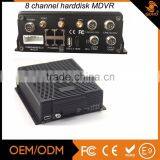
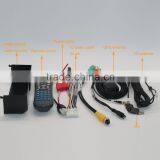
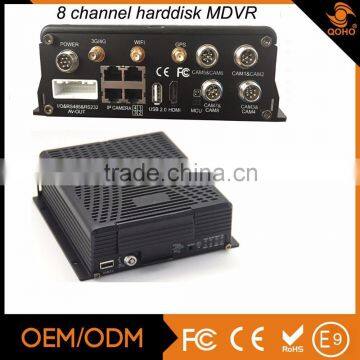
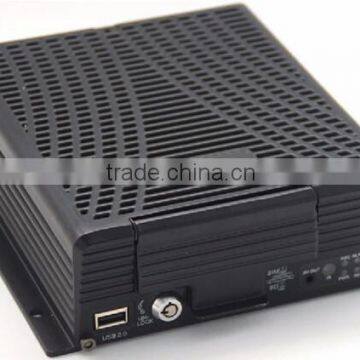
8 Channels 960H Hard Disk Mobile DVR/NVR,MDVR8108HP



Related Products
-
 128G Dual SD Card MDVR Surveillance Camera SystemNegotiableMOQ: 1 Piece
 -
8-CH HDD Car Mobile DVR Mobile Hdd DvrNegotiableMOQ: 1 Piece
-
8-CH SSD Vehicle Mobile DVR,4G GPS Google Map,school Bus Mobile DvrNegotiableMOQ: 1 Piece
-
8-channel Car Mobile DVR With 8 x D1 Real-time Record , H.264 Compression , Built-in G-sensorNegotiableMOQ: 1 Piece
-
Two SD Card Vehicle Mobile Car DVR and 3G / 4G SIM Card,Anti-dust , Vibration Feature Quality ChoiceNegotiableMOQ: 1 Piece
8-CH HDD Car Mobile DVR mobile hdd dvr
| System | Language | English / Chinese |
| Operation Interface | Graphical menu operation interface(OSD menu) | |
| Password security | Permissions setting of administrator & user | |
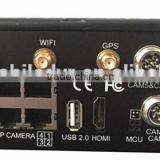
| Video | Video input | 8 channels, support CIF/HD1/D1/960H camera |
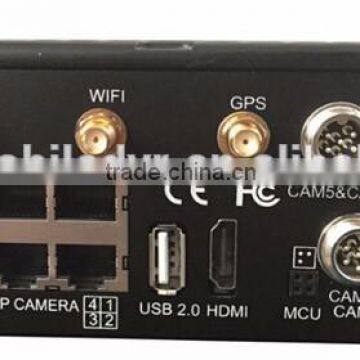
| 4 x RJ45, support IPC camera with maximum of 1080P | ||
| Video output | 3 channels (1 x HDMI , 2 x CVBS,1 as φ3.5 Phone Jack, 1 in the 24pin connector) | |
| Video display | Single picture, 4 pictures | |
| Signal system | PAL / NTSC | |
| Image compression | H.264 Main profile | |
| Audio | Audio input | 8 channels |
| Audio output | 2 channels (1 as φ3.5 Phone Jack, 1 in the 24pin connector) | |
| Record format | Synchroniz ed video & au dio recording | |
| Recording& | Video resolution | Support 8 channels CIF/HD1/D1/960H camera Video input |
| Storage | Support 8 channels 960H+4 channels IP camera Hybrid Video input(Coming in soon) | |
| Video coding | ISO14496-10 | |
| Video bit rate | CIF: 1536Kbps ~ 128Kbps, | |
| D1: 2048Kbps ~ 400Kbps, | ||
| 960H: 2048Kbps ~ 400Kbps, | ||
| 8 grades of image quality optional, Grade1 as best, Grade8 as lowest | ||
| Audio bit rate | 8KB/s | |
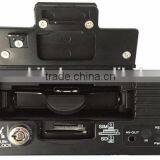
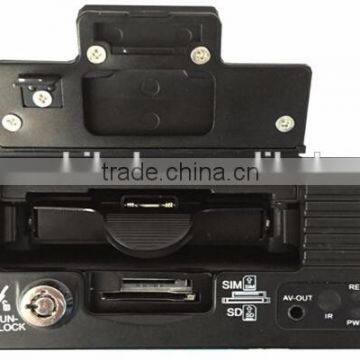
| Storage | Up to 2TB HDD/SSD and 1 SD card for backup (with 3G/4G module option ) | |
| Alarm | Alarm input | 8 channels, alarm activated by low voltage (<1V) or high voltage (>5V) |
| Alarm output | 1 channel, 12V output | |
| Communication | RS485 | RS485×1 |
| Ports | RS232 | RS232×2 |
| RJ45 network | ||
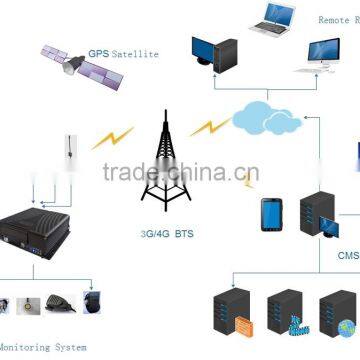
| Wireless | 3G | Built-in 3G (HSUPA / HSDPA / WCDMA / EVDO / TD-SCDMA) module optional |
| Communication | 4G | Built-in 4G(TDD-LTE / FDD-LTE) module optional |
| Wi-Fi | Built-in Wi-Fi( 2.4 / 5.8 Ghz) optional | |
| GPS | Built-in GPS module. Real-time geographic coordinates, speed information | |
| G-Sensor | Built-in G-Sensor | |
| Software | PC playback | Video files playback in PC with analysis of the vehicle status |
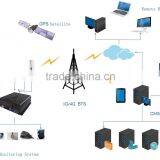
| CMSV6 / IVMS | Wireless real-time video & audio monitoring, GPS, alarm, etc. | |
| Software | Upgrade through the front USB2.0 & hard disk | |
| Upgrade | ||
| MDVR Electric Specifications | ||
| Items | Parameters | Specifications |
| Power input | 8—36V | Input voltage:+8V~+36V, When long-term under 8V, or long-term over 36V, Auto power off, enter protected mode. |
| Power output | 12V | 12V(+/-0.2V), Max:3A. |
| Power-off working time | 8S | If main power supply is off,MDVR can continue running 8 seconds.If connect built-in patent UPS power-supply,MDVR can continue running 60 minutes. |
| Vehicle key signal | ≤4V | OFF |
| ≥5V | ON | |
| Video input impedance | 75Ω | 75Ω for each video input impedance |
| Video output Volt | 2Vp-p | Input 2Vp-p CVBS analog signal, reveal device input need 75Ω impedance to fit |
| I/O interface | 0—4V | Low level alarm |
| 4V above | High level alarm | |
| -4V below | Negative voltage alarm | |
| Operating Temperature | Under well-ventilated environment condition. | |
| Body Dimension | 186(W)mm x 61(H) x 192(L)mm | |
WE have got good reputation from all over the world.
INTERSEC dubai,MIPS Moscow,ISAF turkey,Securex Poland.etc.....
Installation picture
CMS server(Center Management Software)
CMS viewer( Remote Live view in realtime recording)
PAS(Playback Analysis Software)
E-mark for E-9 certificate
CE FCC ROHS
Temperature&humidity&Shock test
FAQ:
Q: Deviation of GPS location on map?
A: It means the signal is valid if the GPS module already positioned, there may many reasons for the deviation, such as government restrictions, permissible error, GPS signal interruption, etc; the actual satellite map may have deviation for security reasons, general map can solve the problem by using GPS correction.3G wireless module.
Q: How to do when the video input interface is different from the camera output interface?
A: The car uses 4PIN type while camera uses BNC or aviation head type, if not in correspondence, please use conversion head for connection or wiring based on standard corresponding according to the cable sequence defined.
Q: When 3G has neither report nor video , what should be done first?
A: Press INFO key to enter the system information page, check whether the SIM card exists and view the signal strength as well as dial-up status, whether the antenna is in good contact, and then check the SIM to see whether it is out of traffic, the most basic judgment is to replace the SIM card. If the dial up failed with signal, then check whether the settings of center number and the port are correct. Moreover check whether the device number of the product is already occupied.
Q: 3G signal is intermittent, video is jammed?
A: At present the signal coverage of WCDMA and EVDO is rather wide, however, there are some mountainous districts without signal coverage, and some suburban areas have weak signal due to the local network constraints, then it will be jammed during watching of video, or video cannot be watched at all, the greatest impact of this situation is from the local network; Moreover check whether the frame rate setting of sub-stream is too high, because the video may also occur such situation when the network is poor and frame rate setting is high.
Q: Why the vehicle and video cannot be seen in CMSviewer client when the device has been started?
A: At first make sure the central registration server is switched on and on the net, then check whether the host device number has been occupied to cause conflict, secondly check whether the settings of server-centric IP and port are correct; devices report to the center via the built-in 3G module or via WIFI. If via built-in 3G, please check whether selected the correct type of built-in 3G module, for example, WCDMA and EVDO module needs the support from corresponding SIM card, check whether the antenna is in good contact; If it still can not report when above all are checked, enter into the system information page to view dial-up. If dial-up is not successful, look up whether the setting of data access point and center number is correct. If all ultimately fail, please collect as much information as possible to submit to the technical supporting staff for analysis, the more data provided, the more convenient for technicians to solve the problem.
Q: The device is online, but why can I not see the video image?
A: Please set lower sub-stream to transmit image, the blocked or slow transmission speed situation may occur when the sub-stream frame rate is set very high and be affected by network uploading limit; poor network signal or intermittent will seriously affect the video transmission.
Q: The device is properly reported on CMSviewer, but the videos cannot be seen after using for some time?
A: Firstly check whether the host side displays dialing, if it keeps the dialing status, it may be because the flow of the SIM card has run out, replace the SIM card to test; Secondly query whether the host device number has been modified by the driver, the host with modified device number needs to be resubmitted to add vehicle information; thirdly, if it still does not work by changing the card, it will need to check whether the host’s 3G module fails.

Send Inquiry to This Supplier

You May Also Like
-
BNC PIN CONNECTOR Gold Plated for CCTV CameraUS$ 0.1 - 10MOQ: 1 Piece
-
JT-D10008E 8 CH DVRUS$ 55.08 - 55.08MOQ: 1 Set
-
H.264 Format Standalone DVR With 3G Phone ViewingNegotiableMOQ: 1 Piece
-
Pelco DSSRV2-240RD-US 128 Channels Network Video RecorderNegotiableMOQ: 10 Pieces
-
Supply of Sodimax Financial Escort Vehicle In-vehicle Wireless 4G Monitoring SolutionUS$ 4 - 5MOQ: 1 Piece
-
4 Channels 1080P HD Mobile Network Video RecorderUS$ 236 - 252MOQ: 1 Set
-
Sell CCTV LensNegotiableMOQ: 50 Pieces
-
BC1 Mini Portable Pen Type Clip Motion Detection Voice Video Digital Record Police Body Worn CameraUS$ 42 - 50MOQ: 5 Pieces
-
Wdm-H. 264 4chs 1080P CCTV Home Security NVRUS$ 38.24 - 38.24MOQ: 20 Pieces
-
16CH AHD DVR With H264 Cms Free Software( DVR-6316AHD)NegotiableMOQ: 1 Piece


