








 Contact Platform Support
 Help Center
Intelligent Home Security Alarm Based IP Cloud Server Newest Alarm

Related Products
-
 Wireless 868mhz IP Cloud Alarm Door/window Magnetic SensorUS$ 99.9 - 168MOQ: 10 Sets
 -
Wireless 868mhz IP Cloud Alarm System Without GSMUS$ 99.9 - 168MOQ: 10 Sets
-
Smart Cloud IP Alarm System Monitoring Your Home From AnywhereUS$ 99.9 - 168MOQ: 10 Sets
-
Innovative Cloud IP Alarm System Monitoring Your Home/cottage/dorm From AnywhereUS$ 99.9 - 168MOQ: 10 Sets
-
Innovative Cloud IP Security Alarm System Monitoring Your House/department From AnywhereUS$ 99.9 - 168MOQ: 10 Sets
Smart residential and commerical Cloud IP Alarm
What is Finseen Cloud IP Alarm System?
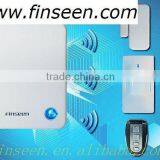
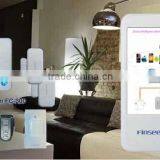
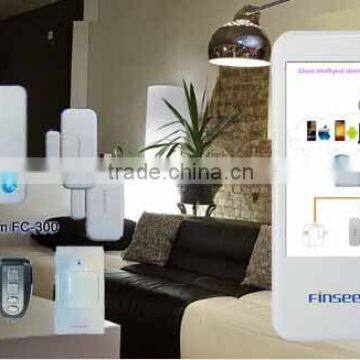
Finseen Cloud based IP Alarm is a latest technology burglar alarm system controlled by your smart phone or tablet via the internet. The IP Alarm Cloud drives the system, which provide you with information about who enters your house, which sensor has been triggered etc. Notifications are distributed to friends and neighbors, ether by PUSH or email. Power and internet connections are surveyed online. Should one interrupt the power or the internet, the system will notify you within seconds. The app can monitor and control the system from anywhere as long as your phone or tablets connected to the internet.
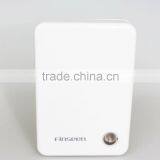
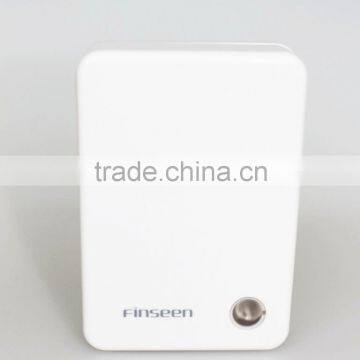
The central unit of the system is the IP Alarm Scanner(Alarm Host/Panel).
Advantage for IP Cloud Alarm System comparing with others:
1.Controlled by smart phone or pad via the internet,without any card,wireless and no buttons.All function can done by APP,operation more simply and uncomplicated.
2. No need drilling hole in the doors or windows,you can stick the sensor with special tape and install easily.
3.Hacker or thief maybe interrupt/break the SIM card but cannot break the IP Cloud system easily.
4.User will get a notification via PUSH/Email within seconds even if the internet or power be interrupted or stopped.
5.Even large distance the operation still can work smoothly because IP cloud system operated on background and all communication with the IP Cloud is verified.
6.System will notify if the battery nearly runs out and need to be changed.
7.Different from the other Alarm system controlled by the base unit,IP Cloud alarm operated via the Cloud Server.
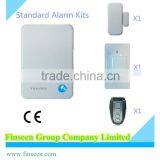
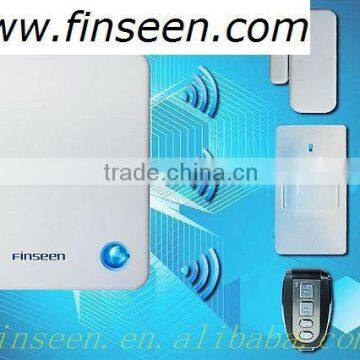
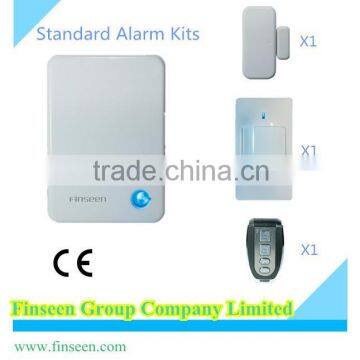
Standard Kits consist of:
1pc of Alarm Host;
1pc of PIR Detector;
1pc of Door Sensor;
1pc of Remote Control;
1pc of Lan Cable;
1pc of Power Supply.
IP Alarm’s door/window sensor is an intelligent switch, which you attach to the doors and windows or other places in your home where you want control or an alarm in the event of a break-in. The sensor is fitted with a discreet diode, which glows when the switch is communicating with the IP Alarm system.
IP Alarm’s motion detector is what many call a PIR sensor (Passive Infrared) or PID sensor (Passive Infrared Detector).
In daily use, a motion sensor is one of the most important components in the surveillance of your home against break-ins. It is best placed in areas where you expect a thief to pass.
A little diode shows when the sensor is communicating with IP Alarm. All communication is done via the wireless technology, which the scanner and sensor utilize. You can see the sensor communicating when the light is on.
IP Alarm’s remote has 4 buttons, which can be used separately.
Button 1:
- Disarming the burglary alarm or disconnecting in the event of an alarm.
- Disconnect the burglary alarm.
- Disconnect the home security mode.
- Stop an alarm where the sirens sound off.
Button 2:
- Arm the system
- Connect the burglary alarm.
Button 3:
- Connecting the home security, secures the doors and windows in the system whilst your motion sensors stays inactive so you can stay in the house without the alarm sounding.
Button 4:
- use this button, to activate the panic alarm. The system will send an alarm notice to those who you have included in your security service.
1. What iOS devices are compatible with the Finseen Cloud based IP Alarm system?
Compatible for Iphone or Ipad which is with iOS 5.0 above.
2. What Android devices are compatible with the Finseen Cloud based IP Alarm system?
Compatible for Android 2.3 above.
3. How do I set up the Finseen Cloud based IP Alarm system?
The system is a DIY [Do it yourself] system with a minimum of setup. Just download and install the “IP Alarm” app from Google Play or Apple App Store. Make sure the system is powered up and connected to the internet. Check that your mobile device is connected to the internet.
4. How can I log in APP?
Turn back the alarm host, you can find the Alarm ID and password from the sticker.Then enter the ID and password and follow the guide to enter into your account email, user name etc.
5. How do I add/enroll new sensors after the installation?
Ensure the system under “disarm”mode,”
- Go to the menu ´Device’ in the IP app
- Select ‘+´ to add Device
- Select the appropriate device illustrated.
- Press ´Enroll´ and follow the instructions in the Video.
- Wait for the confirmation from the server.
- After enroll, edit the location name of the device.
- Done.
6. How can I know if the enroll sensors is successful or fail?
If your enroll succeeded, red light of alarm host will flash quickly for 5 seconds and the acoustic buzzer sound with 5 beeps at same rate as red light flashes.But if your Enroll failed, red light of alarm host will be off, and acoustic buzzer sound 1.5 s.
7. How many sensors in maximum that I can enroll in total?
You can enroll in max.10 pcs Remote controls, 19 pcs Smoke detector or gas detector, 40 pcs Door /Window sensor and 40 pcs Motion detectors.
8. How can I change the password?
Go to “Set up ”profile, and choose “ change password”.Then enter the old password, followed by enter a new password. Repeat the new password to ensure correct entry.

Send Inquiry to This Supplier

You May Also Like
-
Electronic Horn/buzzing Sound(Wechat:13510231336)NegotiableMOQ: 500 Cartons
-
Security AlarmNegotiableMOQ: 2500 Combos
-
Safety With AlarmUS$ 0.65 - 4.5MOQ: 1000 Pieces
-
Anti-theft Alarm Device for Mobile Phone/computer/laptop Display Supplier's ChoiceUS$ 0.1 - 2MOQ: 5 Pieces
-
Wireless Magnetic Door Sensor Contact SDM-100 Wireless Mental Rolling Door Magnetic Contact Wireless Rolling Door SensorUS$ 2 - 3MOQ: 1 Piece
-
Gsm Gprs Rtu 4~20 mA / 0~5 V Gsm Sms Temperature Control AlarmUS$ 60 - 90MOQ: 5 Pieces
-
Metal Type Magnetic Proximity Switch SensorUS$ 4 - 8.1MOQ: 20 Sets
-
Hand Emergency Signalling Apparatus,power Tools,handware Tools,ISO9001,UKASUS$ 239.5 - 254.6MOQ: 1 Piece
-
H0292 LED Key Finder Wireless Key RF Item Locator Remote Control Pet CellUS$ 0.28 - 0.42MOQ: 10000 Pieces
-
Laser Position DetectorNegotiableMOQ: 1 Set


