








 Contact Platform Support
 Help Center
Best Cloud IP Home Alarm in Home Security Market

Related Products
-
 2015 New Burglary Alarm System IP Cloud Home Security Not GSM AlarmUS$ 65.99 - 99.99MOQ: 1 Piece
 -
NO Antenna,NO GSM,New Alarm System Based IP Cloud Alarm System KitsUS$ 230 - 300MOQ: 100 Pieces
-
Finseen Cloud Base IP Alarm System FC-300NegotiableMOQ: 100 Pieces
-
Finseen Cloud IP Alarm APPNegotiableMOQ: 1000 Sets
-
IP Intrusion Alarm Detection System With IOS, Android APP Base on Cloud ServerNegotiableMOQ: 5000 Sets
Specifications
IP cloud alarm100% wierless, No Need GSM card
Instant notification on phone APP
99 zones Multi languages App
Plug and play
Finseen New Cloud IP Technology Home Alarm
868mhz Cloud Based IP Security Alarm System,Not GSM Alarm System Anymore!
What is Finseen Cloud IP Alarm System?
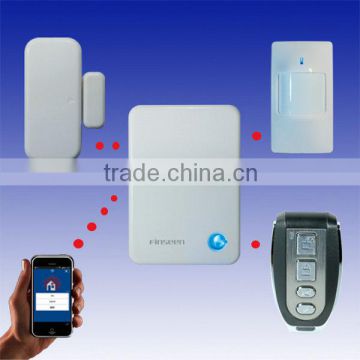
Finseen Cloud based IP Alarm is a latest technology burglar alarm system controlled by your smart phone or tablet via the internet. The IP Alarm Cloud drives the system, which provide you with information about who enters your house, which sensor has been triggered etc. Notifications are distributed to friends and neighbors, ether by PUSH or email. Power and internet connections are surveyed online. Should one interrupt the power or the internet, the system will notify you within seconds. The app can monitor and control the system from anywhere as long as your phone or tablets connected to the internet.
Difference Between Cloud IP Alarm and GSM Alarm
|
Finseen Cloud IP Alarm |
GSM Alarm |
Frequency |
866MHz |
Mainly 315/433MHz |
Technology |
868 FSK Cloud Service |
GSM phone technology |
Phone Card |
No need. Internet cloud service |
GSM card |
Cost |
No cost |
Pay for GSM card rent every month |
Operation |
Phone/tablet APP control the whole system anywhere |
Panel keyboard control the system |
Notification |
Instant PUSH Notification on phone or sending Email |
Sending SMS to phone |
Alarm Type |
Phone APP blow and siren blow at the same time, can alarms while having phone call |
Dialing to the phone, can not blow while having phone call |
Signal |
strong and fast, we spend millions dollars built 5 servers over the world |
Weaker and slower, share server with others, don’t have own server |
Antenna |
No, but with strong signal via cloud server |
Yes, signal unstable |
Rate of False Alarm |
Low. 868mhz FSK technology, get accurate indicator by Cloud Servers. |
High. Alarming while neighbor’s alarm triggered. Always interference by other’s alarms |
Tamper-proof |
“Tamper Triggered” inform to your phone and whistle on phone even though power or internet interrupt |
No notification |
Learn accessories |
10 seconds. Easy and saving time, wireless learning, just add to the phone APP |
Some minutes. Complicated, input many information |
Name the Zones |
Name every accessories |
Can Not. |
Specification:
• Power Supply: 5VDC 1000mA regulated
• Radio Frequency: 868MHz
• Range: Max 300m
• Backup time: Ca 4 hours
• Humidity: 10-95%Rh
• Temperature: -10°C - +40°C
Alarm Zone:
here is 109alarm wireless zones in total for alarm panel.
00 : Wireless Remote control (10pcs in total)
01-19 : 24hours zone (19 wireless zone in total)
20-59 : Perimeter zone (40 wireless zone in total)
60-99 : Motion zone (40 wireless zone in total)
1. What is Finseen Cloud IP Alarm System?
Finseen Cloud based IP Alarm is a latest technology burglar alarm system controlled by your smart phone or tablet via the internet. The IP Alarm Cloud drives the system, which provide you with information about who enters your house, which sensor has been triggered etc. Notifications are distributed to friends and neighbors, ether by PUSH or email. Power and internet connections are surveyed online. Should one interrupt the power or the internet, the system will notify you within seconds. The app can monitor and control the system from anywhere as long as your phone or tablets connected to the internet.
The central unit of the system is the IP Alarm Scanner(Alarm Host/Panel).
2. What iOS devices are compatible with the Finseen Cloud based IP Alarm system?
Compatible for Iphone or Ipad which is with iOS 5.0 above.
3. What Android devices are compatible with the Finseen Cloud based IP Alarm system?
Compatible for Android 2.3 above.
4. How do I set up the Finseen Cloud based IP Alarm system?
The system is a DIY [Do it yourself] system with a minimum of setup. Just download and install the “IP Alarm” app from Google Play or Apple App Store. Make sure the system is powered up and connected to the internet. Check that your mobile device is connected to the internet.
5. How can I log in APP?
Turn back the alarm host, you can find the Alarm ID and password from the sticker.
Then enter the ID and password and follow the guide to enter into your account email, user name etc.
6. How do I add/enroll new sensors after the installation?
Ensure the system under “disarm”mode,”
- Go to the menu ´Device’ in the IP app
- Select ‘+´ to add Device
- Select the appropriate device illustrated.
- Press ´Enroll´ and follow the instructions in the Video.
- Wait for the confirmation from the server.
- After enroll, edit the location name of the device.
- Done…
7. How can I know if the enroll sensors is successful or fail?
If your enroll succeeded, Red light of alarm host will flash quickly for 5seconds and the acoustic buzzer sound with 5 beeps at same rate as red light flashes.
But if your Enroll failed, Red light of alarm hot will be off, and Acoustic buzzer sound 1.5 s.
8. How many sensors in maximum that I can enroll in total?
You can enroll in max.10 pcs Remote controls, 19 pcs Smoke detector or gas detector, 40 pcs Door /Window sensor and 40 pcs Motion detectors.
9. How can I change the password?
Go to “Set up ”profile, and choose “ change password”.
Then enter the old password, followed by enter a new password. Repeat the new password to ensure correct entry.

Send Inquiry to This Supplier

You May Also Like
-
Electronic Horn/buzzing Sound(Wechat:13510231336)NegotiableMOQ: 500 Cartons
-
Security AlarmNegotiableMOQ: 2500 Combos
-
Safety With AlarmUS$ 0.65 - 4.5MOQ: 1000 Pieces
-
Anti-theft Alarm Device for Mobile Phone/computer/laptop Display Supplier's ChoiceUS$ 0.1 - 2MOQ: 5 Pieces
-
Wireless Magnetic Door Sensor Contact SDM-100 Wireless Mental Rolling Door Magnetic Contact Wireless Rolling Door SensorUS$ 2 - 3MOQ: 1 Piece
-
Gsm Gprs Rtu 4~20 mA / 0~5 V Gsm Sms Temperature Control AlarmUS$ 60 - 90MOQ: 5 Pieces
-
Metal Type Magnetic Proximity Switch SensorUS$ 4 - 8.1MOQ: 20 Sets
-
Hand Emergency Signalling Apparatus,power Tools,handware Tools,ISO9001,UKASUS$ 239.5 - 254.6MOQ: 1 Piece
-
H0292 LED Key Finder Wireless Key RF Item Locator Remote Control Pet CellUS$ 0.28 - 0.42MOQ: 10000 Pieces
-
Laser Position DetectorNegotiableMOQ: 1 Set


