








 Contact Platform Support
 Help Center
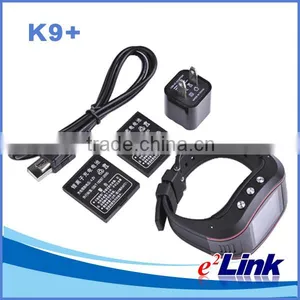
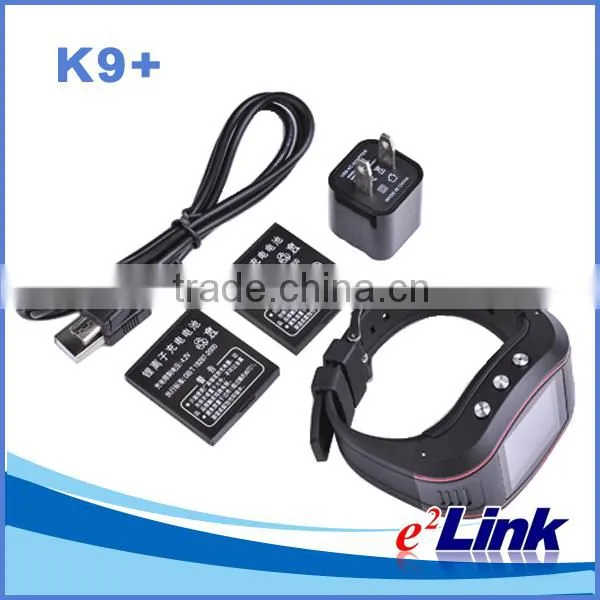
Wrist Watch Personal Gps Trackers K9+


Related Products
-
 Gps Gsm Watch Tracker for Senior Citizen K9+NegotiableMOQ: 100 Pieces
 -
Kids Child Gps Tracker Bracelet Personal GPS GSM Real Time Tracking Personal Wrist Watch StyleNegotiableMOQ: 100 Pieces
-
K9+ Personal GPS Tracker Gps Child Tracking Bracelets,child Gps Tracker BraceletNegotiableMOQ: 100 Pieces
-
K9+ Hidden Gps Bracelet Personal Tracker for KidsNegotiableMOQ: 100 Pieces
-
Smart Mini K30 GPS WIFI LBS Tracker for the Older, Kids, Pets, ChirdrenUS$ 31 - 40MOQ: 10 Pieces
Specifications
1.GPS & LBS positioning2.Long time standby time
3.Remote monitor
4.GEO-Fence alarm
5.Removable battery, low battery alarm
Scenarios:
K9 GPS watch can be used in:
1. Find elderly, children’s location, communication.
2. Outdoor sports, rangers, patrol and other outdoor workers’security.
Installation:
No need to install
PRODUCT FEATURES:
Supports quad bands,i.e. 850/900/1800/1900MHz, universal in the world.
Two way communication, one key dial family number
One key for SOS help, remote monitor.
GPS precise positioning and uploaded by GPRS regularly, Supports real-time tracking and history track playback.
Double Module,GPS & LBS positioning.
Web browser platform, Smart phone app platform and SMS query.
GEO-Fence alarm .
Removable battery, low battery alarm .
Local record GPS tracks ,generate PLT file.
GPS granting time, real-time latitude and longitude ,altitude.
Multiple protocol support, OTA upgrade program.
ALARM TYPE:
Speed Alarm
Geo-fence Alarm
Low battery Alarm
Detail picture
GPS positioning accuracy |
5-15m (Depend GPS signal) |
GSM positioning accuracy |
100-1000 m |
GPS Frequency |
1575MHz |
GSM Frequency |
850/900/1800/1900MHz |
Hot/warm/cold start time |
<3s,<15s,<60s |
Battery capacity |
550mAh |
Dimensions (mm) |
70(L)X48.5(W)X16.8(H) |
Operating temperature |
-20°C~70°C |
Operating humidity |
20%~80%RH |
Weight |
69 g |
Instructions for use
Power onPower off
Press and hold key 4 to power on and enter the main interface; press and hold key 4 again to power off..
SOS one key for help
When power on, press and hold key 5, then the terminal will call the presetting numbers circularly and send SOS SMS at the same time.
Call the numbers on SIM card
From idle mode, press key 3 to enter the main menu, next press the UP key or DOWN key to choose the phonebook, press key 3to enter.
Use the UP/DOWN key to choose the number, next press key 3 to enter the options.
Use the UP/DOWN key to choose “Call”, next press key 3 to make a call. Numbers must be stored on the SIM card.
Call the numbers in call logs
From idle mode, press key 3 to enter the main menu, next press the UP key or DOWN key to choose the call center, press key 3to enter.
Use the UP/DOWN key to choose the number, next press key 3 to enter the options.
Use the UP/DOWN key to choose “Call”, next press key 3 to make a call.
Call the manager numbers
When power on , press and hold the Key 1, key 2 or key 3 to call the corresponding presetting manager numbers.
Answer the calls
When managers call the watch for more than 8 seconds, or others call the watch, the watch ring and show the incoming numbers on the screen, press key 3 to answer the call.
Key 5 can be pressed to reject the call.
When the call cannot be answered on time, the missed contacts will be displayed on the missed call screen.
Check the missed calls
If calls missed, then the missed call prompt can be displayed on the missed call screen.
Check SMS
You can enter the Messaging menu to check the SMS.
Hand free
The watch will use hand-free automatically when making a call.
Adjust the volume
When making a call, press key 1 to increase the volume and press key 2 to decrease the volume.
Organizer
Including Calendar/World clock/File manager/Work mode/GPS logger, etc…
Enter the Organizer menu, use UP/DOWN key to choose the function and press key 3 to enter.
User profiles
Including Gerneral/Silent profiles.
Enter the User Profiles menu, use UP/DOWN key to choose the profile and press key 3 to enter.
Settings
Including Phone settings/Network settings/Restore factory settings.
Phone settings: Language/Flight mode.
Network settings: Network selection/GPRS transfer pref.
Enter the Settings menu, use UP/DOWN key to choose the function and press key 3 to enter.
Positioning
If the watch has no presetting numbers, then press and hold key 1/2/3, the watch will position itself.
The watch displays: Positioning, then it will receive the position SMS.
(If no GPS signal, then the LBS positioning SMS will be received)
Positioning using a call
The managers can call the watch for less than 8 seconds and then hang up, the watch will send the positioning SMS automatically without ringing.
If the managers call the watch for more than 8 seconds and the watch rings, they can make a normal call.
Work mode
From idle mode, press key 1 to enter Work mode, next press UP/DOWN key to choose one mode, press key 3 to enter.
0: Tracker mode: GPS always on.
1: Saving mode: GPS on when the watch moving or be inquired position.
2: Sleep mode: GPS on only when the watch is inquired position.
3: Hibernate mode: GPS off
Set the Work mode::
#720#Work mode number#Password##
Update time automatically
The watch will open the GPS automatically for 3 minutes after power on, it will enter the presetting Work mode after updating the time. (Under Hibernate mode, the watch will close the GPS and not update time.)
GPS Data Interface
Press key 5 to enter the GPS data interface.
The screen will display the following data if there is GPS signal:
Current longitude, latitude, speed, altitude, satellite numbers, positioning logo:
N-GPS Sleeping
V-Searching the satellites
A-Already Positioning
GPS logger
First set the work mode to tracker mode or saving mode.
Second press key 2 to enter the GPS logger menu, use UP/DOWN key to choose the speed and press key 3 to start GPS log.
Finally enter the GPS logger menu, use UP/DOWN key to choose the “off”, press key 3 to make sure to end the GPS logger.
Command: #777#Time#Password##,Time means sampling frequency(one sample/Time). Time=0 means cancel the GPS logger.
GPS logger settings(Local Operations):
First set the work mode to tracker mode or saving mode.
Second press key 2 to enter the GPS logger menu, use UP/DOWN key to choose the speed and press key 3 to start GPS log.
Finally enter the GPS logger menu, use UP/DOWN key to choose the “off”, press key 3 to make sure to end the GPS logger.
Read the GPS logger
Power off the watch and use data cable to download the *.plt file to PC from the memory of the watch.
If the PC has installed the “Google Earth”, then you can view the GPS logger using the “Google Earth” to open the *.plt file.
GPS Tracking System
1) Geo-fence Alarm
2)Add device with protocol you need
3)GPS tracking Statistics report
Office and Laboratory
Factory SMT Workshop
Factory Cable Assembly Workshop
Company Certificate
Focusing on products that are truly superior and innovative, Eelink has been awarded China National Hi-tech Enterprise and Software Enterpise, Certificate of Utility model PatentCertification, Eelink’s products have passed the international certification BV, SGS,D&B, Design Patent, CE, FCC, PAHs,CCC,etc.

Send Inquiry to This Supplier

You May Also Like
-
Original SMC IP200-120 Cylinder Positioner New Original AuthenticNegotiableMOQ: 1 Piece
-
GPS NavigatorNegotiableMOQ: 2500 Pieces
-
Alarm Monitoring Center Software for Navigation & GPSUS$ 5 - 55MOQ: 1 Piece
-
Analog Capacitive Level Sensor With Stainless Steel ProbeUS$ 40 - 80MOQ: 1 Piece
-
RION-BD982 High Positioning Accuracy GPS Navigation,Can Provide Position Information of Carrier (longitude, Latitude, Height)...NegotiableMOQ: 1 Set
-
GPS+GSM (850/900/1800/1900/2100MHz) / 3dBi GSM, 28dBi GPS Gain GSM/GPS AntennaUS$ 3.5 - 4.5MOQ: 10 Pieces
-
Speed Governor 3098693US$ 1 - 90MOQ: 1 Piece
-
Gps Tracker Key Chain Gps TrackerUS$ 1 - 3MOQ: 500 Pieces
-
Child Aviation Restraint System for Airplane TravelEUR 3 - 7MOQ: 200 Pieces
-
Globalsat BU-353 BU353 Android Tablet USB GPS Receiver Linux SIRF III Navigation Micro USB GPS Receiver BlackUS$ 1 - 100MOQ: 100 Pieces
