








 Contact Platform Support
 Help Center
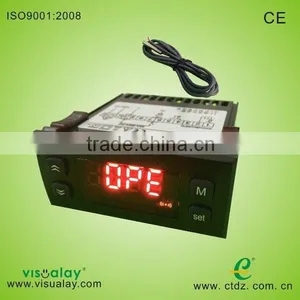
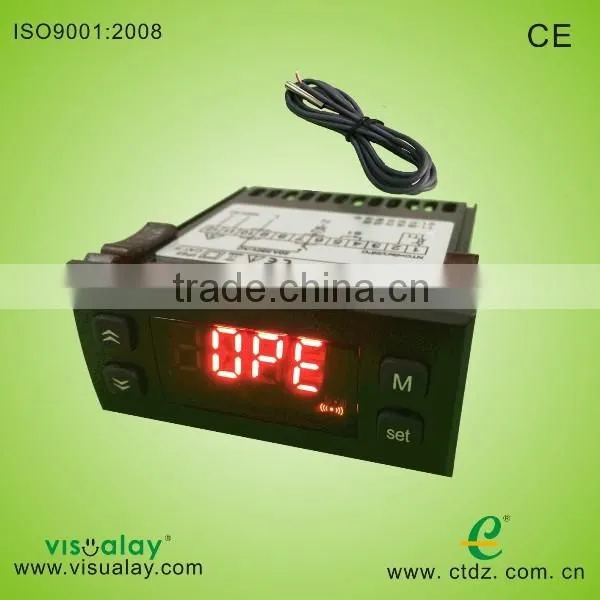
Temperature Controller With One Sensor D10

Related Products
-
 Digital Temperature Controller D10US$ 11.5 - 15MOQ: 1 Set
 -
Swimming Pool Controller D10US$ 12 - 15MOQ: 15 Sets
-
Hot Sells of Digital Temperature Controller D10US$ 11 - 12MOQ: 2 Sets
-
Digital Temperature Controller With 20 Relay D10US$ 11 - 12MOQ: 10 Sets
-
RS485 Temperature Controller E50US$ 37 - 47MOQ: 10 Sets
Specifications
Temperature display, temperature controlling,compressor start delay protection, 2 defrost modes (electric heat, hot gas),
Main Function
Temperature display, temperature controlling(refrigeration/heat mode can be set),compressor start delay protection, temperature sensor error alarm, one external alarm input, password, C/F unit change.
Technique Index
1,Temperature display range: -50~150°C(The resolution is 0.1°C)
-58~302°F(The resolution is 0.1°F)
2,Power supply: AC 220V±10% or AC 380V±10% 50Hz (Refer to the wiring diagram)
3,Operating environment: temperature -10°C~50°C, humidity≤85%
4,Relay contact capability: 20A/250VAC (pure resistive load)
5,Temperature sensor: NTC R25=5kΩ, B (25/50) =3470K
Operating Guide
1,Meaning of the index lights on the panel
Index light |
Name |
Light |
Flash |
Temp setting |
In the state of temp setting |
- |
|
Refrigeration |
Refrigerating |
Ready to refrigerate, in the state of compressor start delay protection |
|
Heat |
Heating |
Ready to heat, in the state of compressor start delay protection |
|
- |
- |
- |
|
- |
- |
- |
|
Alarm |
- |
Alarm state |
2,Meaning of the LED display
The LED usually shows temperature, if it shows “SHr”, it means the temperature sensor is short, and “OPE” means the temperature sensor is open. The temperature and the alarm code (Axx) will show alternately when in the alarm state. The code is showing below:
Code |
Meaning |
Explanation |
A11 |
External alarm |
Alarm from external alarm signal, refer to the internal parameter code “F50” |
A21 |
Temperature sensor error |
Open or short(showing “OPE” or “SHr”) |
3,Set temperature
Press the key “S” for at least 2 seconds, then enter the state of temperature setting, the LED displays the setting temperature, then using “5” key or “6” key can change the parameter(the key “5” adds 0.1°C, the key “6” minuses 0.1°C, press and hold it over 0.5 seconds can add or minus rapidly). After setting, press “S” again, then exit the state of parameter setting. Pressing the key “M” in the setting process means cancel and exit, but the setting value will not be saved.
4,Refrigerate (or heat) forcibly
When displaying current temperature, the temperature is between “setting temperature - temperature difference” and “setting temperature + temperature difference”, the system may or not refrigerate, you press the key “5” and hold it for 5 seconds, the controller will enter the refrigeration state forcibly when in the refrigeration mode, and stop refrigeration when the temperature is below “setting temperature – temperature difference”; the controller will enter the heat state forcibly when in the heat state, and stop heating when the temperature is above “setting temperature + temperature difference”.
5,Advanced operation
Press the key “M” and hold it for 5 seconds, and if you have set the password, the LED display the “PASS” to hint you to enter the password, you can use the key “5” and “6” to enter the password, if the password is correct, the LED will display the parameter code, use “5” or “6” to select the parameter code, pressing the “S” key can make it to show the value of the parameter after select the parameter, you use “5” or “6” to set the parameter, then press the “S” key to return the state of showing parameter code after finishing setting. Pressing the key “M” can exit the parameter setting state when display the parameter code, pressing the key “M” means cancel when in the process of setting parameter, and the parameter will not be changed. Internal parameter code is showing below:
|
Sort |
Code |
Parameter name |
Range |
Factory setting |
Unit |
Remark |
Temperature |
F11 |
Setting temperature |
F14 – F13 |
0 |
°C/°F |
The setting range is limited by F13 and F14 |
F12 |
Temperature difference |
0.1 – 20 |
1.0 |
°C/°F |
|
|
F13 |
Max setting temperature |
-58 - 302 |
302 |
°C/°F |
Notice: the controller will follow the rule of F14<F11<F13 forcibly, if you find out that one parameter can not be adjusted, it is because the parameter is limited by other parameters, you must first adjust other parameters |
|
F14 |
Min setting temperature |
-58 – 302 |
-58 |
°C/°F |
||
F19 |
Temp sensor adjustment |
-20.0 – 20.0 |
0.0 |
°C/°F |
Adjust the temperature sensor bias |
|
Compressor |
F21 |
Compressor delay time |
0 -- 10 |
3 |
min |
|
F29 |
Temp controlling mode |
COOL/HEAT |
COOL |
- |
COOL: refrigeration mode HEAT: heat mode |
|
Alarm |
F50 |
External alarm mode |
0 -- 4 |
0 |
- |
0: without external alarm 1: always open, unlocked 2: always open, locked 3: always closed, unlocked 4: always closed, locked |
System means |
F80 |
Password |
OFF 0001 -- 9999 |
OFF |
- |
OFF means no password 0000 System means clearing password |
F81 |
Temperature unit |
C/F |
C |
- |
C: Centigrade F: Fahrenheit |
|
Testing |
F98 |
Reserved |
|
|||
F99 |
Testself |
This function can attract all relays in turn, and please don’t use it when the controller is running! |
||||
|
End |
Exit |
|
|||
Basic Operating Principle
1,Temperature controlling
The controller has 2 temperature controlling mode: refrigeration and heat (F29). Temperature controlling point is controlled by “setting temperature (F11, or press the “S” key for some time to set)” and “temperature difference (F12)”. In refrigeration mode, the controller begins to refrigerate when the temperature sensor is over “setting temperature + temperature difference”, and it stops refrigerating when the temperature is under “setting temperature - temperature difference”; In heat mode, the controller begins to heat when the temperature sensor is under “setting temperature - temperature difference”, and it stops heating when the temperature is over “setting temperature +temperature difference”.
2,Compressor delay time
The compressor delay time is set by F21, for example, 3 minutes. The controller contains a “compressor halt calculagraph”, and it begins to time when compressor stops, the program first check the calculagraph before booting the compressor next time, the program will immediately boot the compressor if the calculagraph reach 3 minutes ,if the calculagraph doesn’t reach 3 minutes, it will boot again when the calculagraph reaches 3 minutes. Thus you can ensure that the boot alternation is over 3 minutes after halt, so it can prevent to breaking the compressor as a result of frequent boot. In addition, the controller doesn’t boot the compressor within 3 minutes after turning on the power supply, thus the compressor can also be protected in the state of power cut and then power on.
3,External alarm
The controller can connect a switch value as external alarm source (Pin 4, 5), when the external alarm occurs, the controller stops, displays the alarm code “A11”. External alarm signal has 5 modes (F50): 0: without external alarm, 1: always open, unlocked, 2: always open, locked; 3: always closed, unlocked; 4: always closed, locked. “Always open” means in normal state, external alarm signal is open, if closed, the controller is alarm; “Always closed” is on the contrary. “Locked” means that when external alarm signal becomes normal, the controller is still in the alarm state, and it needs to press any key to resume.
4,Password
In order to prevent irrespective persons from changing the parameters, you can set a password (F80), and if you have set a password, the controller will hint you to enter the password after you press the key “M” for 5 seconds, you must enter the correct password, and then you can set the parameters. If you don’t need the password, you can set F80 to “OFF”. Notice that you must remember the password, and if you forget the password, you can not enter the set state.

Send Inquiry to This Supplier

You May Also Like
-
Explosion Proof Infrared Thermometer 700 Degree CNegotiableMOQ: 1 Piece
-
Honeywell EC7890B1028 Burner Control EC7890 B 1028 Honeywel EC7890B1028/UNegotiableMOQ: 1 Piece
-
Customizable Fiber Optic Temperature Transmitter for Online MonitoringNegotiableMOQ: 50 Pieces
-
DP70B Handheld Dew Point Meter for Compressed Air Dryer SystemsNegotiableMOQ: 1 Set
-
Water Transfer Mould Temperature MachineNegotiableMOQ: 2 Sets
-
The Cheaper Price Temperature Control Thermostat Electric Add Wifi Function Thermostat With RemoteUS$ 12 - 28MOQ: 10 Pieces
-
Gas Cooker Thermocouple Universal Gas ThermocoupleNegotiableMOQ: 1
-
3G/GPRS Temperature Data Logger S260 Record and Alarm for Remote Monitoring Temperature, Humidity,current,voltage and so onUS$ 1 - 10MOQ: 1 Piece
-
Hot Sell Gsm Remote Terminal Unit Gprs/ftp Data LoggerUS$ 80 - 150MOQ: 1 Piece
-
SMALL&HIGH SENSITIVITY Pid Temperature ControllerUS$ 0.01 - 0.02MOQ: 1 Unit


