








 Contact Platform Support
 Help Center
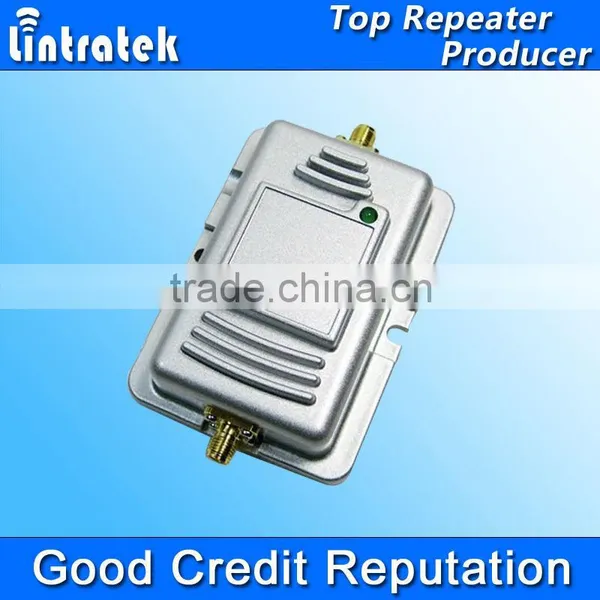
LINTRATEK 2W Wireless Wifi Amplifier , Indoor Wireless Wifi Repeater, Wifi Booster Access Point Indoor Wifi Signal Repeater




Related Products
-
 LINTRATEK Wifi Booster Wireless 2Watt Wifi Amplifier Access Point Indoor Wifi Signal RepeaterUS$ 1 - 60MOQ: 10 Pieces
 -
Wifi Signal Repeater Waterproof Outdoor 5W Wifi RepeaterNegotiableMOQ: 5 Pieces
-
Lintratek Increase Wireless Coverage and Throughput , 5Watt Wifi Repeater Access Point High Quality Indoor Wifi AmplifierUS$ 1 - 100MOQ: 5 Pieces
-
Increase Your Wireless Coverage and Wifi Signal , 5 Watt Wifi Repeater Access Point High Quality Indoor Wifi BoosterUS$ 1 - 100MOQ: 5 Pieces
-
5w Device High Receiving Smart High Transmitting Power , 5Watt Wifi Repeater Access Point High Quality Indoor Wifi BoosterUS$ 1 - 100MOQ: 5 Pieces
Specifications
2Watt 2.4G Wifi Repeater1)IEEE 802.11b/g/n
2)frequency:2400-2483.5mhz
3)Certificate:CE&RoHs
4)warranty: 1years
LINTRATEK 2W wireless wifi amplifier , Indoor wireless wifi repeater, wifi booster Access Point Indoor wifi signal Repeater
Product Features:
1.IEEE 802.11b/g/n compatible
2.High receiving sensitivity and high transmitting power(2W)
3.Increase your wireless coverage and throughput
4.Works with Most Wireless Access Point/Routers or Wireless Network Card
5.Easy to install and use
6.Ideal for use detachable 2.4GHz antenna equipments
Package Contents:
Open the box carefully,check the following articles:
Parts |
Quantity |
Description |
Wi-Fi Booster |
1× |
RF610 Pro |
Antenna |
1× |
6 dBi Dipole Antenna |
Power supply Adapter |
1× |
9V DC 1000mA |
Shielded cable |
1× |
|
User manual |
1× |
|
Color Box |
1× |
|
Operating frequency |
2400-2483.5MHz |
Operating mode |
TDD |
Signal standard |
IEEE 802.11b/g/n |
Minimum input power |
3dBm |
Maximum input power |
20dBm |
Maximum output power |
33dBm (2w) |
Uplink gain |
16dB |
Downlink gain |
12dB |
Noise figure |
lower 2.5dB |
Delay |
<1uS |
Operating temperature |
-20°C to + 55°C |
Weight |
129g |
AP/Router Interface |
SMA Female |
Antenna Interface |
RP-SMA Male |
Installation Guide
Step 1:Connect Antenna to the Wi-Fi Booster.
CAUTION: The Booster antenna interface canonly connect antenna, Don’t connectto any other wireless products in any case, otherwise it will result in equipment malfunction or damage.
Step 2:Connect Wireless AP/Router or Wireless Network Card to the Wi-Fi Booster.
Tips: Users can also use other shielded cables to connect, but the cable length should be as short as possible, preferably not exceeding 3m.
Step 3:Power up the Wi-Fi Booster.
At first, the color of the LED is green. When the data is being transmitted, the light will turn red.The more dense data transmission, the faster color change of the LED.
Step 4:Adjust the Antenna position and angle,make the Wi-Fi Booster receive the best signal
Tips: You can use third-party software such as Network Stumbler or WirelessMon to detect the signal of Wireless AP/Router / Wireless Network Card, and adjust the antenna angle to achieve the strongest signal.
Attentions:
1.Keep at least 1m distance between Wi-FiBooster antenna and any other 2.4G wireless products,Otherwise may result in equipment malfunction or damage.
2.This type of Wi-Fi Booster is not waterproof, please do not put it in the humid environment.
3.Do not use it where the place surrounded by a large number of metals.which will make the electromagnetic signal blocked.
4.If the user install antenna in the high location, you need to take protection measures for lightning.
5.After the Wi-Fi Booster is turned on, can not remove the Antenna, otherwise may damage the Wi-Fi Booster.

Send Inquiry to This Supplier

You May Also Like
-
Small Size Big Power Lintratek Brand Golden WIFI Repeater, 5 Watt Wifi Repeater Access Point High Quality Indoor Wifi BoosterUS$ 1 - 100MOQ: 5 Pieces
-
Wifi Booster 802.11 Wireless 2Watt 2.4GHz Wifi Amplifier Access Point Indoor Wifi RepeaterNegotiableMOQ: 50 Sets
-
Powerful Wifi Booster,outdoor 4watt Long Distance Coverage Wifi AmplifierNegotiableMOQ: 1 Set
-
Wifi Amplifier,Outdoor Wifi Amplifier,4w Wifi AmplifierUS$ 1 - 88MOQ: 2 Sets
-
Wifi Repeater,Outdoor Wifi Repeater,4w Wifi RepeaterUS$ 1 - 88MOQ: 2 Sets
-
Wifi Booster,Outdoor Wifi Booster,4w Wifi BoosterUS$ 1 - 88MOQ: 2 Sets
-
Outdoor Wifi Extender Amplifier Waterproof Wlan Booster Long Range Wifi Signal ReceiverNegotiableMOQ: 1 Piece
-
RF600 Pro Wifi Booster Amplifier for Outdoor UseNegotiableMOQ: 1 Piece
-
Big Power Wifi Signal Booster/amplifier RF600 ProNegotiableMOQ: 1 Piece
-
4W Wireless Outdoor Waterproof Wifi Booster to Enhance Wifi SignalNegotiableMOQ: 1 Piece


