Contact Platform Support
 Help Center
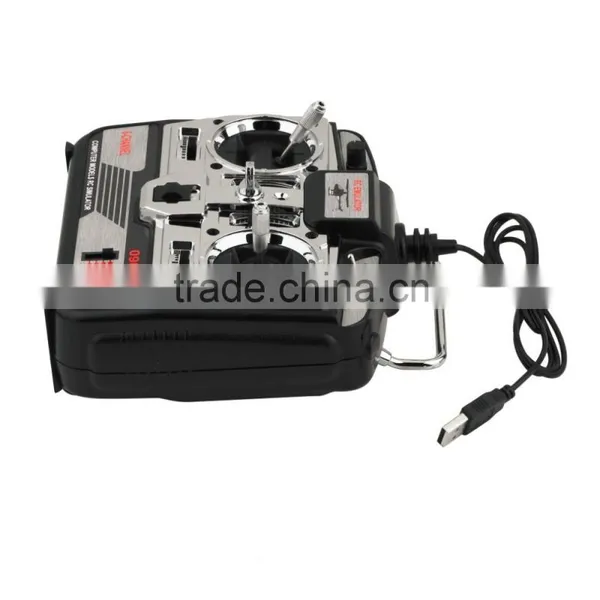
JTL0904A Airplane CD 6CH XTR Flight Controll Simulator Emulator




Related Products
-
 New 6CH USB 3D RC Helicopter Airplane Flight SimulatorNegotiableMOQ: 10 Pieces
 -
FlySky FS-i6 2.4G 6CH AFHDS RC Transmitter With FS-iA6 ReceiverNegotiableMOQ: 50 Sets
-
FlySky FS-i4 2.4GHz 4CH Remote Control Receiver For RC AirplaneNegotiableMOQ: 100 Pieces
-
4 Channels 2.4GHz Remote Control & Receiver For FlySky FS-T4B RC AirplaneNegotiableMOQ: 100 Pieces
-
Flysky FS-iT4S 2.4GHz 4 Channels Touch Screen RC Radio IA4B Receiver for RC DroneNegotiableMOQ: 50 Sets
JTL0904A Airplane CD 6CH XTR Flight Controll Simulator Emulator
Feature:
6CH XTR RC Flight Simulator 6 CH JTL-0904A Airplane CD, 6CH XTR Flight Simulator
1. Take XTR as an example: steps can not be wrong! Pull the analog switch to XTR logo Department, will simulate remote-controlled USB lint plug into your computer, then open the simulated remote control power switch, this time the remote control power lantern kept flashing (if not switched on, the computer interface, no, need to Another change computer interface, the operation sequence above still need to operate once).
2.Take XTR as an example: steps can not be wrong! Pull the analog switch to XTR logo Department, will simulate remote-controlled USB lint plug into your computer, then open the simulated remote control power switch, this time the remote control power lantern kept flashing (if not switched on, the computer interface, no, need to Another change computer interface, the operation sequence above still need to operate once).
3. a good XTR software installed, open the software, point the top of the directory bar "remote control" and then point the pop-up "channel distribution", the channel is set above diagram, the signal can not be set if there is no channel allocation, then replace the computer's USB interface else is even trying.
4.channel settings --- Select a helicopter model (the oil machine is also OK), and then will simulate all the fine-tuning the remote control center, will throttle the most significant pull away several times under the pole (not such action would lead to "calibrate neutral position" when the throttle item can not be neutral, and thus can not be a normal takeoff), and then placed in the middle of the throttle rod, after the computer software catalog column "remote control" below to find out "calibration neutral position" calibration, calibration, simulation start after the completion point --- check to see which channels do not (all around the hem tail, tune into a real machine, such as the same direction as the control) --- if so, what channel do not, then the return channel settings that will control the right side of the channel "+" to "-" ( or vice versa), as indicated in figure on the right to re-calibrate icon --- --- channel settings are correct, you can begin to play !

Send Inquiry to This Supplier

You May Also Like
-
Heavy Duty Custom Gear, 20MnCr5 Alloy Steel, Carburized & Quenched, Pinion Gear Wheel for High SpeedNegotiableMOQ: 1 Piece
-
Precision Mechanical Transmission GearNegotiableMOQ: 2500 Pieces
-
Wholesale Price Cnc ac Drive HF-KP23JK-S11 Mitsubishi Motor Original ServoNegotiableMOQ: 1
-
Low Alloy Steel Gearbox Bevel GearUS$ 1 - 3MOQ: 100 Pieces
-
for WII GEARNegotiableMOQ: 10 Pieces
-
X5C X5SC X5SW rc Drone Bettery Camera and All Spare PartsUS$ 0.5 - 58MOQ: 1 Piece
-
Forging Carbon Steel Gear RingUS$ 1,500 - 6,000MOQ: 1 Metric Ton
-
2 X 325mm Helicopter Main Rotor Blade Carbon Blade For Trex 450 XL SE V2US$ 1 - 10MOQ: 100 Pieces
-
Straight Bevel GearUS$ 3 - 50MOQ: 500 Sets
-
Gear Rack, RackUS$ 5 - 5MOQ: 100 Pieces