








 Contact Platform Support
 Help Center
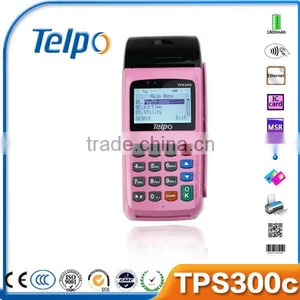
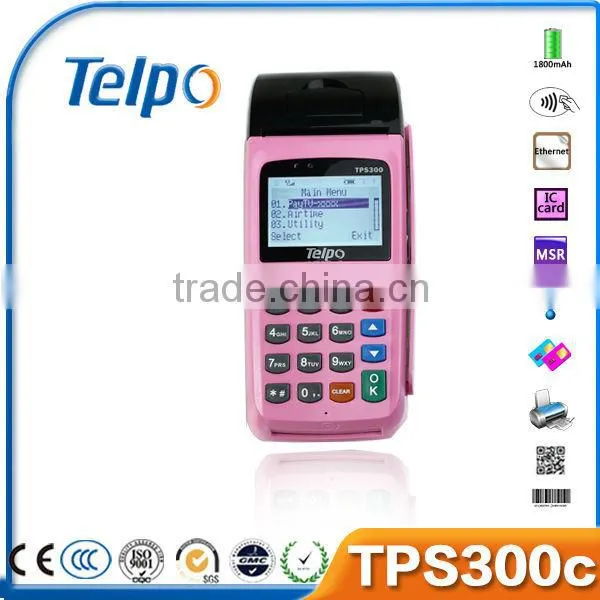
Telpo300c Mobile Payment/lottery Handheld Gprs Pos Terminal With Sdk Quality Choice


Related Products
-
 Mobile TOP UP & Mobile Recharge & SMS PrinterNegotiableMOQ: 50 Units
 -
Air Voucher ChargerNegotiableMOQ: 100 Sets
-
Airtime Recharge Payment TerminalNegotiableMOQ: 50 Sets
-
Mobile Payment & Mobile Recharger POS TerminalNegotiableMOQ: 100 Sets
-
Prepaid Airtime & Mobile Recharger POS Terminal With Sms PrinterNegotiableMOQ: 100 Sets
Specifications
Mobile Payment gprs pos terminal1. Prepaid Airtime, Bill payments, Mobile money
2. GPRS, IVR, SMS, STK, USSD
Telpo300c Mobile Payment/lottery handheld gprs pos terminal with sdk
Applications of Mobile Payment POS Terminal
- Money Transfer / E-Wallet / Instant Mobile Remittance
- Loyalty card
- Bill Payment: Electricity /Gas / Insurance / Charity
- Prepaid Recharge: Mobile / TV /DTH / Internet / Fixed Line / Gift card / Game card
- Travel & Ticket: Hotel / Air Ticket / Railway / Subway / Taxi / Bus / Movie
- E-shopping
- Lottery
| °cCPU | ARM7 |
| Memory | Built-in ROM 128M |
| Built-in RAM 4M | |
| GSM Modem | SIM840 |
| Communcation Way | GPRS, Ethernet, WIFI(Optional) |
| Display | 128*64 pixels |
| LCD Size | 59*36.4mm |
| Keyboard | 20 keys |
| Battery | 1800MAH Li-ion battery |
| Developing environment | OS of SIM340 for design |
| Dimensions | 205mm×81mm×68mm |
| Weight | ≈1.1kg |
| IC card | ISO7816 |
| Magcard | 1/2/3 track, bidirectional |
| SIM Slot | One or two(Optional) |
| 2PSAM (optioncal) | ISO7816 |
| AC input voltage | 100V~240V AC |
| Power adaptor output | DC 12V/2A |
| Operating temperature | 0°c~50°c |
| Relative humidity | 10%~95% |
| Environment noise | ≤60dB(A) |
| Atmospheric pressure | 86~106kPa |
| Frequency bands | Quad bands, GSM850/900/1800/1900 MHz |
| Frequency stability | <2.5ppm |
| Receiver sensitivity | < –104dBm |
| Transmit power | <2W(900MHz), <1W(1800MHz) |
| SIM card Interface | 3V |
| Antenna | Built-in |
| Printing method | Thermal-line dot method |
| Speed | 40mm/sec |
| Paper | Thermal roll paper(standard), 57*50 |
| Effective Printing area | 48mm |
| Character | 12*24 dots |
| Number of columns | 32 columns/line |
| Printing Head Life | Pulse resistance:100 million pulses/dot(under standard conditions); Abrasion resistance: paper traveling distance 50km(print ratio:25% or less) |
1) Trade Terms: FOB, FCA, EXW, CIF, CNF
2) Payment Terms: T/T, Western union, LC
3) Payment Condition: 30% deposit in advance, 70% balance before delivery
4) Delivery time: Sample-Within 2 to 3 days after payment
Batch order up to order quantity
5) Packing: Neutral Carton
6) Shipping: By sea, by air and by express delivery
7) We provide 1 year warranty for main device as well as 24 hours online service to help you out.
Q1. How to check the software version |
A: Turn on the device, it will show the software version number on the screen during startup. |
Q2. How to enter factory test mode |
A: (1) For some old version, when the device is under standby state, click keys *#55#, it will enter factory test mode |
(2) For new version, after press power on key, when the device is in startup, click the key “Cancel”. |
It will show “Factory Mode”, then input keys *#55#, and click key “Menu”, then it will enter factory test mode. |
In factory test mode, you can test lots of hardware function such as test printing, test keypad, test LCD, test GPRS connection, test SMS and so on. |
Q3. Can not Turn On |
A: Check the power adapter, or try to change another workable power adapter. |
Check the battery, or try to change another normal battery. |
Remove the battery, and only connect the power adapter. Or only use battery, and do not connect power adapter to test it. Then check the Power Supply Circuit and switch on/off the circuit according the test result. |
If the circuit has no problem, and it still can not turn on, please try to discharge. |
Q4. Can not detect the SIM CARD |
A: Please check whether the SIM card is installed well. |
Install the SIM CARD again. |
Change another SIM card |
Scrape the surface of the metal spring in the SIM CARD slot with knife. |
Check whether all the weld point of the SIM CARD slot is welded well or not.. If not, please weld it again. |
Replace the part of the SIM CARD slot. |
Q5. Can not detect wireless signal |
A: Please check whether it has GSM wireless signal in this place. If it has no GSM wireless signal or the signal is very weak, please try to test the terminal in another place with good GSMwireless signal. |
Otherwise, please open the shell of the device, and check if the antenna is connected well. |
Q6. Print unconventionality |
A: If it can’t print, or has other print problem, please check the problem device according to following steps: |
(1). Open the shell of the POS. |
(2). Clean the printer header with ethanol. |
(3). Check the connector cable |
(4). Disconnect the cable, and clean the connector of the cable |
(5). Reinstall, and test it again. |

Send Inquiry to This Supplier

You May Also Like
-
Customized 12.1" Chassis Case LCD MonitorNegotiableMOQ: 1 Unit
-
15'' LCD POS Terminal CheapUS$ 230 - 500MOQ: 1 Set
-
Customizable Touch Screen Ticket Vending Machine With Fingerprint ScannerUS$ 800 - 3,000MOQ: 1 Piece
-
Cash Register POS Touch Terminal Machine ManufacturersUS$ 485 - 1,500MOQ: 5 Sets
-
Android System Programmable All in One pc POS / All in One Pos System / Android Pos TerminalUS$ 400 - 600MOQ: 1 Piece
-
Aonpos AP20 Capacitive Touch Screen Pos Windows 10 Pos Machine Takeaway Pos SystemUS$ 145 - 165MOQ: 1 Carton
-
Z92P Secure Handheld Payment Terminal,Octa-Core Android POS With Dual SIM Slot,5MP Barcode Scanner Support Fiscal Module for Pharmacy & Kiosk CheckoutUS$ 219 - 260MOQ: 1 Unit
-
Cash Register Spare Parts Cash DrawerUS$ 48MOQ: 10 Pieces
-
Factory Direct Metal Case POS Automatic Supermarket Cash Drawer for RetailUS$ 18.99 - 29.99MOQ: 10 Pieces
-
5.5 Inch POS Terminal Touch With 58mm Printer OEM Logo Android 12/13 Handheld POS TerminalUS$ 99.9 - 109.9MOQ: 5 Pieces


