Home > Electrical & Electronics > Electrical Control System > Foxboro FBM203 P0914SV 8-Channel Isolated RTD Input Module

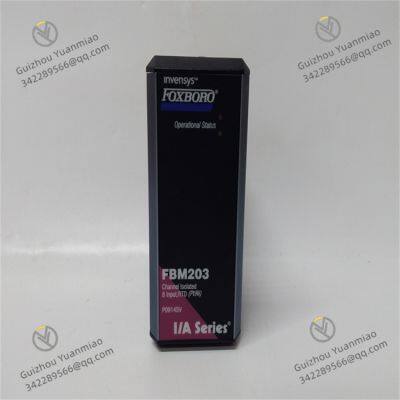
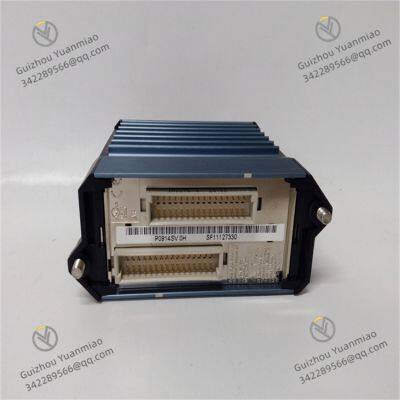
Foxboro FBM203 P0914SV 8-Channel Isolated RTD Input Module

Foxboro FBM203 P0914SV 8-Channel Isolated RTD Input Module photo-1
Foxboro FBM203 P0914SV 8-Channel Isolated RTD Input Module photo-2
Negotiable MOQ: 1 Piece (Price negotiable depending on order volume and customization)
Key Specifications
Get Latest Price
Material:
Other, Global universal model
Condition:
Other, Global universal model
Task:
Other, Global universal model
Payment & Shipping
Payment Methods:
Port of Shipment:
China
Delivery Detail:
Delivery time depends on order quantity.
Material Other, Global universal model
Condition Other, Global universal model
Task Other, Global universal model
Mathematical Model Other, Global universal model
Signal Other, Global universal model
Customized Non-Customized
Structure Other, Global universal model
Weight 0.4kg
Dimensions 4.5cm×11cm×11.5cm
Power Supply 24VDC
Foxboro FBM203 P0914SVBasic Information
  • Origin: United States.

  • Weight: Approximately 0.4kg.

  • Dimensions: 4.5cm×11cm×11.5cm.

  • Power Supply: 24VDC.

Functional Characteristics
  • Channel Configuration: 8 isolated RTD input channels, accepting 2-wire or 3-wire RTD sensor inputs with a resistance measurement range of 0 to 320 ohms.

  • Signal Isolation: Each analog input channel achieves current isolation from other channels and ground, effectively resisting interference to ensure reliable operation in harsh industrial environments.

  • High-Precision Measurement: Accuracy up to ±0.1% with a resolution of 0.01℃, meeting high-precision temperature measurement requirements in most industrial scenarios.

  • Wide Temperature Range: Operating temperature range of -40℃ to 85℃, adapting to different ambient temperatures in industrial fields.

  • Configuration Options: Executes analog input applications, providing configurable options for conversion time and rate-of-change limits, enabling flexible settings based on actual application needs.

Working Principle
The module collects resistance signals from field RTD sensors, processes them through internal signal conditioning circuits (amplification, linearization, etc.), and converts analog signals to digital signals using high-precision analog-to-digital conversion circuits. The converted digital signals are processed and calibrated, then transmitted to the controller of the control system via fieldbus.
Application Fields
  • Temperature Measurement: Widely used in chemical, petroleum, natural gas, and other industries for precise temperature measurement in various technological processes.

  • Process Control: Provides accurate temperature data for control systems during industrial production to enable temperature control and adjustment, ensuring production stability and product quality.

  • Data Acquisition: Collects temperature data to provide basic data support for production process monitoring and analysis.

  • Alarm Monitoring: Triggers an alarm when the measured temperature exceeds the set range, reminding operators to take timely measures to ensure equipment and production safety.

Integration with Control Systems
The FBM203 P0914SV module connects to the controller of the Foxboro I/A Series control system via fieldbus. During system configuration, corresponding configuration tools must be used to configure the module, including setting channel parameters, input ranges, measurement types, etc., to ensure the module correctly collects and transmits signals for seamless integration with the entire control system.

FBM203 P0914SV (2)

Common Faults and Solutions for Foxboro FBM203 P0914SV1. Module Power Indicator (PWR) Not Lit
  • Fault Phenomenon: The power light does not turn on, and the module shows no signs of operation after power-on.

  • Possible Causes:

    • Power not connected or wiring error (positive and negative poles reversed).

    • Power voltage exceeds the allowable range (e.g., 24VDC power fluctuates by more than ±10%).

    • Power circuit fuse blown or power module failure.

  • Solutions:

    • Check power wiring, confirm the positive and negative poles of the 24VDC power supply (red wire to +, black wire to -), and use a multimeter to measure the power voltage.

    • Replace the power circuit fuse; if ineffective, replace the power module or check the control cabinet power supply system.

2. Abnormal Communication Indicator (COM) (Always Off or On)
  • Fault Phenomenon: The communication light is off or always on, and the module cannot communicate with the controller.

  • Possible Causes:

    • FOUNDATION Fieldbus cable disconnected, short-circuited, or poorly connected.

    • Bus impedance mismatch (terminating resistor not connected or damaged).

    • Incorrect module address setting or address conflict with other modules.

    • Communication interface failure on the controller side.

  • Solutions:

    • Check bus cable connections, re-plug or replace shielded twisted-pair cables, ensure correct bus topology (tree/bus type), and install a 100Ω terminating resistor at the end.

    • Use a multimeter to measure bus impedance and confirm normal resistance; check the module address (e.g., Slot number) in the configuration software to match the actual installation location.

    • Restart the module or controller; if ineffective, replace the controller communication card.

3. No Signal or Abnormal Measurement Value in Channel
  • Fault Phenomenon: The input signal of a channel is normal, but the module displays zero, out-of-range, or large fluctuations.

  • Possible Causes:

    • Loose, short-circuited, or open field signal wiring (e.g., 4-20mA signal disconnection).

    • Incorrect signal type configuration (e.g., mistakenly set to voltage input during configuration while actually connecting current signal).

    • Hardware failure in the module channel (e.g., damaged internal amplifier or A/D converter).

    • Signal distortion due to electromagnetic interference (e.g., unshielded cable or proximity to strong electromagnetic sources).

  • Solutions:

    • Check terminal block wiring, use a multimeter to measure field signals (e.g., whether 4-20mA signals are within the normal range), and re-tighten the wiring.

    • Confirm correct setting of channel parameters (signal type, range, filtering time) in the configuration software; for example, set the range for 4-20mA to 0-100%.

    • Test with a spare module of the same type; if the fault transfers, the original module channel is damaged and needs repair or replacement.

    • Add a shielding layer to the signal cable and ground it reliably, keeping it away from interference sources like frequency converters and transformers.

FBM203 P0914SV (1)

4. Excessive Measurement Deviation or Inadequate Accuracy
  • Fault Phenomenon: The module display value deviates from the actual signal value beyond the accuracy range (e.g., ±0.05% of full scale).

  • Possible Causes:

    • Module uncalibrated or calibration expired, causing zero/full-scale drift.

    • Voltage drop in the input signal loop (e.g., Too long cable length or too thin wire diameter).

    • Incorrect cold junction compensation setting (if related to temperature signals).

    • Ambient temperature exceeds the module's operating range (-20℃~+60℃), causing component performance fluctuations.

  • Solutions:

    • Use calibration equipment (e.g., signal generator) to calibrate the module's zero and full scale, and execute the calibration program in the configuration software.

    • Check the signal loop resistance (4-20mA loop resistance ≤500Ω), and replace with thicker cables or shorten the wiring distance.

    • If measuring temperature signals, confirm correct setting of cold junction compensation method (e.g., RTD compensation) and check for loose RTD wiring.

    • Improve the module installation environment by adding cooling fans or thermal insulation to ensure the temperature stays within the allowable range.

5. Channel Alarm or Fault Indicator (FAULT) Lit
  • Fault Phenomenon: The FAULT light of a channel is on, and the configuration software displays an alarm (e.g., disconnection, out of range).

  • Possible Causes:

    • Thermocouple/thermal resistance signal disconnection (burnout detection function triggered).

    • Input signal exceeds the range (e.g., 4-20mA input exceeds 21mA or is lower than 3.6mA).

    • Abnormality detected by the module's internal fault diagnosis function (e.g., channel overload).

  • Solutions:

    • For thermocouple signals, check sensor wiring for disconnection and replace damaged thermocouples or compensation wires.

    • Measure whether the input signal is within the rated range; if out of range, check if field instruments (e.g., transmitters) are faulty.

    • View detailed alarm information in the configuration software to confirm the fault type, and restart the module or replace the channel if necessary.

6. Module Overheating or Abnormal Heating
  • Fault Phenomenon: The module surface temperature exceeds 60℃, possibly accompanied by performance degradation or restart.

  • Possible Causes:

    • Poor ventilation in the installation environment with insufficient heat dissipation space (distance between modules <50mm).

    • Excessive temperature in the control cabinet without cooling fans or air conditioners.

    • Internal component short circuit in the module, causing abnormal power consumption.

  • Solutions:

    • Ensure sufficient heat dissipation space around the module, install according to specifications (spacing ≥50mm), and avoid stacked installation.

    • Check the control cabinet ventilation system, install cooling fans or air conditioners, and maintain internal temperature ≤40℃.

    • After powering off, touch the module surface; if a certain area is abnormally hot, it may be an internal short circuit, requiring module replacement.

Product Tags: FBM203 , P0914SV

Send Inquiry to This Supplier

Message
0/5000
Want the best price? Post an RFQ now!
1Yr
Business Type
Trading Company
Year Established
2014
Factory Size
1,000-3,000 square meters
Product Certifications
SA8000