








 Contact Platform Support
 Help Center
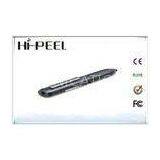
Portable Capacitive Touch Wireless Touch Pen For Tablet PC


Related Products
-
 Wireless Touch Pen Support NFC Function , Digital Touchscreen PenNegotiableMOQ: 1 Kilogram
 -
Bluetooth 3.0 Wireless Touch Pen For Capacitive Touch ScreenNegotiableMOQ: 1 Kilogram
-
Ultra-thin 2 Inch TFT Screen Smart Standby Mobile Cell PhoneNegotiableMOQ: 1 Piece
-
Standby Bluetooth Auto Recording Mobile Phone , Quad Band CellphoneNegotiableMOQ: 1 Case
-
Auto Recording Mobile Phone With Bluetooth Stereo HeadsetNegotiableMOQ: 1 Piece
Certification:CE,FCC,RoHS
Portable Capacitive Touch Wireless Touch Pen For Tablet PC
Quick Detail
The ultra-responsive T03 provides a comfortable, pen-like experience, perfect for writing or drawing directly on your smart phone or tablet capacitive touch screen. Clip it to your pocket or case and take it with you wherever you go. The stylus is compatible with all capacitive touch screen devices including the Kindle Fire, iPad , iPhone, iPod touch, Samsung Galaxy SIII and more.
Specification
|
Product name: |
T03 |
|
Weight: |
0.2kgs |
|
Dimensions: |
Dimensions: 20cm x 10cm x 5cm (7.87in x 3.94in x 1.97in) |
|
Version: |
Bluetooth 3.0 & 4.0 |
|
Talk time: |
6h |
Description
1. Charge your handset
A. Connect the bundled USB cable to the AC adaptor, and then plug it into a power outlet.
B. Connect the other side of USB cable to MK912
C. Make sure that charge each for at least 1 hour before first time use, or 2 hours to fully charge.
In charging: LED indicator glows red
Fully charged: LE indicator rums off
Battery low: Red LED indicator keeps blinking
3. Using your Handset
Turning your handset on/off
To turn on your handset, press the Multi-Function button and hold on for 3 seconds, and then blue LED indicator will flash;
To turn off your handset, press the Multi- Function button and hold on for 6 seconds, and then red LED indicator will flash;
Paring the handset with your phone
Enter pairing modePress the Multi-Function button and hold on for 5 seconds, blue and red LED indicator will flash alternately, that means your handset is in discoverable mode.
B. Enabled the Bluetooth option in the phone settings and search your handset.
C. On your phone, choose MK912 from Bluetooth devices list and connect with the handset.
Phone call
Answer a call
Tap (less than 1sec) Multi-Function button on your handset to answer a call
End a call
Tap Multi-Function button on your handset to end an active call
Reject a call
Press and hole (approc.2 sec) Multi-Function button
Redial last number
Double tap Multi-Function button
Activate voice dialing
Press and hold Multi-Function button for 3 seconds
Volume control
Tap volume control“+” button to increase volume
Tap volume control“—”button to decrease volume
Music
Plug in the stereo headset to 3.5mm audio jack, and then launch music-player on your phone.
Play
Tap(less than 1 sec) Multi-Function button
Pause
Tap Multi-Function button to pause
Previous/Next
Press and hold (approx.2 sec) Volume Controlbutton to play next or previous song
Application
It’s compatible with Android and Apple devices,smart phones, tablets and other mobile devices with DC 5v .
Advantage
We support OEM & ODM products from factory outlet Stylus works on all capacitive touch surfaces; use with iPad, iPod Touch, iPhone and other touch screen devices Use to take notes, draw or turn a page Soft, durable fiber tip, much better writing experience than regular rubber/sponge tip Other end as a twist-open ballpoint pen for traditional note taking Allows users to type accurately and comfortably Support NFC function with your smart phone and other devicesWe always make convenience for you .

Send Inquiry to This Supplier

You May Also Like
-
Electronic Restaurant Ticketing Machine For Self Service Ticketing Printing KioskNegotiableMOQ: 1 Piece
-
Hot Selling Competitive Price Wireless Emergency Call DeviceUS$ 80 - 200MOQ: 1 Set
-
GOLD APOLLO - Digital Pagers Numeric Pagers Wideband ReceiverUS$ 1 - 9,999MOQ: 1 Piece
-
Wireless Watch Wrist Pagers System for Hospital,restaurant Calling Waiter Service+Wireless Call(KR-C166)US$ 40 - 42MOQ: 1 Piece
-
DMR Radio+Android Smartphone ,Runbo H1 Ip67 WaterproofUS$ 700 - 700MOQ: 1 Piece
-
NEW Design MMCall Alphanumeric Pager HousingUS$ 1.2 - 18MOQ: 1200 Pieces
-
V3.0 Over Head Bluetooth HandsetUS$ 10 - 20MOQ: 1000 Pieces
-
Restaurant Table Management ApplicationNegotiableMOQ: 1 Piece
-
Hospital Intelligent Wireless Paging SystemUS$ 500 - 1,000MOQ: 1 Set
-
Waterproof With Double-sided Adhesive Singcall Table Call BellUS$ 1 - 550MOQ: 1 Set


