








 Contact Platform Support
 Help Center
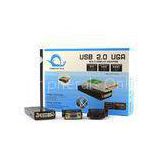
3in1 Extra Multiple Display USB to VGA Converter , Linux Usb Graphics Card


Related Products
-
 HD PC Laptop USB to VGA Converter To VGA / DVI / HDMI Multi Display AdapterNegotiableMOQ: 1 Piece
 -
1.2GHz CPU HDMI 2.0 USB to VGA Converter Support Window 7 / Vista 32 / 64-bitNegotiableMOQ: 1 Piece
-
UGA to DVI VGA HDMI Multi Display USB to VGA Converter / VGA Graphic CardNegotiableMOQ: 1 Piece
-
USB To VGA / DVI / HDTV USB Capture Cards Connect LCD and ProjectorNegotiableMOQ: 1 Piece
-
USB 3.0 VGA Graphic Adapter Driver Converter Connect LCD Monitor / ProjectorNegotiableMOQ: 1 Piece
Certification:CE FCC ROHS
3in1 Extra Multiple Display USB to VGA converter , Linux usb graphics card
The USB2.0 Multi-Display Adapter allows you to connect an extra monitor (CRT, LCD, Projector…) to you PC’s USB port. The connected monitor can be configured to either clone your primary screen, or extend the Windows desktop allowing visibility of more applications at the same time. This ensures that there is little difference in performance between a directly connected screen and a screen connected through the USB2.0 Multi-Display Adapter.
SYSTEM REQUIREMENTS:
· With CPU at 1.2GHz or higher processor clock. Intel Pentium / Celeron family, or AMD K6/Athlon/Duron family, or compatible processor.
· 256MB of RAM
·30Mb of available disk space.
· At least one USB2.0 port
· Windows 2000_SP4/XP/Vista 32/64-bit, Window 7
· Mac OS X
· Linux
· Super VGA,DVI,HDMI (1920*1080)
SOFTWARESUPPORTS MODES BELOW:
| Resolution | 16bit | 32bit |
| 640x480 | 60 72 75 | 60 72 75 |
| 800x600 | 56 60 72 75 85 | 56 60 72 75 85 |
| 1024x768 | 60 75 85 | 60 75 85 |
| 1280x960 | 60 85 | 60 85 |
| 1284x1024 | 60 75 85 | 60 75 |
| 1360x768 | 60 | 60 |
| 1366x768 | 60 | 60 |
| 1368x768 | 60 | 60 |
| 1400x1050 | 60 75 85 | 60 75 85 |
| 1440x900 | 60 | 60 |
| 1600x1200** | 60 | 60 |
| 1600x1050** | 59 60 | 59 60 |
| 1920x1080** | 59 60 | 59 60 |
INSTALLATION:
1. Insert the driver CD into your CD-ROM driver. The setup program will run automatically. If not, double-click the Setup.exe.
2. When the welcome screen appears, click NEXT.
3. If prompted to restart your computer, click Yes to restart or NO to manually restart later. Note that a reboot is always needed for a successful installation. If the reboot prompt doesn’t appear, make sure to manually reboot your computer.
4. Connect the adapter to your computer and monitor. Connect the smaller end of USB cable to the adapter. Then connect the other end of the USB cable to an USB2.0 port on you computer. If your computer is not yet connected to the adapter, make the connection and power on your monitor.
5. After you connect the adapter, Windows will automatically complete the installation.
6. Once the installation is done, an extended screen will appear on the add-on monitor

Send Inquiry to This Supplier

You May Also Like
-
Steatite Ceramic PipeUS$ 0.05 - 10MOQ: 1000 Pieces
-
Piezoelectric Ceramics Disc YL090E-20US$ 0.01 - 0.1MOQ: 5000 Pieces
-
Steatite Ceramics With High QualityUS$ 1.70 - 2.00MOQ: 2000 Pieces
-
Cordierite Mullite Ceramic Insulators for Electric HeaterUS$ 0.99 - 9.99MOQ: 10 Pieces
-
Alumina Ceramic Snail Wire Guides(ceramic Pigtail Coil )NegotiableMOQ: 100 Pieces
-
Aluminum Oxide Industrial Ceramics, Insulation, Shaped Ceramic Heads, Wear-resistant Ceramics, Ceramic Accessories, Electronic CeramicsNegotiableMOQ: 1000 Pieces
-
Piezoelectric Pzt Element Ultrasonic Cleaning Transducer Material Lead Zirconate Titanate Ceramic Ring 25x10x3mmUS$ 3.5 - 4MOQ: 50 Pieces
-
Boron Nitride CeramicUS$ 20 - 200MOQ: 1 Piece
-
Pulp Mold Products Packaging InsertNegotiableMOQ: 1 Piece
-
Beryllia Oxide Ceramic Substrate, Ceramic Rod,ceramic Cylinder,ceramic TubeUS$ 5 - 100MOQ: 1 Piece


