








 Contact Platform Support
 Help Center
Home > Computer Products > Keyboard > Mechanical Keyboard > Ipad 2 Smart Cover, Ipad 2 Case, Ipad 2 Aluminium Bluetooth Keyboard, Aluminium Wireless Keyboard for Ipad 2
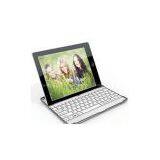
Ipad 2 Smart Cover, Ipad 2 Case, Ipad 2 Aluminium Bluetooth Keyboard, Aluminium Wireless Keyboard for Ipad 2

US$ 26 - 26
MOQ: 100 Pieces
Key Specifications
Get Latest Price
Brand Name:
Place of Origin:
China
Model Number:
IBK001
Payment & Shipping
Payment Methods:


Port of Shipment:
China
Delivery Detail:
7 days
Related Products
-
 Ipad 2 Case, Ipad Case, Car Headrest Mount for Ipad, Ipad 2 CarrierUS$ 8 - 8MOQ: 100 Pieces
 -
Ipad 2 Bluetooth Keyboard, Ipad 2 Case, Ipad 2 Wireless Keyboard, Ipad 2 Smart CoverUS$ 25 - 25MOQ: 100 Pieces
-
Laptop Screen Protector, Notebook Screen Guard, Laptop Screen Film, Notebook Screen SkinUS$ 1 - 1MOQ: 100 Kilograms
-
Ipad 2 Screen Protector, Ipad 2 Screen Guard, Ipad 2 Screen FilmUS$ 1 - 1MOQ: 100 Kilograms
-
Sticky Pad, Car Sticky Pad, Anti Slip Pad, Car Pad, Auto MatUS$ 0.5 - 0.5MOQ: 500 Pieces
Place of Origin
China
Model Number
IBK001
Super slim aluminium bluetooth keyboard designed for ipad 2.
Features:
1. Built-in wireless bluetooth 2.0 keyboard
2. Modern styles designed sepcialized for ipad 2
3. Ipad 2 display stand for easy viewing
4. Built-in Rechargeable lithium battery
5. Special "home" screen key for one touch access to variety of applications
6. Light weight, slim style, quiet keytouch, waterproof and dust proof
7. Energy saving, with magnet on the corner, can wake and sleep your ipad 2 automatically.
Specifications:
1. Key layout: 82 keys
2. Product size: 245*190*11mm, super slim, with an ipad 2 together only have 17mm thickness
3. Weight: 280g
4. Bluetooth 2.0 interface standard
5. Operating distance to 10 meters
6. Operation voltage: 3.0-5.0V
7. Working current: <5.0mA
8. Standby current: 2.5mA
9. Sleeping current:<200uA
10. Charging current: >100mA
11. Standby time: 55 days
12. Charging time: 4-5 hours
13. Lithium battery capacity: 160mA
14. Continuing working time: 55hours
15. Lithium Battery life: 3 years
16. Lithum battery size: 40*20*3.5mm
17. Key touch strenght: 70-90g
18. Operating Temperature: -10 - +55°C
User's Guide:
Step 1: Turn on the power toggle switch. The [power] and [Bluetooth] indicator light will be 5 seconds, then the light will go off.
Step 2: Press on the [connect] button. The [Bluetooth] indicator light will be blinking, and the [power] indicator will be on. The keyboard is now ready to be connected to ipad.
Step 3: Turn on and unlock ipad. Click on the ipad [setting] icon.
Step 4: On the settings menu, select item [General] to access [Bluetooth] settings. Click on [Bluetooth] to turn on the connection. Ipad will automatically search for a Bluetooth-enabled device.
Step 5: Wireless keyboard found. Click on the device to connect.
Step 6: Enter the password code as displayed on screen.
Step 7: Wireless keyboard connected successfully. [power] indicator light will stay on until the keyboard is swithed off.
Special Note:
The wireless keyboard can be connected to iphone 3G,3GS,4G and ipod Touch that had installed iOS 4.0 or later. For other Bluetooth enabled device, please verify the Bluetooth standard & compatibility before attempting to connect to the keyboard.
Charging:
When the battery power is low, the [power] indicator light will start blingking, it is time to recharge the keyboard.
Energy Saving Sleep mode:
The keyboard will kick into sleep mode when it is inactive for 15 minutes, and the keyboard [power]indicator or light will go off. To act. ivate from sleep mode, just press any key and wait 3 seconds, the keyboard will come back on.
Packing: 1pc/1 color box with USB charging cable and user guide
Color: Aluminium cover color is silver, keyboard has black and white two colors,please choose the right color you need.

Send Inquiry to This Supplier

* Email
Want the best price?
Post an RFQ now!
Business Type
Trading Company
Total Employees
101 - 200 People
Main Markets
North America, South America, Eastern Europe
Location
Tongchuan, Shaanxi, China
You May Also Like
-
Original CNC Fanuc PLC Keyboard A16B-2201-0101NegotiableMOQ: 1 Piece
-
High Quality Cnc System Controller A98L-0001-0568 Membrane Fanuc KeypadNegotiableMOQ: 1
-
Untested Scrap Recycle Computer Hardware Used Keyboard PartsNegotiableMOQ: 10000 Pieces
-
Air Conditioner Remote Control ButtonUS$ 0.01 - 0.5MOQ: 1000 Pieces
-
Waterproof Thin Film Membrane SwitchUS$ 0.056 - 0.16MOQ: 200 Pieces
-
KEYBOARDNegotiableMOQ: 3 Pieces
-
Customizable Compact Small Kiosk Industrial Keyboard With Optical TrackballNegotiableMOQ: 1 Piece
-
Full Color Outdoor Led Video Screen RentalNegotiableMOQ: 1 Piece
-
Flag Terminal Thermistor Temperature Sensor Probe 4300 For Industrial EquipmentNegotiableMOQ: 1 Piece
-
SECC / EGC Automotive Stamping Parts 1.0mm Thick For Lexus Auto DVD ChassisNegotiableMOQ: 1 Piece


