








 Contact Platform Support
 Help Center
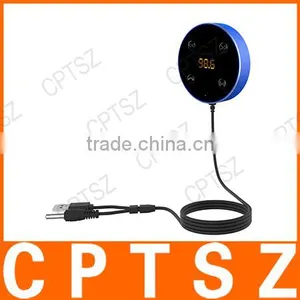
Bluetooth Car Kit FM Transmitter AUX Music Audio Receiver Hands-free 3.5mm With Dual USB Charger Car Accessories








Related Products
-
 LM-HDCP01 HD Converter HDCP2.2 to HDCP1.4US$ 28 - 28MOQ: 100 Pieces
 -
V4.2 Car Bluetooth Music Receiver to Car AUX / Stereo SpeakerUS$ 5 - 5MOQ: 100 Pieces
-
2015 2nd Generation New Chromecast 2 Digital HDMI Media Video StreamerUS$ 11 - 11MOQ: 10 Pieces
-
Wireless Wifi Repeater Network Wifi Router Expander 802.11N/B/G Wifi Roteador Signal AmplifierUS$ 6 - 6MOQ: 10 Pieces
-
150W Car Power Inverter 12V DC to 220V/110v AC Converter Adapter With Cigarette Lighter and USB 5V Charger For LaptopUS$ 5 - 5MOQ: 100 Pieces
Bluetooth Car Kit FM Transmitter AUX Music Audio Receiver Hands-free 3.5mm with Dual USB Charger Car Accessories
AUX transmission:
SETTING UP AND PAIRING YOUR BLUETOOTH Receiver
1. Find a suitable place on your car d
2.
1. Find a suitable place on your car dash board, stick the magnetic base firmly on the dash board;
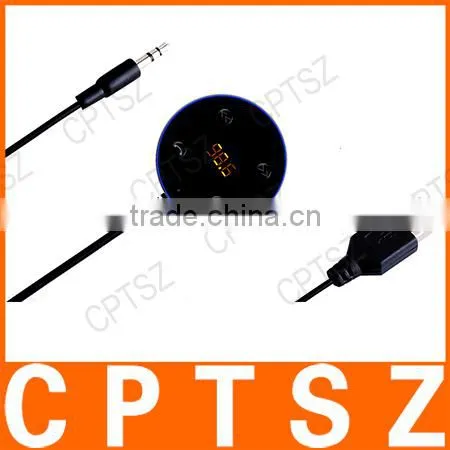
2. Connect the 3.5mm audio jack with your car’s audio input(AUX)port and ignore the FM frequency display window.
3. Plug the USB connector into USB power source, (a car cigarette charger is included in the package, you can use it to power JRFC02, or you can use your car’s current USB port),
4. Upon power connected, the JRFC02 will automatically power on and enter into pairing mode when driver starts the engine.
5. Turn on your phone’s Bluetooth and search for new device. Upon a new device being found (JRFC02), press the device's name to pair.* the default pairing code is 0000.*
MUSIC CONTROL
• Play/Pause music: Press once on the (3) multi-function button
• Next track: Press once on (2) “Next” button
• Previous track: Press once on (1) “Previous” button
• Volume up: Press and hold on (2) “Next” button. When to maximum volume, there will be one "BEEP"
• Volume down: Press and hold on (1) “Previous” button. When to minimum volume, there will be one "BEEP"
PHONE CALL CONTROL
• Answering a call - Upon Incoming call, Press the (3) multi-function button once
- During answering, press and hold the (3) multi-function button 2 seconds for phone and hand-free mode switch
- Switch between the two calls, double press the (3) multi-function button
• Ending a call - During a call, Press the (3) multi-function button once
• Refusing a call - Upon Incoming call, Press and hold the (3) multi-function button for at least 2 seconds
• Redialing the last number - Double press the (3) multi-function button
FM transmission:
SETTING UP AND PAIRING YOUR BT FM TRANSMITTER
6. Now you can disregard the 3.5mm audio cable, and do above 1,3,4,5 steps
7. Turn on the car FM radio, comply the FM frequency of the product with the car FM radio, the music will be out via the original car radio system.
8. Tune your radio to an unused FM frequency, and then adjust the frequency of JRFC02 to the same.
9. Frequency adjustment, press once(4) FM button to enter mode on LED display window, then short press “Previous(1) “or “Next(2) “to adjust frequency-/+ in the range of 87.5-108MHZ.; Tuned to the target frequency, the screen flashes four times (about 5 seconds )after the fixed, the screen to stop flashing, automatically exit FM frequency adjustment.
10. The operations of MUSIC CONTROL and PHONE CALL CONTROL are the same as above.

Send Inquiry to This Supplier

You May Also Like
-
Bluetooth Car Kit FM Transmitter HandsFree Phone MP3 Player SD/MMC/USB + Remote Kit CarUS$ 1 - 100MOQ: 100 Pieces
-
Bluetooth Adapter 5.3 Desktop Computer USB Module Laptop External Wireless Headphones Mouse Audio ReceiverUS$ 5MOQ: 1 Piece
-
Factory Supply, Portable Dual 2 USB Charger LCD Bluetooth Car Kit MP3 AUX FM Transmitter AdjustUS$ 7 - 10MOQ: 100 Pieces
-
New Solar Visor Bluetooth Hands-free Car Kit SpeakerphoneUS$ 9.2 - 15MOQ: 60 Pieces
-
Sun Visor Bluetooth Handsfree Car Kit Newest Model Shenzhen JingzeUS$ 10.5 - 11MOQ: 10 Pieces
-
G32 5V/3.1A Dual USB Wireless Car Radio FM Transmitter Bluetooth Car MP3 Player With TF Card Slot for Music PlayUS$ 3.20 - 3.30MOQ: 100 Pieces
-
2016 T9S Wireless Bluetooth Car Kit MP3 Player FM Transmitter A2DP With USB Charging Port Music Control Hands-Free CallUS$ 7 - 7.8MOQ: 1 Piece
-
Solar Power Supply Mobile Speaker Universal Phone HandsfreeUS$ 1 - 11MOQ: 50 Sets
-
2017 3.5mm Blutooth Car Handsfree Car Stereo Bluetooth Aux AdapterUS$ 2 - 7.5MOQ: 100 Pieces
-
In-car Wireless FM Transmitter Car Charger MP3 Player Bluetooth Hand-Free For Steer WheelUS$ 11.5 - 13MOQ: 120 Pieces

